|
|
RSS 1.0 RSS 2.0 |
July 09, 2009
Google to Offer Chrome OS – Cloud Computing Tie-in Seems Likely
Setting aside the Mac vs. PC debate for a minute, how about Chrome OS as your next OS choice? News.com reports that Google is moving beyond its Chrome web browser and Android smartphone operating system, and is actively developing a lightweight PC operating system based on Linux and Web standards for personal computers. It will also be based on Google's Chrome browser.
More info is available on this earlier report at News.com - that "lower-end PCs called Netbooks from unnamed manufacturers will include it in the second half of 2010. Linux will run under the covers of the open-source project, but the applications will run on the Web itself. In other words, Google's cloud-computing ambitions just got a lot bigger." (my emphasis added)
There is certainly a lot of buzz surrounding Netbooks and cloud computing, and tech pundits have been talking about the return to thin clients for years. For better or worse, Netbooks have been the first real manifestation of that prediction for mainstream users, or at least the first commercially successful one. A lot obviously depends on what Google ultimately delivers to us in Chrome OS, and the integration with their online apps.
As it is based upon Linux, I can see where Chrome OS could also end up as an alternative OS on mainstream PCs, probably set up by users in a multi-boot fashion much like Ubuntu, another Linux OS that's been designed to be more user friendly. Given the reduced computing ability of Netbooks and the likely phasing out of Windows XP, a lightweight OS such as Chrome could be a compelling Netbook successor - if it offers the right mix of what Netbooks users are looking for.
The Netbook market is a great focus for Google for several reasons. First, since Netbooks currently lack sufficient computing power to run heavier applications, they are best used as web clients, aligning with Google's online world and business model.
I also think Chrome OS already has too much competition on the mainstream OS front, from Microsoft, Apple, and even other Linux variations. So far, my impressions are that I have yet to see the Android OS take off as a serious smartphone contender (especially in light of the iPhone and Palm Pre, and new BlackBerry offerings coming from RIM). I still see the Chrome browser as somewhat of a tech curiosity rather than a mainstream browser, as most people are still using some flavor of IE or Firefox as their main browsers. That's not to say that Chrome hasn't introduced some nice features, such as tear-away tabs and better stability resulting from improved memory management. But it's been uniformly criticized as having too few features to compete head-on with leading browsers, an observation with which I tend to agree.
So, given the "less is more" approach of the Chrome browser, I expect the same philosophy in Chrome OS, particularly as it will be based around its browser namesake. And which computing platforms have capitalized on and appealed to us as "less is more"? That's right - Netbooks and cloud computing. Thus I see Google sensing a critical opportunity in the Netbook OS market in the interim between the aging Windows XP Home and whatever is next from Microsoft. It is an opportunity to tie together two emerging markets that are heavily steeped in the Web - Netbooks and cloud computing - in a way that Google couldn't do as effectively by relying upon others' operating systems.
Google has a long history of making great applications that are particularly easy-to-use, whether they are PC or web-based, including Google Desktop, Picasa, Google Maps, Google Earth, and Gmail. It will be interesting to see how Google approaches their OS design, particularly with Linux as it can be daunting for non-techie users under the hood. However, they've certainly had ample dress rehearsal with it in developing the Linux-based Android OS for smartphones.
While it certainly remains to be seen whether Chrome OS will appeal beyond consumers to significant business use, it's always nice to have options, especially in these emerging tech markets where the lines of traditional computing tasks and collaboration tools are being blurred almost daily to generate more value to us, the end users. From current reports, look for Chrome OS being available on Netbooks in the latter half of 2010.
[7.21.09 Update: eWeek has a thought-provoking slideshow, "10 Concerns About Google Chrome OS", pointing out such interesting tidbits such as Google is not a platform vendor but a Web app developer, and wondering whether any Linux-based OS will ever catch on with consumers as a comfortable OS. My point above about Chrome OS having too much competition on the mainstream OS front was also mentioned.]
July 07, 2009
Improve Vista’s Performance With Fantastic Free Indexer Gadget
I've been meaning to blog about this handy tool for some time now. Unless you bought a Netbook or custom ordered your PC online, just about every Windows PC sold within the past two years came preloaded with some version of Windows Vista. While I prefer Vista's interface and built-in search features to the aging XP platform, Vista definitely leaves something to be desired in the performance department. I often found my hard drive thrashing at the most inopportune moments, slowing my system down when I needed it the most. There was seemingly no rhyme or reason for it - until I looked at the system processes and found that the indexer was running amok.
Having indexed files really speeds up performance when you're searching for content on your hard drive - especially when searching within Outlook. But how often do we do that over the course of a day? Perhaps just a few minutes or seconds at a time when we're looking for a specific document or e-mail. The problem is that the rest of the time, we want our apps to launch and run as quickly as possible.
The common cure is to turn off Windows' indexer service altogether, but then you won't be able to search for newly added content since it won't be indexed - which completely defeats the purpose of having an indexer installed in the first place. Sure, one could use an alternate desktop search tool, but if you're otherwise happy with the built-in Windows search service, it's nice to have it run on your terms.
Enter a fantastic Vista gadget that has significantly reclaimed my system performance and my sanity when using Vista:
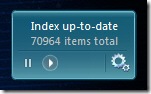
BrandonTools offers the Windows Indexer Status gadget, which allows you to:
- Stop and start the indexing service (this is the best benefit for improving Vista's performance)
- Monitor the current state of the indexer
- See how many items need to be processed
- View the total count of indexed items
- Open the Indexing Options control panel
- View the installed Windows Search version number
- Multiple backgrounds / color combinations
Just so you're aware, if you're running as a standard user account in Vista (which you should for security reasons), you'll need to enter an administrator password when starting or stopping the indexer service (via the "play" and "pause" buttons on the gadget). This is a very small annoyance to eliminate a much bigger one. The nice thing is you only need to run the Windows Sidebar when you want to start or stop the indexer service. Otherwise, you can close the Sidebar to free up memory and increase your CPU performance even further.
It works with Windows Search versions 3.0 and 4.0. Windows Search 3.0 comes built-in with Vista, and version 4.0 is available as a free download from Microsoft.
April 09, 2009
Juror Tweets, Not So Sweet
The ABA Journal ran this article about a juror who tweeted from his cell phone both during and after his jury service in a trial where the jury awarded a $12.6M verdict. Obviously this is cause for concern and consternation by the losing party and their attorneys, but the judge found that it didn't rise to the level of improper conduct. The lesson learned by one of the plaintiff lawyers is that he will ask potential jurors about cell phone and Internet use. The juror's response: "The courts are just going to have to catch up with the technology."
Bob Ambrogi over at Legal Blog Watch posted some of the juror's more inflammatory tweets. Definitely not so sweet.
March 30, 2009
Big Hard Drives = Big Failure Rates? How Safe Is Your Data?
Consider this post as a public service announcement. I've recently been shopping online for a nice big capacity external hard drive, as well as a larger capacity notebook drive. Over the years, I've seen the major hard drive manufacturers go through major problems with quality control and drive failure issues. So naturally I headed on over to Amazon and Newegg to check out the feedback on various drives. It's good to know which zone they're in at the moment before buying.
Since my last 3.5" drive was a Seagate that has performed exceptionally well in one of my desktops, I checked the Seagate drives first. However, after reading about their failure rates in both their external FreeAgent series as well as the internal drive models, I would recommend staying away from them for some time, especially in the 1 - 1.5TB range, and even their previously acclaimed Barracuda series. I also read some negative feedback on their 500GB notebook drives - that users have experienced serious performance issues with audio or video media stuttering while trying to play back from these hard drives.
I thought I'd share my online findings as a "Buyer Beware" post, based on the following numerous sources:
Slashdot:
- "Seagate Hard Drive Fiasco Grows" (Jan 16, 2009)
- "Seagate Firmware Update Bricks 500GB Barracudas" (Jan 21, 2009)
Newegg User 1-Egg Reviews:
- Seagate FreeAgent Desk ST315005FDA2E1-RK 1.5TB 7200 RPM Silver External Hard Drive - Retail
- Seagate FreeAgent XTreme ST315005FPA2E3-RK 1.5TB 7200 RPM USB 2.0 / IEEE 1394a / eSATA Black External Hard Drive - Retail
- Seagate Barracuda 7200.11 ST31500341AS 1.5TB 7200 RPM 32MB Cache SATA 3.0Gb/s Hard Drive (bare drive) - OEM (This last one is an internal drive, so it seems to illustrate that the problems run across the Seagate 3.5" drive line)
Amazon User 1-Star Reviews:
- Seagate FreeAgent Desk 1 TB USB 2.0 Port External Hard Drive-Silver ST310005FDA2E1-RK
- Seagate FreeAgent Xtreme 1.5 TB External Hard Drive (Black)
- Seagate 1TB Barracuda 7200.11 Bulk/OEM Hard Drive ST31000340AS (this is an internal drive)
In my book, when the 1-star reviews (the worst rating) constitute the first or second highest category of customer feedback for each drive on multiple sites, this indicates a serious problem, which is backed up by the Slashdot articles and postings above.
You see, a number of the 3.5" Seagate drives were/are affected by a firmware issue that makes the drives inaccessible after a very short period of use. While Seagate has issued firmware updates, the feedback from users on their effectiveness is not encouraging at all. In fact, it's downright miserable out there, and I wouldn't be surprised in the least to hear of a class action in Seagate's near future. [3.31.09 - I figured I wasn't the only one, see this law firm's site.]
Supposedly the data stored on the drive is still intact, it's just rendered inaccessible. Gee, just what I want to experience with a brand new drive! Others reported the dreaded "click of death" within just days or weeks of use - a sound that usually signals drive failure is imminent. So while Seagate's firmware recommendations page states this "affects a small number" of drives, it would seem that the above Slashdot and negative user feedback pages provide more insight into the scope of the problem(s).
So until we hear of users being more successful with a firmware update, it's probably best to steer clear of those drives for a while. Even if Seagate should release an effective firmware update, the average purchaser probably won't know which dealer stock has the fix, and which ones won't. To have to flash a hard drive right out of the packaging is ludicrous, and who would feel safe trusting their data in this context? Our data is worth far, far more than the drives themselves. As I said, I've had good luck with Seagate drives previously, so it's a shame to hear all the negative feedback with their latest drives. I sincerely hope they're able to turn things around for everyone's sake.
Seagate Not Alone:
That's not to say that Western Digital doesn't have its issues as well. A number of their 3.5" large capacity external "My Book" drive models have received significant negative or mixed feedback online as well, which makes me question why we're seeing such poor or mixed reliability in the 1TB and 1.5TB drive range. Technical issues? Cost-cutting? Quality control issues? Bueller? Bueller?
For a nice in-depth review of several external 1TB drives, see the following at Tom's Hardware:
WD Scorpios in the Notebook Spotlight:
Moving on to notebook drives, the bright spot seems to be the Western Digital Scorpio Blue and Black 2.5" SATA drives, which have received very good feedback on the above sites. FYI, WD's marketing folks made it very easy to understand the product line: the Scorpio "Blue" notebook drives run at 5400 rpm, while the "Black" drives run at the faster 7200 rpm speed.
The difference is that currently, WD offers a 500GB notebook drive in the Blue series, while the faster Black series maxes out at 320GB, forcing one to choose between larger storage and faster performance. However, looking at the in-depth performance testing over at Tom's Hardware, it appears that the 500GB Scorpio Blue drive provides a very nice balance of high capacity notebook storage, better performance than smaller capacity drives from even a year or two ago, and reasonable power consumption. Because the Scorpio Blue 500GB drive has received overwhelmingly good feedback at several major sites (Amazon, Newegg, Tom's Hardware), this is the one I've selected for a swap for my laptop's 200GB drive. I want a bit more room for my many projects, photos, and other media, without sacrificing battery life, and its user reviews are overwhelmingly very positive.
SimpleTech to be Acquired by Hitachi:
It was recently announced that SimpleTech (by Fabrik) is being acquired by Hitachi Global Storage Technologies. While SimpleTech's base-level offerings have never appealed to me, I was very much intrigued by their Pro Drive external hard drive line, particularly the 1TB and 1.5TB models with the quad interface (USB, FireWire 400, FireWire 800, and eSata). That's when I saw the acquisition announcement.
I'm informed from both their sales and tech support departments that while their previous Pro Drive external hard drive products were multi-sourced with drives from several different drive manufacturers, their newly manufactured Pro Drives will contain Hitachi drives only. No surprise there, given the acquisition. So far the limited online feedback I've seen on the 1TB Hitachi drive appears to be fairly good in balance, although I've never tried a Hitachi drive yet myself. But given the mixed feedback on both Seagate and Western Digital 3.5" external drives, it's enough to make me consider SimpleTech's Pro Drive line instead. It's certainly more versatile in the connection department, and it received a good recommendation in the Tom's Hardware article listed above.
Another option is to roll your own external drive, by buying the drive you prefer along with an external drive enclosure. Just make sure that the enclosure is rated for the drive. Because of power and potential chipset limitations, though, many enclosures are not rated for these big capacity drives, which is why it's nice to buy a ready-made external drive in the first place.
[Update 3.31.09: I should also note the external V2 ABSplus USB 2.0 & eSATA drives offered by CMS Products. Their bundled backup software, BounceBack Ultimate, has some interesting features, including full drive restoration including partition formatting, continuous data protection, versioning, synchronization, and support for backing up open files.
It also backs up your files in their native format on the drive. Native file format is nice for the fact that you can simply copy the backed up files from the external drive to another drive without having to first install or use the proprietary backup software on another PC. You can also use the BounceBack software to restore them too, it's your choice. The trade-off with native file storage is that you lose some of the space savings that comes from backing up in a compressed format, but I really like that you aren't handcuffed to the backup software to restore it.
By the way, CMS Products is based in California (est. 1983), their sales and tech support people both answered the phone quickly, and were very helpful and pleasant in answering all my questions. It was soooo nice not having to deal with outsourced tech support, so score one for a domestic tech company with great customer service.
I'm informed that while their external 1TB V2 ABSplus drives were using drives from Western Digital and Hitachi, their 1.5TB drive was indeed the exact same model number as the Seagate Barracuda drive I listed as the third one under the Newegg heading above. Thus I shared with them my concern over the Seagate drives at the present time.
Notably, their 1TB drive recently won the top "Best Buy" category in PC World's "Top Ten External Hard Drives" list. Unlike most other 1TB external drives that have a plastic enclosure, this drive comes in an aluminum case - which makes it far more durable and protected, and the metal case also serves to dissipate heat. I also like that it has a power switch on the back, something most consumer brand external drives lack these days. So I ordered a 1TB V2 ABSplus unit, and am looking forward to putting it through its paces.]
January 26, 2009
WSJ’s Mossberg on Windows 7 Beta – Leaves Vista in the Dust
I rather enjoy reading Walt Mossberg's Personal Tech column. Walt likes to tell things as they are, the good and the bad, without slanting it with too much tech enthusiasm or jaded pessimism. He recently loaded the Windows 7 Beta onto two laptops and overall had some good things to share about it, including a personal video. If his experience is any indicator, performance is noticeably better than Vista, its nag prompts are better controlled, and there's some interesting tweaks to the user interface relating to the task bar for better control.
I'm also interested in the new multi-touch input feature likely heavily influenced by Apple - think iPhone and iTouch for sizing photos and videos with your two fingers. But as it requires new hardware that supports multi-touch, I just found another compelling reason to look for a new laptop when Windows 7 is officially released.
On the downside, he notes that currently only Vista users can upgrade directly to Windows 7, not XP users. Supposedly there will be a migration process from XP that will involve several hops aimed at preserving data, but it doesn't sound too appetizing. This may affect some, perhaps more the consumer and small business side. However, as most experts will tell you, a fresh install of a new OS is usually far better than an upgrade, and I'd expect many enterprise deployments to follow this curve.
Also, he confirmed what I've been hearing that Microsoft is removing some of its basic free apps (Windows Mail, Calendar, Movie Maker, Photo Gallery, etc.) from the Windows 7 installation package. Instead, there will be Windows Live counterparts available for download, with the idea that they will be more web enabled. I tend to use more third party apps for those tasks anyway (e.g., Outlook, Photoshop, etc.), so it's probably not as big of a deal as it may sound, and if it helps Windows 7 to be a bit leaner than Vista, that should be a very good thing.
Many of us are hoping that Windows 7 will be what Vista should have been. Don't expect too much of a departure from Vista, though - it's been said repeatedly that Windows 7 shares much of Vista's kernel (the main operating component) - which would also explain why Walt didn't experience any compatibility issues with some leading third party apps. If his first impression with the beta is any indication, it sounds like Microsoft has learned from some of its mistakes with Vista. But as with any major new release, we'll definitely be hearing more as its release date nears.
December 03, 2008
PC Magazine Going Digital-Only
For you computer enthusiasts, after 26+ years, PC Magazine is discontinuing the print version of the magazine, primarily for financial reasons. The Jan. 2009 issue will be the last print edition, and there will be a digital version instead going forward starting with the Feb. 2009 issue.
While this is certainly a "green" way to go and other publications have already blazed this trail, I'll miss the print version. Why? There's at least one situation where hardcopy is still king -- when you're strapped in while "all electronic devices need to be turned off at this time." Until the rules are changed regarding low-power handheld devices such as the Amazon Kindle, or even your laptop, you can't read eBooks for at least 20-30 minutes at either end of your flight.
Note to Publishers: If you're going to "Go Digital", don't think in paper terms. It's important to offer a downloadable version so we can read it offline when Wi-Fi isn't available, as well as offering versions that don't require an installable reader app, so we can read it on a wider range of portable devices on the go (think iPhone, iTouch, BlackBerry, etc.).
October 17, 2008
Donna Payne's BlackBerry Tips & Shortcuts
While the iPhone is all the rage for consumers wanting the ultimate smartphone and entertainment device, many businesses still won't support them until they're more enterprise- and security-friendly (some improvements in those areas are on the way). So BlackBerries are still the main staple for corporate and firm smartphones, at least for a while yet.
Techno.Diva Donna Payne just published a very cool BlackBerry tips column on Law.com. She covers both beginning keyboard shortcuts and Super Geek Tips to help you get the most out of your CrackBerry, including links to several other great BlackBerry resource and tip sites.
Here's another tip: Bookmark them on your BlackBerry's web browser for easy access on the go.
October 10, 2008
CNET Blogs: Why the iPod Should Die
A couple of interesting CNET blog posts explaining why the iPod has to die before we'll see any serious innovation in the music player and PMP (portable media player) space:
Why I can't wait for the iPod to dieFrom Don Reisinger's post:
Posted by Don ReisingeriPod dying? It's already dead
Posted by Matt Rosoff
When one company makes it big with a product in the tech industry, every other company in the market wants to try its luck in the same space. Because of that, we've seen countless iPod-wannabes like the Zune, the iRiver Clix, and many more. None were able to vanquish the leader, and few were even able to make a dent. And yet, all these companies still try to make their iPod competitors work.As I said, interesting. I've been eyeing up my next portable entertainment purchase, and have been considering these for the following reasons:Here's a clue: it'll never happen if you do the same thing Apple does.
[...]
Instead, I think the iPod is the main reason why innovation is at a standstill in the PMP market and why we're not being satisfied nearly enough by the right devices.
As Apple continues to sell millions of iPods, it realizes that it has no reason to change tactics and try something new. And as executives at other companies look at the state of the economy and their company's own financial health, they think it's better to offer a PMP that will appeal to a small percentage of the market than take a risk and try something new.
And therein lies the rub. How can we get out of this vicious cycle if neither the leader nor the others competing in the market want to change anything?
The way I see it, nothing will change until Apple experiences a year of declining iPod sales. Once that happens, its competitors will panic and try to be the first to the market with something innovative and Apple will be forced to make serious changes to the iPod or come up with something new altogether. And once that happens, the market should start booming with innovation once again.
iPod Touch 32GB:
Leader of the iPod pack for me. Finally, a flash storage version that offers more than the Nano, enough for hopefully a somewhat decent collection of music, podcasts, and movies when traveling. The larger screen and App Store -- big pluses. The only reason I didn't mention the iPhone is that it's still tied to AT&T (nee Cingular). I've had Cingular in the past and was very dissatisfied with both their lack of coverage and customer service. If Verizon Wireless offered the iPhone, then it'd be a no-brainer for me, but I'm not going to wait until whenever the iPhone becomes non-exclusive -- 2010? We'll have all new devices by then. Touch's main drawbacks: No camera, and it's flash memory is still lagging behind the hard drive storage of the iPod Classic. Apple, I want to be able to bring along my entire music collection and a decent number of movies! Give me a few hundred Gigs and I'll be happy. (Seriously.)
iPod Classic 120GB:
Purely from the standpoint of the massive storage -- enough to bring along LOTS and LOTS of music and movies, but the screen is still a tad too small for getting into a movie I'm watching on it. The problem with the Classic is that by today's standards, it lacks a wireless connectivity feature, it's too big physically, yet too small of a screen, for what it offers and costs overall. It was great in its heyday, though, but it's been surpassed by the iPhone and iPod Touch. It also just doesn't have the same cachet it held just a few years ago.
iPod Nano (newest redesign -- long and thin):
Not sure what to make of this one as it doesn't offer too much of any one thing, other than a nice pocket size. The revised screen dimensions are a little better. I like the accelerometer sensor so you can just shake it a few times to shuffle songs without pressing buttons. The Genius playlist feature is nice, but I believe that's more a function of the new iTunes software than the player. Definitely not enough storage capacity for a true PMP, but 16GB is enough to take a decent set of music along.
Slacker G2 (2nd Generation Player):
While the original Slacker portable player reminded me a lot of the Amazon Kindle eBook reader (big and boxy), the G2 looks a lot more compelling. Note that Slacker calls it a "Personal Radio Player", not a music or mp3 player. What the Kindle did for books, the Slacker G2 does for music via a Wi-Fi connection. It's clearly not an iPod-killer, and isn't aimed as such. It takes a completely different approach as it's focused on serving you what you want to hear, exploring music you don't own (yet), and serving up lots of background information on the groups and artists as your're listening to them.
In my opinion, despite the lazy-themed name, Slacker Radio is the BIGGEST innovation in internet radio with a great tie-in to a portable music player. Granted, it's not an iPod nor a regular internet radio provider, as Slacker has created their own niche. It's aimed squarely at the die-hard music lovers (no movies). So if you're a music-loving-first kind of consumer who doesn't want to be tied down to just the music you own, you need to check out Slacker's online radio player, downloadable player for your PC, and their redesigned portable player. Stay tuned for a post on how much I really enjoy Slacker Radio, and why it's the biggest innovation in internet radio and portable music that I've seen in a long time.
October 09, 2008
Should You "Go 64-Bit" with Vista or Windows 7?
I subscribe to Windows Secrets, a weekly tech newsletter by industry veterans that usually provides good technical information on all things Windows. However, last week I read a column by Stuart J. Johnston that recommends that you don't "go Vista" unless you implement the 64-bit version instead of the more common 32-bit version. My take is that sounds great if you're ready to buy all new hardware and software, have the expanded budget to do so, don't have a lot of critical-use 32-bit software, including drivers, and don't mind creating additional tech support issues.
That's a lot of "if's", isn't it? The catch is that it would require you to buy a PC with a 64-bit compatible BIOS, CPU, chipset, OS, device drivers, and the programs you use. Lack any one of those, and you could experience problems that range from mildly annoying to very serious.
This is borne out by Mr. Johnston's follow-up column where he received very negative real-world feedback from some 64-bit Vista users. You can click through to the article so I won't repeat here all the problems encountered. While 64-bit Vista can run a number of 32-bit programs in a 32-bit compatibility mode, you could experience some quirks and problems with them, as several Windows Secrets readers reported. My favorite was the poor guy who found this out the hard way:
Another glitch Heiker continues to confront is a real doozy: with no explanation in sight, his 64-bit Vista PC has accumulated some 23 million Registry entries. No, that's not a typo - 23 million.23 million registry entries would likely result in a very large registry database that would become fragmented and would probably slow down your PC where you'd notice it."I brought this to Microsoft's attention and there's no solution to it," he said. "Apparently, a Registry entry is made each time a 32-bit application tries to update the Vista-64 Registry ... duplicating Registry entries a huge number of times."
Despite Heiker's long list of complaints and multiple contacts with Microsoft support, little has changed. "They haven't fixed a single problem that I've reported," he adds.
By the way, this isn't just another negative issue tied to Vista. Windows XP's 64-bit version has its issues too, and it wasn't even as refined as Vista's 64-bit incarnation. Don't get me wrong, I'm all for improving our computing capabilities and 64-bit systems look promising when all the right pieces are in place. We're getting there.
However, while the hardware world has been catching up with 64-bit components over the past year or so, the software side has definitely lagged behind in this regard. Nearly two years after Vista was released, and definitely many more years since Windows XP 64-bit came out, a significant number of programs and device drivers still are only available in 32-bit versions, including Office 2007, arguably the most common group of business applications used daily by millions of people (I'm including all its prior versions still in use today). From the 2007 Microsoft Office system requirements web page:
Note: The 2007 Microsoft Office system programs client is a 32-bit application and can run on a Windows 64-bit platform (Windows XP, Windows Server 2003, and Windows Vista) but there may be some feature limitations as noted in the system requirements below.In theory, the biggest improvements from installing the 64-bit version of either XP or Vista on a compatible 64-bit computer platform is increased speed in calculations/processing, some security improvements, and the ability to access more than 3GB of memory by the OS. Notice that I said by the OS, because some of those who have gone 64-bit early on have found that 32-bit programs lack this ability. You see, 32-bit computing is limited to accessing a maximum of 4GB of RAM. Furthermore, roughly the last 1GB is not usable by programs, but is shared by the system with other devices. So even on a PC with 4GB of memory installed, you might only get to use somewhere between 2.7GB and 3.5GB for your OS and software.
For most users, this is not a problem. For instance, I'm running the 32-bit version of Vista Ultimate (the one with all the extras), and even when I have lots of open programs, including photo editors and media players, I haven't seen it come even close to maxing out the 2GB on my laptop. Now if you're running some really big bloated apps simultaneously (games, multimedia development, video processing, etc.), then I can see where you'd want more. However, most legal and business users are not in that category. And regarding the 64-bit speed increase mentioned above, some experts have said that regular users may not notice it all that much, as it's likely to benefit those who are doing some serious crunching with their PC. DBA's, data and financial analysts, and those working with large multimedia apps would all likely fall within the group who would probably experience the most benefit from running a 64-bit OS.
But again, for most users, the ability to have some likely modest speed increases and more usable memory is going to greatly pale against the need to be able to install legacy programs and drivers, have them run without compatibility problems, and without having to shell out a lot more money to buy all new 64-bit versions (if they even exist).
The bottom line is that 64-bit processing is the direction the industry has been heading. Over time, regular end users will likely find it to be a better experience overall as applications and drivers are either updated or recoded from the ground up. However, I've been running Vista Ultimate 32-bit well over a year now with precious few issues, none of them serious (I'm as surprised by that as anyone), and have found that it is by far the more compatible way to run Vista with legacy apps and drivers.
So my best advice, today, is that if you're buying a new PC, you'll want to keep your options open. The good news is that a new 64-bit PC should be able to run a completely 32-bit software platform (OS, drivers, programs, etc.). This provides the option to upgrade to a 64-bit OS and other software later while maintaining compatibility with your current apps and drivers today. The downside is upgrading later involves some additional time and expense, but it also gives you the most flexibility. Personally, I wouldn't move to a 64-bit desktop Windows OS just yet because of the mix of software that most people and organizations have accumulated over time, and can't afford to part with yet -- at least until they can find suitable 64-bit replacements for the most critical ones. This is particularly true for anyone using legacy peripheral devices and their accompanying drivers. Another key point is that as we continue to move to web-based apps and working in the cloud, I'm not sure that the pain and costs associated with going all 64-bit are justified, at least not yet.
64-bit computing is certainly being touted as the way to go, we'll get there eventually, and it certainly has some notable advantages. However, as a practical matter the existing 32-bit Windows OS platforms will serve the average user for the foreseeable future (meaning the next 2-3 years, which is what the average PC lifecycle is). Many new dual- and quad-core PCs are pretty fast already. Notice I'm only talking about the choice to use 64-bit Windows, and not the hardware. I agree buying an all 64-bit hardware system that's backwards compatible makes a lot sense these days.
Perhaps by the time Windows 7 gets released the software world will have evolved to update most of our apps and new hardware drivers to 64-bit. That would be very nice indeed, but until then I think most people and organizations will choose the OS version that best fits their user base, tasks, applications, and driver mix. If that can be achieved with a 64-bit OS without creating lot of support headaches and additional costs, great. But if not, I think they'd be wise to stay with a 32-bit OS until that changes. This is an area where the best fit and mix today will certainly change with advancements in the hardware and software industries, so we'll just need to remain informed to be best prepared in making various tech choices.
December 17, 2007
What's New in Cordless Mice?
Not counting BlackBerries, many mobile legal professionals are toting a notebook as their primary computer. In doing so, it's sometimes easy to overlook some of the essentials, such as a good travel mouse. Touchpads and eraser-head "pointing sticks" have their place, but there are still definite productivity and ergonomic advantages to be gained with a well-designed cordless travel mouse, especially if you do any work with images and presentations.
I was recently in the market for a new notebook mouse, and definitely wanted to avoid anything with cables. I haven't done a gadget review in a while, so I had some fun with this one. With the holidays upon us, a good cordless mouse could make a nice road warrior present, and they're fairly affordable.
Logitech and Microsoft still dominate the field, but there are other options as well, including several unconventional yet innovative designs. Finding a small travel mouse isn't a problem these days, but the trick is to find one that's fairly comfortable, flexible, and usable with a minimum of travel fuss. Here's my take on current offerings, including what's particularly naughty or nice in each mouse's overall design and function. Please note all prices listed are MSRP, and you may find a particular mouse at lower prices online and during holiday sales:
Microsoft's Dangley Dongles
Price Range: $29.95 to $99.95 MSRP
I've long been a fan of various Microsoft desktop mice, as they have been very comfortable and durable performers. However, I just haven't been as impressed by a number of their cordless notebook mice due to their USB dongles. While generally sturdy and compact mice, many of their models' USB transceivers are absolutely HUGE by today's standards -- they stick out more than some thumb drives. Breakage is a real concern on the road, which likely increases the longer the dongle sticks out from your laptop. As Logitech has proven below, smaller is better and it's doable. Microsoft needs to go back to the drawing board and redesign their USB dongles. With that caveat, two of Microsoft's higher-end mice offer additional features for the mobile road warrior:
Wireless Notebook Presenter Mouse 8000

Price: $79.95 MSRP
Perhaps most notable is the new Microsoft Wireless Notebook Presenter Mouse 8000. On the top it's a nicely designed travel mouse, with a laser pointer embedded in the front end. On the bottom there are a number of buttons for controlling PowerPoint presentations or your media player. I like that it has a tilt-wheel for horizontal scrolling and side function buttons. All in all, it's a unique and useful combination. Its $79.95 retail price is on the high side for a notebook mouse, but keep in mind it could save you the cost and space of bringing a separate presentation mouse.
As for the ergonomics and tactile feel, I didn't like the skinny scroll wheel's feel under my finger. First, it lacks the intermittent scroll "clicks" which usually aid in controlling scroll movement and help prevent "overshooting" your mark. I also didn't like the tactile feel of the milky-white material used in Microsoft's tiny scroll wheels, nor the hard plastic ridge surrounding the center scroll wheel. It just wasn't as comfortable as it looked, as that ridge kept spreading my fingers apart and felt annoying.
The Presenter Mouse 8000 is also a Bluetooth (BT) mouse, which is an advantage if your laptop has built-in Bluetooth; otherwise you'll need to use the separate USB Bluetooth receiver. Keep in mind that BT generally only has a 30-foot range, which may not be sufficient for some presentation locales -- especially in a mouse developed specifically for this purpose. As my laptop doesn't have built-in BT (only about half do currently), and after reading a good amount of online criticism against BT mice performance lags in general (not specific to the 8000), I decided to keep looking. But if you're looking for the most features in one compact device, it should be on your list -- especially if your laptop has built-in Bluetooth.
Mobile Memory Mouse 8000
Price: $99.95 MSRP
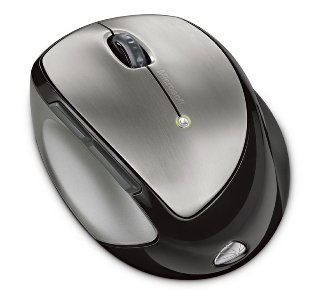

Another good but very pricey mouse is the Microsoft Mobile Memory Mouse 8000. At first glance, it's unconventionally round and squat for a mouse, but don't judge it by its looks. The Mobile Memory Mouse 8000 felt extremely comfortable the moment I put my hand to it and started moving it around -- the ergonomics are surprisingly excellent. It features two programmable side buttons, often used for browsing forwards and backwards in web pages, and they're located in just the right place -- where your thumb can easily press them without ungainly stretching exercises. It also features a battery indicator light and a fully functional scroll wheel. Again, this is just my preference, but it lacks the scroll "clicks" and is somewhat narrow for a scroll wheel. With that said, the smooth top surface of the Mobile Memory Mouse 8000's buttons is a huge improvement ergonomically compared to the Wireless Notebook Presenter Mouse 8000 above -- as there is no hard plastic ridge pushing against your fingers on the Memory Mouse.
The reason it's named the "Memory Mouse" is that it comes with a 1GB flash memory thumb drive that doubles as the 2.4 GHz radio transceiver. While a nice bonus, 1GB is now at the shallow end of the thumb drive pool, and again, it makes for a noticeably larger USB dongle. While a wonderfully comfortable mouse, Microsoft introduced a puzzling paradox in the "wireless" department. You see, the Memory Mouse 8000 is a rechargeable mouse, which means you need to take its charging cable along or risk it ending up as road warrior road-kill. Thus I greatly prefer replaceable batteries in mobile mice. The good news here is the recharging cable's magnetic connector, à la the Apple MacBook Pro. So if it's accidentally caught or yanked, it'll just pop off the end of its USB dongle. But why? As a wireless mouse should in fact be wire-less, it rather defeats the purpose. All these extras also make this mouse very expensive at $99.95, so while I loved its overall feel, I simply felt there were better and more affordable travel mice available for notebook users.
Mogo Mojo?
Price: $69.99 MSRP
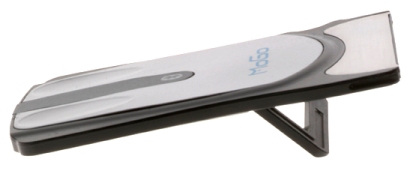

In the "Think outside the box, store it inside the box" category, I was intrigued by the radically different Mogo Mouse. It's extremely thin and shaped to fit inside a notebook's PC Card slot. This saves space, ensures it's always with your laptop, and recharges the Mogo mouse while it's in the slot (only ~40 mins. full recharge time). It features a plastic kick-stand that flips down for use. This elevates the back of the mouse to provide a more suitable angle for your hand. There are two versions of the Mogo mouse -- one for PC Card slots, and another for the differently-shaped Express Card slots found on some newer laptops. It's another Bluetooth mouse, so again you're in luck if your laptop has built-in Bluetooth. If not, you'll need a dongle.
Which brings up several of its disadvantages and compromises: The current PC Card model is only a basic two-button mouse, with no scroll wheel or other buttons. However, Mogo now offers scrolling software which adds a scroll function by using button and movement combinations. However, it appears this is actually very old abandoned software initially posted by a Mogo user. It's also only a 500 DPI mouse, which places it at the mid-to-low range of current mouse resolution offerings. This means you'd likely have to move the mouse further to move it smoothly across wider and higher resolution laptop panels. It's usually possible to increase the mouse speed and/or acceleration settings to compensate, but many times that also increases screen "jumpiness" in use. It's also not as suitable for fine detail work, such as working with images.
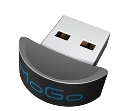 I'd need a BT dongle, and due to the Mogo's slimness, you can't store the receiver inside the mouse itself. In addition, I was concerned with the durability of the plastic kick-stand. While it's an innovative storage and charging design, overall the Mogo came across as a bit too gimmicky for my needs. With the slot type dependency, there's a chance you'll need to buy the other form factor if you get a new laptop with a different card slot, but that would be down the road. In contrast, external cordless USB mice would be more freely transferable to newer laptops.
At least Mogo is planning to provide arguably the world's smallest Bluetooth adapter in the Mogo Dapter. It's a tiny, rounded, and speedy Bluetooth 2.0 and USB 2.0 adapter you can leave plugged into your notebook. Announced earlier this year, it doesn't appear available yet. When I started writing this review, the Mogo web site stated it would be available "Fall 2007". Apparently, it's now pushed back to "January 2008". As it was initially slated for release within Q2 2007, it should be very useful whenever it gets released, supposedly for a $49.99 MSRP. Let's hope with all these delays it's not just another vaporware product.
Honey, I Shrunk the USB Dongle!
Price: $69.99 MSRP


Brand new is the Logitech VX Nano, so named for its smaller size and tiny USB receiver. I really, really wanted to like the new Logitech VX Nano. It has the world's smallest USB receiver, which is so incredibly tiny you can just leave it in your notebook's USB slot and forget about it.
Logitech has raised the bar significantly on this feature alone, and it's likely only a matter of time before other manufacturers follow its lead. The Nano also stores the receiver inside the battery door on the bottom of the mouse. Unlike last year's VX Revolution, storing the wireless receiver does not turn off the VX Nano, so you'll need to use the power button on the bottom of the mouse. Ejecting the USB receiver also requires you to first remove the battery door. I'd expect most people will simply leave it in their notebook's USB port assuming they have one open.
The VX Nano mouse is noticeably smaller than last year's VX Revolution, both in thickness and length. It's compact design means it takes up less space in a crowded bag, and it has the cool Logitech free-spinning scroll wheel for hyper-fast scrolling through long documents, spreadsheets, and web pages. No longer do you have to flick a switch under the mouse to change scroll modes from the clickety-kind to the free spin as was needed for the VX Revolution. Simply push down on the scroll wheel to toggle the spin mode -- great for changing on the fly. It takes two AAA batteries and battery life is estimated at six months with occasional use. Heavier users can naturally expect less, but this is a long time for a cordless mouse.
Unfortunately, Logitech had to make a number of compromises to fit all this goodness into such a small space: Gone is the beautifully curved and ultra-comfortable right-handed ergonomic contour from the prior Logitech VX Revolution notebook mouse. Also gone is the VX Revolution's programmable zoom button. While the new ambidextrous design is certainly better for lefties, the VX Nano is not as ergonomic since it requires a claw-like grip. That's fine for short usage, but it's not as appealing for longer stretches.
It's so slim height-wise that Logitech moved the forward/back buttons away from the thumb rest and placed them on the extreme upper left corner by the left mouse button. That made them difficult to reach, requiring a very unergonomic finger "stretch maneuver". These two buttons are made from a rubbery material instead of hard plastic (as on the Revolution mouse), so you don't get as much of a tactile response. The nice 4-stage battery meter of the Revolution was replaced by a single LED on the Nano. Last but not least, the smaller redesigned scroll wheel has a looser, sloppier feel compared to the Revolution's larger wheel -- particularly when pushing it left and right for horizontal scrolling. However, I liked the smaller wheel's size itself, which was more appropriate for a compact travel mouse.
All in all, I could probably live with these drawbacks due to its more compact size and wonderfully tiny receiver, but the real deal-breaker for me was that the VX Nano's scroll wheel cannot function as a middle mouse button. Clicking down on the wheel only changes the wheel's mechanical spinning mode. I caught myself automatically clicking the wheel out of habit. Since I'm a multi-tasking power user, particularly with tabbed web browsers, losing the the middle click button was a tougher item to ignore. The ability to use it to open and close web links in a new tab is a key productivity feature that I just wasn't willing to sacrifice -- especially as I use the middle click button far more often than the free-spinning scroll feature. FYI, the bundled SetPoint software can be used to reassign one of the other buttons (e.g., the search button) to become the middle click button -- a change that will take some time getting used to.
Overall, it's a good travel mouse with some extra features and buttons, a travel pouch, and the tiniest USB receiver to date, so it's very worthy of consideration. It's certainly one of the better cordless mice in its size class and has a nice "executive" look, but I recommend you try it out in the store before you buy.
A Fast Fish with a Twist
Price: $39.99 MSRP
 An interesting contender presented itself from a very unlikely brand -- the RocketFish Twister Wireless Laser Mouse. RocketFish is Best Buy's house brand, and the Twister Mouse is extremely compact yet quite usable. The built-in twist is simply brilliant. The mouse stores flat, and I do mean flat, in an included travel pouch. Give it a quick twist, and it adds the necessary curve for use. For an animated demonstration of the "twist", view the 360º image.
To keep its low profile, it substitutes a flat scroll touchpad where the scroll wheel would be, and underneath that is a clickable middle mouse button. Other features include a diminutive USB receiver dongle that stores right in the mouse. I prefer mice such as this that not only store the receiver inside, but which automatically turn the mouse on/off when ejecting or reinserting it back in the mouse to save battery power. The Twister mouse includes an extra button on the left side, nice for clicking "back" when web browsing, and bundled software for reassigning button functions and adjusting mouse performance.
The Twister Mouse's flatter design is perfect for extremely crowded laptop bags and it easily fits in nearly any pocket. I discovered another great use as a wireless presentation mouse -- the mouse buttons are the perfect size, but just don't touch the middle scroll pad unless you want your slides to advance very quickly. Its wireless range could be a bit better, as I only got roughly 20-30 feet away on fresh batteries before responsiveness dropped off. So it's best suited for small to mid-sized presentation rooms, or where you won't be moving far from your notebook. Note that the mouse buttons operate in either twist mode, so you can use it to present in your hand with it flipped flat as desired. Another tip: Change PowerPoint's setting to uncheck "Show menu on right mouse click." This allows you to use the second mouse button to go back a slide without popping up PowerPoint's annoying navigation menu.
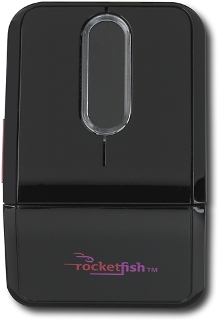 Now for the reality check: It took time before the Twister's unconventional shape felt more natural in use. It's boxy, but usable. The middle scroll touchpad is innovative, but requires a heavier touch for the desired responsiveness. It's a shame its touchpad sensitivity is not currently adjustable in the bundled software, which would help make it feel more fluid and require less effort. The left and right mouse buttons are fairly quiet and have a very short click depth. This makes them quicker to click, but it's an acquired taste. The red side button is also too slim and recessed for easy clicking. I had to consciously apply more pressure to make it click. However, since many notebook mice don't even have an extra button, this was at least a thoughtful and somewhat useful addition.
The Twister Mouse features a "Connect" button on its bottom should its USB receiver not automatically recognize it. This occurred on occasion: several times upon insertion of the USB receiver into the laptop (easily cured with the "Connect" button), and once after the mouse was left inactive for 30+ minutes. Unfortunately, the "Connect" button did not solve the latter problem, but removing and reinserting the USB receiver did the trick. So it wasn't a seamless connection throughout, which could cause problems before a big presentation and/or potentially frustrate a new cordless mouse user.
Battery-wise, it takes two AAA's and both the USB receiver and the mouse will light up in various colors indicating relative battery strength. I prefer a multi-segment meter, or at least a percentage indicator in the included mouse software, but it's better than nothing to avoid a dead rodent. Bringing or buying spare AAA batteries on the go is easy enough, and for that reason I prefer replaceable batteries over internal rechargeables for notebook mice.
Compared to Logitech's and Microsoft's offerings, the Twister Mouse doesn't compete in refinements, but it's more reasonably priced, functional, extremely compact, and is still somewhat comfortable in use despite its small and boxy size. If you're looking for a tiny mouse to use on an airline tray and have a cramped laptop bag, consider the Twister Mouse or the Logitech VX Nano above.
[Update: It is currently unknown whether Best Buy is continuing to sell this mouse. As of this date, the RocketFish site features a broken link to Best Buy's site, and the latter doesn't return any results for this mouse. It may still be available in some Best Buy stores.]
Viva La Revolution!
Price: $79.99 MSRP


When it came down to it, my favorite cordless notebook mouse is the Logitech VX Revolution. It's not the smallest, but if you're looking for a single cordless laser mouse to use while traveling and also as a desktop mouse, this is the one. It's elegant, extremely comfortable, and incredibly versatile. If you do a Google search for VX Revolution review, you'll find many highly positive reviews. Logitech did a superb job in designing this mouse.
I had become so accustomed to using a touchpad that I'd almost forgotten some of the benefits of a great cordless mouse:
- The Revolution is so-named for its innovative dual-mode scroll wheel. Flicking a little switch on the bottom changes its function from the clickety-kind to a nearly frictionless free scrolling wheel -- perfect for long documents, web pages, and even longer spreadsheets.
- Its long radio range is phenomenal, and its 2.4 GHz frequency worked beautifully along with all of my Wi-Fi devices -- no interference either way.
- I also like the deep comfortable thumb rest and the proper location of the forward/back buttons just above it, so they're very easy to reach. It has just the right tactile feedback as well, giving it a very polished and refined feel. However, it's not ergonomic for the left-handed, who will likely want an ambidextrous design.
I'd say the VX Revolution only has two drawbacks: First, it's a slightly larger and thicker notebook mouse, due to the higher but extremely comfortable ergonomic palm curve. The other is you'll have to flip the mouse over during use to flick the microgear switch to change its mechanical scroll wheel modes. However, as the VX Nano above demonstrates, smaller isn't always better, and I'll gladly make a little extra room in my laptop bag for the VX Revolution. It doesn't come with a travel pouch, so a quick trip to my local Best Buy matched me up with a nice Lowepro Ridge 30 case that fits it perfectly and is lined in soft brushed-tricot to prevent scratches.
As the Logitech VX Nano is the newest model, the VX Revolution's price has begun to drop. I've also recently seen a number of rebates at online stores if you're so inclined. The rebates may signal a phase-out in favor of the newer, smaller Nano. So if you if want a Revolution, you might want to give it a spin before they're gone.
November 27, 2007
Addressing Laptop Data Vulnerabilities
Law.com has an excellent article discussing several workable approaches for securing data on corporate laptops. A quick look at one list of data breaches illustrates how sensitive data continues to be compromised by unsecured storage on laptops.
It's a particularly savvy article because its first piece of advice is not to overreact and go overboard -- "Draconian laptop-use policies may, ironically, increase an enterprise's vulnerability." Consider that employees often respond by finding other ways of circumventing security to make their jobs easier, which usually means making the data more accessible (i.e., less secure). For instance, blocking file saves to the laptop's hard drive or limiting e-mail inbox sizes can result in employees saving the data to unsecured thumb drives or forwarding sensitive e-mail to personal e-mail accounts. Where there's a will, there's a way. EMC was quoted as opting for a more blended approach, depending on the sensitivity of the data.
Another interesting suggestion was full hard drive encryption, rather than just encrypting the documents folder. This is often a highly debated solution. In my experience, some IT professionals will quickly suggest that doing so will entail a performance hit on the user and cause additional support problems. I'd say that noticeable performance hits are more likely with older, slower laptops. If this presents serious problems, consider phasing in encryption or issuing new laptops to those accessing more sensitive data.
Also keep in mind that when you are working on a laptop, it is likely creating a number of temporary file copies on the hard drive, sometimes in places outside the document folders. Full drive encryption therefore provides more complete protection for these additional copies of sensitive data. Naturally, such a solution would need to be thoroughly tested to determine the real-world impact on users and the IT support organization. Another issue to consider is segregation of the master keys -- do you allow one person or group to have them, or do you segregate them between two entities within the organization to avoid unilateral and potentially undesirable actions? I liked the allusion to the missile silo two-operator requirement.
Removable storage continues to be a major concern, such as flash thumb drives and external hard drives. And let's not forget iPods, which are either the former or latter type of devices. On one hand, these drives are very useful tools for mobile users. When unsecured (e.g., unencrypted), they can represent a larger security threat due to their tiny physical size and increasing storage capacities. For example, an 8GB thumb drive goes for less than $100 and can store a staggering amount of information. The article mentions products that control which devices can be plugged into which computers, and the best ones allow exceptions to be set when needed. If thumb drives will be used and supported, I'd suggest issuing employees with the following: only those models which support high-end encryption, such as AES, and make its entire capacity encrypted before it's issued to the employee. While a savvy user will likely know how to reformat the thumb drive to make it unprotected, the default encryption status is in your favor for the majority of users.
Many new laptops have built-in fingerprint readers, which can make security a bit more convenient. But as the article states, users often forget a key step: Register more than one finger with the device, so if you cut or burn your primary finger, you can use another one to gain access via the reader. Also, without the back-end drive encryption, keep in mind that a fingerprint reader only locks the front door. There are other ways to get to the unencrypted data on the hard drive, such as removing it from the laptop and accessing it from another PC.
Lastly, the article mentions lojack services for laptops, which hopefully reduce their recovery time. However, once the horse is out of the barn, it's too late to employ any of the above security measures. An unprotected hard drive containing sensitive data can be copied very quickly to a number of storage devices. The data contained on missing laptops is often much more valuable and/or costly to an organization than the cost of the physical laptop itself. An ounce of prevention...
Posted by Jeff Beard | Permalink
May 16, 2007
Speech Recognition Comeback Via Cell Phones?
Speech recognition has been around for a long time, but hasn't enjoyed much traction. Products like Dragon Naturally Speaking were useful if one was prepared to spend the requisite time training and correcting it. Another problem was transferring around the large speech files between computers as it was speaker-dependent.
New services are popping out of the Web 2.0 world, making it much easier for people to use their phones to communicate with others in a variety of ways. You could probably call some of these services "Phone 2.0".
For instance, Jott provides a service whereby you can leave a short voice message and have it sent to others (or yourself) as text messages or e-mails. Or, it can send along the voice message. Jott uses a combination of speech recognition technology and human transcribers to convert your voice messages into text.
Of course, this may raise privacy and confidentiality concerns for some. For Jott to work, you need to add the recipients' contact information into Jott's site so it can send your messages to them. Jott is perfect for those times when you need to tell several people, "I'm running late," or "The meeting was changed to ten." Since you can set up groups, it beats having to call each person individually or have one tell all the rest.
While Jott says they "hide personal info from the people doing transcription", there's at least a temporary record being made, so it's best to be prudent with messages going through an intermediary. Also, the one-year-old Jott doesn't seem to have much of a business model yet, so what's going to happen to all of that personal and contact information we enter? Jott does have a posted privacy policy, but doubts may linger.
For more, see "Jott Networks Bridges Voice, Text Worlds" at Law.com.
As the article mentions, Microsoft recently completed the acquisition of one of my favorite phone services, Tellme Networks. Simply call 1-800-555-TELL (8355), and speak keywords like "weather", "traffic", or even "blackjack" to play a game with a very convincing and humorous Sean Connery impersonation. Additional voice prompts are given and it recognizes your vocal responses. Granted, sometimes I've had to repeat myself, particularly in noisy locations, but it works and it's free.
Cell phones are also becoming a focal point for other technologies. Location-based services such as GPS-like navigation and social networking "friend locators" are catching on. So expect to see even further convergence of messaging and location-based services from cellular and third-party providers. In other words, watch for even more services to connect the Jotts.
March 25, 2007
New Yahoo! Widgets 4 Upgrades XP & 2000 Desktops
From Wired's Monkey Bites: If you're feeling a bit left out that you're still running Windows 2000 or XP at home, don't worry. Yahoo! just released their new desktop Widgets 4 software to add Vista-like gadgets and sidebars. Want a preview? If you prefer the stability and compatibility of XP, but crave some of the desktop coolness of Vista, this could be the interim cure.
March 24, 2007
Is Palm Getting Palmed Off?
Treo owners take note: Palm is contending with rumors of a buyer for their aging platform. This is nothing new, yet this time around, the latest round of rumors have an unusual amount of detail per News.com -- "It's crunch time for Palm".
Critics are quick to cite that the Palm OS has not been updated in years, still mired in Palm OS 5 (n/k/a Garnet OS). Palm recently retired the LifeDrive, their foray into the hard-drive based media player/organizer market, and seem to be relying on the Treo as their cash cow. To be fair, Palm has been incorporating the Windows Mobile OS in newer Treo devices. But how far can it carry them? The Treo product itself is relatively old, and the design has not changed substantially since September 2003 with the Treo 600, per Gartner.
"...that's a bad thing in a fast-moving industry like this where we've moved to thinner and cheaper devices. The Treo is looking fat, heavy and expensive." -- Todd Kort, Gartner analystTo get a good view of where the smartphone market is headed, one just needs to glance at the svelte Motorola Q Phone, the Samsung Blackjack, and of course, the eye-popping Apple iPhone. The iPhone is even equipped with a rotation sensor to automatically switch its display from portrait to landscape, and a proximity sensor to turn off the display and disable accidental screen touches when it's next to your ear. Nice touches.
While the Treo is a fine device and still useful, it needs to overcome a strong "last year's model" showing. Perhaps getting bought up wouldn't be such a bad thing, if it will infuse more resources into updating the platform.
February 05, 2007
"Palm OS" is No More...
...now that Access (the real owner of Palm OS for some time) has renamed the Palm OS to "Garnet OS" -- thus removing Palm altogether from its name. Engadget has the details and writes, "Treo users die a little more inside."
Palm pretty much started out as a one-product company. With the impending retirement of the LifeDrive, and Symbol Technologies dropping the Palm OS (excuse me, "Garnet OS") from its line, Palm looks like it's headed back to its roots with the Treo being the only compelling product left.
While there's riches in niches, Palm is going to have increasing competition in that space, with the Q phone and Blackjack already making inroads and the Apple iPhone poised to be the latest threat, not to mention being some serious eye candy.
January 29, 2007
Beware Free Wi-Fi Scam In Airports
Everyone loves free Wi-Fi while traveling, right? Check out this Computerworld article on fake Wi-Fi hotspots at major airports that really put you and your company at serious risk.
Fake Wi-Fi hotspots and "man in the middle" attacks are nothing new. The key is that they are actually peer-to-peer or "ad hoc" wireless network connections -- meaning that your laptop connects directly to someone else's PC, not a wireless access point. That's a major security no-no, as they can sniff your logins, passwords, and other confidential data you send through. They can also deposit some nasty items on your PC behind the scenes. Guess what happens when you connect to your company's or firm's network when you get back to the office?
What's nice about this article is that it also tells you how to set your wireless networking settings in both Windows XP and Vista to prevent your PC from making any ad hoc wireless connections. Note this won't stop your laptop from finding and connecting to a bogus wireless access point set up nearby for nefarious purposes. It's just one more layer of security, and every little bit helps.
January 28, 2007
Think Twice Before Upgrading Your Wi-Fi Router
Law.com has a quick and helpful piece on why you shouldn't upgrade to a Pre-N Wi-Fi router -- at least not until the new "n" standard, 802.11n, has been ratified. If you're using your home Wi-Fi network mainly for surfing the web, then your broadband ISP provider is most likely the limiting factor, not your existing router, especially if it's a "g" router (802.11g).
For much less than the unratified "Pre-N" or "Draft-N" routers, you can buy 802.11g routers that have been enhanced with so-called MIMO technology -- which use an array of antennas for Multiple-Input, Multiple-Output transmissions, extending range and speed." The challenge with these pre-releases of "n" routers is how well they'll conform to the final specs and work with various other Wi-Fi equipment from different vendors. My guess is that the closer we get to the final "n" standard, newer routers produced along the way will generally fare better in compatibility -- but -- nothing is for certain until the standard is ratified.
Supposedly, routers using the forthcoming 802.11n standard will be backward-compatible with the previous 802.11a/b/g devices, working at those older devices' fastest speeds. "N" achieves speeds far above "a", "b", and "g" through three methods: It’s more efficient, it has more radios, and it can use more spectrum. It's widely been discussed that "n" wireless routers will have more range and speeds in the hundreds of Mbps.
For now, the enhanced "g" MIMO (Multiple-input-multiple-output) technology looks to be the most cost-effective. MIMO's benefits boost performance and range, while still handling existing 802.11a/b/g radios. Now, if you're regularly pushing very large files and print jobs through your home wireless network and it's taking its toll on your patience or productivity, then the "Pre-N" performance gains are worth a look. It should also be mentioned that as long as the "Pre-N" router hardware is fully compatible with the final "n" standard (buyer beware), it's probably a good bet that "Pre-N" router vendors will make software upgrades available -- allowing users to update the router's firmware to be fully "n" compliant. If you're squeamish about flashing firmware or reconfiguring your router, then I wouldn't recommend "Pre-N" routers. Overall, I think most people will continue to do well with their existing home "g" router until the final "n" standard routers hit the market, with prices falling as volume increases.
October 28, 2006
Charge2Go Emergency Cell Phone Charger Review
Even though battery technology has improved, cell phones still tend to average a few hours of talk time. They drain even faster when using the backlight or all the extras: Bluetooth, camera, music/video player, games, web browser, e-mail, text/photo/video messaging, and GPS navigation.
So sooner or later it happens -- you're out and about and you get the dreaded "low battery" warning. Perhaps you forgot to charge your cell last night, or it's just been a heavy cell day. If you're lucky, you might get a couple of minutes to finish your call.
A Simple Solution: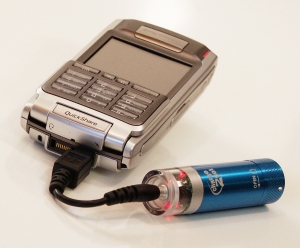
Enter the Charge2Go emergency cell phone charger. You pop in a single AA battery (alkaline, lithium, or even rechargeable), plug in the short connector cable, and hook it up to your cell phone's charging port. Two red LED's start flashing on the top to let you know it's providing power to your phone. The LED's go out when the AA battery is discharged. The main unit is best described as the size of a small flashlight or lipstick, so it easily fits in your pocket or laptop bag. I like that it takes a AA, since they're easy to find on the go. It also makes the Charge2Go reusable.
How It Worked:
I gave it a try with phones from LG and Motorola. Overall, it does the trick, but you have to know how to best use it. Initially, I was disappointed. I had tried to use the Charge2Go to recharge the phones' internal batteries, so I wouldn't have to talk on the phone with the charger attached. Three times it drained a fresh AA alkaline in about 30-40 minutes, but when I powered each phone back up, there was no noticeable increase in battery capacity. On the last test, the phone shut itself off within seconds.
After a helpful call with Charge2Go, I tried a different approach. This time, I used it as an auxiliary battery while making calls. It's a little strange to leave it dangling from the bottom of the phone, but it worked. On the same discharged phone that powered down immediately on its own, I easily made over 25 minutes of calls with the Charge2Go attached, and it still had capacity for more. When I detached the Charge2Go, the phone again powered down, so it was very apparent the Charge2Go did its job.
Construction:
The Charge2Go sports a metal barrel, with a nicely machined screw cap that twists very smoothly. Besides looking sharp, the metal barrel is functional. It dissipates the heat generated when discharging the AA battery quickly. Most often, it was only moderately warm to the touch. Only once did it feel on the hot side, so it's best to leave it out in the open while attached to your phone. It only draws substantial power from the AA battery when it's attached to your phone, so you can leave in a fresh battery until it's needed.
 Pricing and Compatibility:
The Charge2Go is affordably priced and you can order online: $24.99 will get you the Charge2Go charger plus one phone connector of your choice included, all with free shipping. Additional phone connectors are only $2.99, again with free shipping. The charger comes in four colors: Black, Silver, Red, and Blue. There are currently 8 phone connector cables available online, and one for the iPod Shuffle for $3.99.
The web site contains a list of compatible phones and connectors. Some of the newest cell phones are not yet supported. After trying the Charge2Go, I recently upgraded to a fully-loaded LG VX8300 that has a slightly different charger port. The LG connector provided by Charge2Go doesn't fit due to some minor changes made by LG. It's a shame that some phone manufacturers change their charge ports between models, so Charge2Go will need to keep pace. The good news is that Charge2Go has already been working on providing additional connectors, so stay tuned.
Considering Alternative Solutions:
Road warriors usually have multiple chargers on hand, but we're not always within range of a wall or car socket. USB chargers help in a pinch, but you end up draining your laptop's battery unless you're plugged into AC. You can also buy a second phone battery, perhaps an extended one that provides longer life. However, those add to to bulge of your device. Also, some phone chargers can't charge the second battery unless it's actually in your phone at the time. That means buying yet another dedicated charger for the second battery to keep it topped off. (Believe me, I've looked at all of these.)
Don't overlook disposable chargers, such as those that look like Zippo lighters. Keep in mind they cost more than regular disposable batteries, but they don't dangle like the Charge2Go. However, if your phone's charging port is on the side, they can make holding the phone a bit awkward and cumbersome.
Bottom Line:
No solution is perfect, and the Charge2Go is best categorized as an emergency charger. Once you get past the dongle form factor, it's simple, affordable, and reusable. When used properly, it was effective in extending my talk time.
I should also note that the original Charge2Go charger reviewed here has been available for a while. In speaking with Ben Ovadia, their VP of Business Development, I've learned that a new model should be released very soon. He shared it will have even more charging capacity due to incorporating two batteries into the charging unit. Considering how power hungry most new mobile devices have become, this should be a welcome upgrade as long as the overall size and weight stays convenient for mobile use.
April 30, 2006
Palm OS Left Behind
A year ago, I posted what I thought about the various Palm OS announcements, and that it was probably going to be too little, and far too late.
Since then, PalmSource has been acquired by Access, and is stuck with the old Palm OS for at least another year. That will make at least three years from the last Palm OS release -- more like a decade in mobile tech doggy-time. Today I saw CNET News published an equally sober article, "Is the Palm OS Missing the Multimedia Boat?"
Users of mobile devices are increasingly looking for them to do more, and not just to play MP3's either. Business users like more interactive travel aids, maps, remote access to data, etc. Consumers are already primed for mobile multimedia (thanks in no small part to video iPods). Both markets are leaning more toward multitasking devices with better security. The Palm OS lacks native Java, which is required for some new mobile applications. PalmSource relies on external developers to come up with the cool multimedia tools, not a good sign.
Thus it's not surprising the latest Treo is running on Windows Mobile; however, it's not all peaches and cream. Former Treo 650 users tend to prefer their 650 over the new 700, at least from the online comments I've read. Thus it's not so much a prediction as it is an extrapolation these needs will quickly overpower the Palm OS even coupled with newer, faster hardware. Keep an eye out for more mobile applications geared towards Windows Mobile and Symbian platforms. It might just affect your next mobile gadget choice.
April 10, 2006
iPod Used as an Identity Theft Cache -- Only the Beginning
The San Francisco Chronicle reported yet another use for iPods: storing lots of stolen identity-related information. iPod users have known for quite some time that they can be used as portable storage for computer files, just like a thumb drive. Perhaps more troubling than a criminal using it that way is that the San Francisco police sounded surprised and considered this novel -- and that was the fraud division. They got their man through a sting operation, though, and I'm glad to hear it given the details of the identity thefts and other crimes perpetrated.
But it underscores the need for law enforcement and security professionals to consider new uses for everyday tech tools and gadgets, especially when theft of data with iPods is nothing new. As the Tech Law Prof Blog correctly pointed out on this issue, at least four years ago we learned that one could walk up to demo Macs in stores, plug in an iPod, and copy entire software programs for use on other Macs. I remember reading about this on Wired.com ("Have iPod, Will Secretly Bootleg") at the time. So why is this considered something "new"?
With all due respect to our police departments (I mean that sincerely), it sounds like they would benefit from a "Tech Culture 101"-type class. Give them some freebies to go play with -- iPods, thumb drives, camera phones, Treos, BlackBerries, Bluetooth devices, digital cameras, flash cards, etc. Show them how they work, how they capture, store, and transfer information, and perhaps most importantly, how easy it is to hide information on them "in plain sight". I hate to say this, but "you gotta think like a teen".
For example, it would not surprise me to hear one day very soon that someone was caught smuggling confidential information on one of the tiny flash cards inserted into innocuous-looking devices like a cell phone or a PSP (Play Station Portable). In fact, the PSP is quite a useful computer in its own right, well beyond playing games. Heck, you can already remotely control your home with it, not to mention all of these cool uses. Sony is also empowering it with the LocationFree console to stream all kinds of digital media to your PSP at any hotspot.
There's also a new project for porting Linux over to the PSP. As any hacker knows, once you've got Linux running on a capable device with Wi-Fi (yup, it's a Wi-Fi Finder too). . . well, it doesn't take much imagination, does it? Now that makes toting stolen info on your iPod très passé.
Posted by Jeff Beard | Permalink | Comments (0)
March 18, 2006
Enhancing Mobile Security - Feature Article
Organizations usually focus more heavily on protecting the castle by fortifying its defenses. However, mobile technology security can be a bit more challenging, in no small part due to the plethora and complexity of devices, user mobility, and increased risks outside the firewall. Sometimes it doesn't receive as much attention, or perhaps is perceived as less securable. Thus I've recently written a feature article on effective mobile security techniques, strategies, and policies, entitled "Enhancing Mobile Security". The downloadable PDF is compatible with Acrobat 5 or higher.
This was originally published as the cover feature in the February/March 2006 issue of Law Office Computing. I am greatly honored by Amanda Flatten, LOC's Editor and Publisher, for granting me permission to publish it here. Amanda, you're the best. If you're in the legal field and have any interest in improving your practice via savvy use of technology and keeping abreast of new developments, then I highly recommend a subscription to LOC.
Posted by Jeff Beard | Permalink | Comments (0)
Avoiding Mobile Computing Burnout
Whether you're a road warrior or just tote a few mobile gadgets, I think you'll find this article helpful in setting expectations and managing your stress from always being accessible. It was recently published online at eLOC, the e-magazine version of Law Office Computing. A hearty "Thank You" goes to Amanda Flatten, the Editor & Publisher extraordinaire, for graciously permitting me to post the entire published version here at LTG (especially for those of you who download the RSS feed).
Avoiding Mobile Computing Burnout
Use technology to enhance your work, not take over your life.
By Jeff Beard
It’s no secret that lawyers and legal staff have high-pressure jobs. As if we were not multitasking enough, mobile technology makes us even more accessible to client service and other demands. Untamed, it leads to information overload, multiple interruptions throughout the day and more stress.
Are your wireless gadgets just making you more wired? Do you need to go on a technology diet? Clients demand more access to you, and you want to provide good service. Mobile technology offers many tools to help you do just that. The problem is, sometimes they deliver too much of a good thing.
Consider how many devices and technologies are used to stay in touch: wireless e-mail devices; Wi-Fi laptops loaded with e-mail, office suite, time entry and various practice applications; cell phones; hands-free headsets; a lot of cables (laptop power brick, modem, Ethernet, universal serial bus, FireWire, audio, iPod charger, cell phone charger and personal digital assistant charger); home, office and cell phone voice mail accounts; professional and personal e-mail accounts; office, PC and Internet faxes; text messaging; instant messaging; replicated e-mail account on your laptop’s hard drive for offline reading; Virtual Private Networks, Citrix or other remote access software; camera phones, digital cameras and portable scanners; and a prepaid Starbucks card (for a liberal dose of Wi-Fi and caffeine).
That is a lot of technology to manage. It’s not uncommon to hear of professionals checking their e-mail in the middle of the night, while driving, during their children’s sporting events and let’s not even dwell on the restroom scenarios. While some will deny these stories, I have heard them all. The faster you respond, the faster your clients and co-workers expect you to in the future. After all, you reinforce their expectations with a five-minute turnaround from your BlackBerry or cell phone. Congratulations — you have just become a victim of your own success. All isn’t lost, however. There are a number of ways you can avoid mobile computing burnout and reduce information overload.
Set Reasonable Expectations
Jim Calloway, director of the Oklahoma Bar Association’s Management Assistance Program, recommends setting parameters with clients during the initial interview. “Communicate that you will normally get back to them within 24 hours, not including weekends,” Calloway said. “Share that you process messages on a first-in, first-out basis. Think about how you are going to handle the client relationship and what mobile access means.” The same goes for managing your relationship with your employer or co-workers. Calloway said legal professionals often can set themselves up for failure by committing to do too much, but setting realistic goals and ground rules will help you manage your workload.Determine Which Mobile Devices Work for You
When it comes to traveling, less can be more. Ask yourself what you truly need to be productive and if you really will use what you take along. If you are reasonably tech savvy and comfortable with different gadgets and access methods, it might be worthwhile to have alternative technologies at your command. If you are not a technophile, then try introducing one new gadget at a time. That way, you are increasing the odds you will be comfortable using it on your own.This might be a gross oversimplification, but generally I find two main types of BlackBerry or Treo users: those who can’t wait to get one, and those who really, really don’t want one, ever. If you are in the former category, make sure it’s for the right reasons and not just to have a status symbol or another tech toy. If you are in the latter category, take heart and use these tips to set reasonable expectations with others regarding your accessibility. You might be able to agree on alternative communication methods or less onerous response times.
Minimize Interruptions and Multitasking
Remember, technology speeds up many tasks, including the pace at which we make mistakes. “It’s important to recognize multitasking invites errors and misunderstandings,” Calloway said. “We have all sent e-mails that we wish we had never sent.”Brett Burney, legal practice support supervisor at Thompson Hine in Cleveland, advises professionals to avoid the diminished returns of too much multitasking and to focus on the quality of work clients deserve.
Learn and Use the Technology You Have
Burney said he sees a lot of frustration stemming from underutilization of mobile gadgets. “One great way to avoid at least some of the tech-burnout today is to educate yourself on the functions of a device, and beyond that, even to learn a few tips and tricks,” he added. For example, instead of manually scrolling through e-mails, Burney said Treo users running GoodLink software simply can press the “T” key to jump to the top of the list to read a newly arrived message. “While it might only save me several seconds, I am happier because I am immediately looking at what I want to see. I realize this means spending more time with a device, either reading the instructions or just playing with it, but it pays off in the long run because I don’t get so frustrated,” he said.Also, be cautious about adding mobile technology to your arsenal too quickly. Give yourself a chance to absorb it at a comfortable rate. Don’t ask for it if you don’t need it. If you need it, then learn how to use it properly and use it on a regular basis. Great tools are a wasted investment if you can’t use them when you really need them. Don’t wait until you are on deadline or two hours before a flight to pick up a new mobile tool without sufficient training. That is just asking for stress. Instead, plan ahead, test it and ask questions so you will be able to use it well before you leave. For instance, remote access accounts can become disabled if not used regularly. If you have VPN access, but use Web access most of the time, you could forget your VPN personal identification number or password, or the account might need to be reset. This is best summed up as “use it or lose it,” in which case you have unanticipated remote support problems adding to your stress level. Also, it’s not fun for the Information Technology folks who must support your remote technology. In many cases, an ounce of prevention keeps disasters at bay.
If you don’t have time to teach yourself how to properly use mobile technology, find out if your organization or a technology vendor offers any training or user guides. Portable cheat sheets and instruction cards are useful and easily fit into a briefcase or laptop bag.
Recognize That Technology Isn’t Perfect
Bad things often happen — batteries die, power cords get left behind, hardware fails, software applications have bugs, viruses abound, entire systems become unavailable at times, and yes, we all have made mistakes while using technology. That is life in the digital age. In recognizing this, however, we can generate effective alternate plans to get things done.For example, if your cell phone or PDA dies, have a backup list of names and telephone numbers on your laptop or on a flash drive. Planning ahead for outages and problems is one of the best mobile lawyering stress relievers. It’s only a matter of time before Murphy’s Law strikes, and while it’s never fun, knowing you still can communicate and work productively under pressure is a nice safety net.
Use the “Off” Button
Mobile devices have to be recharged — and so do you. If you stay connected all the time, you will become drained and less productive. Put all your commitments into perspective and make adjustments. For instance, turn off wireless e-mail devices and cell phones at family events, or even better, consider whether you really need to bring them to these events at all. Admittedly, most of us like to carry cell phones for personal safety and convenience. In that event, it’s OK to send calls to voice mail. For this reason, I prefer phones with external Caller ID displays for triage purposes. Check if your phone offers a shortcut to manually force an incoming call to voice mail rather than having it vibrate or ring several times. For example, I discovered that pressing the side volume down button twice on my LG cell phone does the trick.If you are in a meeting with a client, there is nothing worse to that client than constant buzzing or ringing interruptions. This gives the client the impression that you are not giving your full attention. Indeed, some firms have added this to their etiquette training. For longtime road warriors, cutting that wireless cord can feel strange at first, but it gets easier with practice.
As professionals, we are quite fortunate to have a wide variety of mobile tools at our disposal. As tools, they serve very useful functions. The trick is to manage them before they manage you by setting realistic expectations and ground rules. There still will be times when you become overloaded or frustrated, but I hope some of these tips better prepare you to anticipate and work through them.
Stress-Busting Tech Resources
- “Technology, Stress and the Lawyer’s Quality of Life,” by Jim Calloway, director of the Oklahoma Bar Association Management Assistance Program
- JDBliss, “A Blog for Attorneys Seeking Career Satisfaction, Work/Life Balance and Personal Growth”
Jeff Beard is the legal services IT manager with Caterpillar Inc., a Fortune 100 company headquartered in Peoria, Ill. He is a former practicing attorney, and is a frequent national author and presenter on contemporary legal technology and practice management issues. Beard enjoys working with mobile technology, and covers many such devices and issues on his blog, LawTech Guru. This article was submitted in his individual capacity, and all views stated are his own.
Posted by Jeff Beard | Permalink | Comments (0)
March 11, 2006
RIM Settles -- So What's Next?
RIM "took one for the team" in settling with NTP last week for a cool $612.5 million. While that's not chump change, it's understandable as the case was taking its toll on its customers and RIM's growth.
So while some are breathing sighs of relief, is RIM out of the woods? To answer this, you might want to read this NY Times piece, "Detractors of BlackBerry See Trouble Past Patents". Whether or not you agree with its tone, it does a nice job of laying out the coming challenges for RIM and its competitors, such as Microsoft and Palm. While BlackBerry is king of wireless e-mail, is that enough? For now, probably, but there will be customers who want more.
February 13, 2006
BlackBerry Shutdown Satire, Onion Style
You know the Crackberry has become a pop icon when the Onion satirizes it. Enjoy.
February 09, 2006
RIM Releases Information on BlackBerry Injunction Workaround Technology
As a follow-up to my last post, today RIM issued a press release and other "details of a software update (named BlackBerry Multi-Mode Edition™) that has been designed and tested as a contingency to allow RIM partners and customers to continue to use the BlackBerry service should the court implement an injunction in the current litigation involving the NTP patents."
The information discusses the legal ramifications, customer impact, and some explanation of the multi-mode software for switching over should the injunction be issued.
Other linked documents include:
February 07, 2006
BlackBerry Shutdown FAQ
Those with Crackberry anxiety due to the latest developments in the RIM/NTP case should find this interesting: CNET News has put together a very informative FAQ: Will BlackBerrys be shut down? It does a nice job of summing up the issues, developments, and possibilities.
January 09, 2006
New Cell Phone Concierge Service
Quick -- if asked, which mobile communication gadget do you think is most prevalent? I'd have to say it was the cell phone, including all the convergence variations.
That's why I like services that work easily for cell users, and not just the smartphones either. Things like Google SMS -- their free text message service that acts like Google for your phone. It's already helped me on the go many times, both around town and while traveling. Occasionally, it's even useful to send or receive e-mail via an ordinary cell phone and additional free services like Teleflip really make it easy.
Here's a newer one worth checking out: CNet News just covered AskMeNow, a pay-for service (49 cents per question, billed to your cell phone) that employs a research team who tries to answer and respond to your question via a text message within a mere three minutes. There's also a variety of free automated services per the web site: "Weather, Movie Times, 411 listings, Sports Scores, Directions, Horoscopes, Flight Information, Stock Quotes and more."
While there are limits on what they're willing to answer (for obvious reasons), the price is reasonable. If all you have handy is your trusty cell phone, the AskMeNow service just may be able to provide answers missed by other automated services. I haven't tried it yet, but it sounds great for travelers, particularly as we all know how limiting those tiny screens are for web surfing. Let someone else's fingers do the walking.
December 06, 2005
2005 Holiday Gadget Gift Guides
'Tis the season for all good gadget lovers to find something cool online, at some of the lowest prices of the year. I've made a list and checked it twice, so here's some great online technology gift guides, other resources, and tips to help you or that special someone get that ultra cool gadget that's been wanted all year:
Online Techno Gift Guides:
- PC Magazine has their 2005 Holiday Gift Guide, which includes daily gift ideas, a high tech wish list, product guides, shopping advice, and more. Perhaps one of the more useful columns is What Not to Buy in 2005. It tells you which items or technologies are on the way out, and which ones you should get instead.
- Computer Shopper has their Present Tech product roundups. It's nicely categorized into The Audiophile, The Frequent Flier, The Newbie, The Fun Lover, The Trendsetter, and Thrifty Gifts. Something for nearly everyone.
- CNet has their Editors' Choice Awards, listing products and services that have won their editors' nod for "best buys" in many categories, from PCs to home entertainment systems, peripherals, mobile tech, and more.
- Wired News offers The Ultimate Geek Gift Guide, by Home, Mobile, and Everything Else (which goes far beyond the mundane PC stuff, including a $1,000 Taser gun, for that hard-to-buy person).
- PC World checks in with Gadget Freak: Holiday Tech Grab Bag--Gadgets to Love or to Lose, an eclectic review of some of the good, bad, and the uglier side of holiday tech gift offerings.
- A bit closer to home, Reid Trautz offers his 2005 Holiday Gift Guide for Lawyers, a combination of the useful and whimsical stress relief.
Once you found something you like, how do you know how good it is? Is it a quality item, or just as likely to break right after the short warranty expires? Here are my preferred methods for finding this information online:
- Search for online reviews: I often search Google and other leading search engines by including the product name or part number, followed by the word "review". That usually brings up a number of useful reviews by professionals and consumers alike.
- Check out the customer feedback on Amazon.com, even if you don't buy from them. You'll likely find out in a hurry what's good or bad about it, similar products or complementary products, and perhaps even some great tips and tricks for using them.
These are the unsung heros in online shopping. They quietly scour the web for all kinds of price cuts, rebates, coupons, specials, and other online and offline deals to save us a bunch of money. I've been able to pick up all kinds of tech gadgets at half prices by tuning into these sites. Some even offer RSS feeds, which are extremely useful if you have the right RSS reader.
I use FeedDemon, wherein I have a special group for these deal sites along with "Watches". Easily created in mere seconds, Watches automatically search the feeds as they arrive. They collect the matching results for anything I'd like to get at a phenomenally good price, such as flash memory cards, USB hard drives, etc. Think of it as news clipping for online deals. That way, I don't have to manually visit each site. I just look in a particular Watch bin to see which new deals match the desired product. All of this is especially important since these kinds of deals are very short-lived -- low-priced stock sells out in hyper-time, and the coupons/rebates expire almost as quickly. But if you jump on them within a day or two, you may have a pretty good chance.
Some of my favorites, complete with RSS feeds:
If you're shopping online, it'll often save you time and money to compare prices. PC Magazine has a review roundup of 6 price comparison sites, complete with ratings and good discussions on what's good and what's lacking.
My personal favorite and all around standby is Pricegrabber, but I've known to use Shopper, Shopzilla, Froogle, and Cairo on occasion.
Don't Forget the Customer Support:
Last, but certainly not least, it's important to be able to contact your online seller by telephone when you have a problem or question. Some online sellers make their customer support numbers accessible, while others would rather that you just leave them alone, as evidenced by a complete lack of contact information other than the dreaded e-mail support. That's a good sign in itself to steer clear regardless of the price. But if you just can't find it anywhere else or feel so compelled, DVDTalk.com offers this valuable consumer resource:
- DVDTalk's list of over 40 online retailers' Customer Service Phone Numbers & Email Addresses. Perfect for when you "just can't get no satisfaction".
Like everyone else, I still buy a lot in stores. However, being a busy professional, sometimes it's just nicer to stay home and let my fingers do the shopping. I often find desired items I can't find in local stores, and at better prices. Have a Happy Holiday, and hopefully this will make your holiday shopping a bit more enjoyable and save you a few billable hours in the process.
October 03, 2005
New DVD Format Wars: Here We Go Again
Will history repeat itself with HD DVD vs. Blu-ray?
What is it about video technology that inspires two competing standards to put consumers smack in the middle? First there was VHS vs. Betamax, with VHS the undisputed winner. While Betamax produced superior image quality, VHS's longer play/record time won out. Regardless, having a single standard made it easy on manufacturers and consumers alike, and the home video market exploded.
More recently, there was DVD-RW and DVD+RW. For a time, the "-" and "+" formats were mutually exclusive. The two "standards" caused all kinds of compatibility issues, at least until drive manufacturers figured out how to include both formats in one device. No clear winner, though, just cohabitation. But it certainly seems to work.
So, just when we finally get to a DVD happy place, two new standards for high definition, high capacity DVDs are threatening to splinter the market. Again.
The two new formats are HD DVD and Blu-ray. Both use blue lasers instead of the red ones used in traditional DVD and CD drives. Due to blue light's shorter wavelength, they can pack more information on a disc.
Each format has different (and in some cases, the same) backers in the industry: Sony, Intel, Microsoft, Walt Disney, Paramount, Twentieth Century Fox, and others have entered the fray. News.com has done a great job of covering the evolving market turns and explaining the whole mess with the following articles posted over the last couple of days:
High Definition TV (HDTV) and Enhanced Definition TV (EDTV) "standards" are confusing enough. Perhaps the drive manufacturers will find a way to either combine the blue laser DVD standards or at least get them to cohabitate. Right now, both camps are fairly polarized and spewing propaganda, so it could be awhile. Until then, at least you'll know what's coming our way in 2006.September 28, 2005
Palm + Microsoft = Treo on Windows Mobile with Outlook
Co-opetetion makes for strange bedfellows. Who would have imagined just a few years ago that Palm and Microsoft would ever have joined forces? However, a short year ago, I posted here that Palm entered a licensing agreement with Microsoft for providing support for Exchange on the Treo line. Many wondered where this was going.
This week, Palm, Microsoft, and Verizon Wireless decloaked out of the stealth closet to announce their alliance, complete with an hour-long press conference with the heads of all three companies, and a brief demo of the new Treo. While watching the entire conference, it was quickly apparent that Bill Gates was the only one truly comfortable on stage, perhaps something of an omen.
To save you some of the PR chatter and mutual admirations, the demo starts at around 20:50 in the video, with audience Q&A beginning around 29:20.
Some of the highlights:
- The new Treo is expected to be out early 2006, running on Windows Mobile OS, not Palm OS (with all the fanfare PalmSource made over switching to Linux, this is a surprise to some).
- It will support Exchange ActiveSync, for an Outlook experience on the Treo.
- The blending of Treo and Windows features will enable one to bring up a contact's multiple phone numbers, text messaging, e-mail, and instant messaging options in a single quick pop-up.
- Verizon Wireless will offer the new Treo exclusively beginning early 2006, with it opening up to other carriers in the second half of 2006.
- Verizon will be supporting the Treo over their fast EV-DO data network.
- Due to the inclusion of the EVDO radio, expect it to cost more than other Treos.
Yes, Palm experienced a reversal in the PDA market, but they realize their strengths with the Treo. Rather than jump on the negativity bandwagon, I recall my opinion from a year ago:
"In the past, Palm and Handspring were great in making such announcements, but never seemed quite able to deliver on all the hype. Thus it will be quite interesting to see if the relatively new merging between Palm and Handspring, and its new relationship with Exchange, will finally give Treo the entré to the Enterprise it has so desperately been seeking since its debut. While other solutions have existed, Palm-based devices have long needed a more level playing field for the corporate wireless messaging market. This is a great announcement, but now palmOne needs to put its money where its mouth is and execute, execute, execute like never before. They're probably not going to get a better opportunity at the corporate market than direct support with Exchange (and thus Outlook)."While I'm sure some are thinking "too little, too late", let's see if they can finally deliver on the hype. With the Microsoft juggernaut backing them this time around, coupled with Verizon's fast and highly rated EV-DO network, they've got a shot. Except that their toughest competition in the enterprise market was never Microsoft.
RIM has quietly proven itself in the enterprise, and is already embedded. That's what Palm is truly up against: It's not the better device or platform who will win. It's the one who can retain the CIOs and messaging managers at these companies, and RIM has a healthy head start. Unless these IT leaders experience serious problems with RIM, I predict they'll take the more conservative approach and stay pat with the one they know. Thus Palm's largest growth target are companies without wireless messaging. I think they'll win some and add revenue, but the real question is whether it'll be enough to make a substantial difference? While I'm intrigued by these new possibilities and love rooting for the underdog, I'm left thinking that Palm can do all the right things and still fall short.
September 13, 2005
Excellent iPod Parody Video
It's been out for a little while, but just seems all the more fitting and funny after the iPod Nano launch. If you've ever wondered how small the iPod could go, you'll love this.
September 12, 2005
Gadget Roundup
For some reason, during this past week a number of interesting gadgets got my attention. Highlights for those who need a gadget fix (you know who you are):
- iPod Nano -- Apple makes a splash with flash memory
- Motorola ROKR phone -- The vaporware iPod phone finally decloaks
- Aleratec USB Copy Cruiser Plus -- The ultimate portable USB host?
- Charge 2 Go -- Emergency Cell Phone Charger
- Batman PC Case
- Übergizmo -- A Gadget Blog
Bye-bye iPod Mini, Hello uber-thin Nano -- but will it fit all the regular iPod accessories on which we've spent so much?
It even claims pretty decent battery life -- because, well, you'll need it if you want to talk more than 15 minutes after you've been cranking your tunes.
Me? I'd rather invest in a slim Nano and keep it separate from my phone, especially as it looks to be more robust than the ROKR. Otherwise, what happens when you want to upgrade your cell phone -- lose the iPod? There will also be occasions when I'd want to mount my iPod into a car holder or portable speaker dock, and keep my cell phone free for calls. Thus I see ROKR succeeding more as a supplement to an existing iTunes account and iPod owner than as a primary player.
From the site: "The USB Copy Cruiser Plus copies digital pictures, MP3 files and other data between USB drives without a computer. With the USB Copy Cruiser Plus you can quickly transfer data between USB drives and Flash Memory cards where ever you are. The easy to use control buttons and LCD display allow you to choose specific files, folders or all files and folders to copy."
Sounds like an interesting solution for digital photo transfers directly from your digicam. Of course, an iPod Photo does this in style. But it does solve that "How can I get this file from my thumb drive to yours" problem without having a laptop booted up.
We've seen emergency chargers before, but this one claims to charge your phone from a single AA battery. It's tiny, cheap at $25 (including shipping) and you can always find a AA battery. This one I'm checking out.
Okay, this isn't so much a gadget as it is a cry for escapism (or help). But if you thought Batman's utility belt was cool, then you'd probably like this case for your PC. Hey, at least it's original. The PC Begins?
(More info at Bios Magazine)
Worthy of the place alongside Gizmodo, Engadget, and Lifehacker in my RSS reader.
September 03, 2005
Tablet PCs: A Reality Check
I came across a very good set of articles today relating to the Tablet PC's lackluster market performance. First, there's the doom and gloom from various market analysts in the BetaNews' "Tablet PC Platform in Trouble?" piece. Yet David Coursey's eWeek column, "Tablet PC Is Stronger Than Predictions Suggest" adds some much needed perspective on the issues.
My perspective is somewhere in the middle of these extremes. Back around the millennium, at the very pinnacle of the Palm and Pocket PC PDA hype, I recall reading analysts' staggering predictions of PDA market share numbers by 2010 that struck me as unsustainable. I felt the analysts didn't fully grasp the concepts of market maturity and saturation at the time. Not to mention that mobile technology experiences fads and subsumption -- as newer and different types of technologies absorb, morph, and obsolete them. For instance, think of how even mid-range cell phones have affected the PDA and pager markets, not to mention the incredible amount of convergence between e-mail, organizers, text messaging, and voice features.
From that point on, while I found tech market analysts' predictions interesting, I knew they were just as swayed by hype and emotion as anyone else. I've seen major analysts' product and vendor rankings that were just plain wrong when further examined. Thus in this regard, I agree with Coursey, and these analysts need to get a grip on reality and admit when they've been off target. I'd also like to see a more conservative approach in their projections, because, after all, they're just guesses.
I've tried numerous PDAs and a few tablets. To sum up my experience, I found Palm-based PDAs to have an intuitive handwriting and navigation interface which facilitated very fast adoption. Pocket PCs, not so much at first, but they've improved and are quite usable once you get acclimatized.
So, moving back to the future: Tablet PCs are just a much harder sell. Why? Well, first there's the price premium for what's effectively a scaled-down PC, and they're much more expensive than a PDA. Even in good economic times, companies managing large fleets of PCs will be less than eager to see the multiplied effect of that per-machine premium on their financials. Several years later, the price difference is finally lessening, but it's still there. Then there's the input paradigm shift from a laptop, but having a keyboard definitely helps, as does a twist display.
I said here well over a year ago: "Don't get me wrong, I think Tablet PCs definitely have their own niches and strengths and are extremely cool, but in a tight economy, a $500 PDA that meets 70-80% of a user's mobile needs is a lot more marketable." For the right uses, a tablet PC could come in very handy. I just think that many businesses will be more comfortable issuing stock laptops and BlackBerries (or possibly Treos) than have to support yet another niche line of products. With the notable exception (pardon the pun) of Microsoft's OneNote, I just haven't seen the "killer apps" for tablets, and it's been several years now. If you do a lot of note-taking, markup, and creative brainstorming, then I could make a better business case. But then I think one would want better collaboration tools between tablet and non-tablet users, and that's more difficult to do well.
In the end, I don't expect tablets to soar nor to go away overnight. Are they cool? Absolutely, but that doesn't factor into a business case. The tablet and software developers need to get together a whole lot more than they have and present us with much more compelling use and collaboration factors. Then they may start to gain better traction. But until that happens, I think tablets will stay relegated to the niche market, used more for sales, field, medical, and other markets where you need to record point-of-contact type information. That could also work in some legal instances, depending on the practice, but it's still not ready for broad adoption by any means. Too bad, as I was seriously rooting for tablets to have been making better inroads by now.
August 31, 2005
Hummer Laptop?
CNET has this photo of the forthcoming GM-licensed Hummer laptop, to be priced at $2,988 and packing enough padding "to survive six separate drops from a height of 30 inches onto two 3/4-inch sheets of plywood placed on top of concrete." Darn, that happened to me just yesterday -- third time this year! ;^)
Marketing hype reality check: It sounds like a carefully crafted test to me. Keep in mind that wood is softer than concrete (even hardwood will dent). Also, if the concrete blocks were spaced apart, the resulting wood scaffolding setup would likely have some shock absorption or rebounding characteristics of its own.
It also didn't say, but if the 30 inches were measured from floor level, then the distance from the laptop to the top of the plywood is substantially less. Come on, if it's Hummer tough, why not just drop it directly onto the concrete? I'm sure there's a few cable reality TV shows or overworked IT support staff who would love to put it to the test.
Still, this CNET article boasts some very nice wireless capabilities:
"The laptops also come with four wireless radios, including an integrated GPS antenna that helps Microsoft Streets and Trips map software locate your position and help you to your destination, Gerber said. The Hummer laptop has the added features of an 80GB shock-mounted removable hard-disk drive (a security benefit for multiple computer users) and a swappable radio module that allows users to switch between North American and European GPRS/EDGE wireless plans."While I prefer the styling élan of the Ferrari laptop as vehicle-inspired PC's go, that's impressive.
Just to up the ante, I'm now waiting for the stealth fighter laptop -- perfect for breezing through busy airports!
August 29, 2005
Cell Phone Tower Search via Google Maps
Google's interactive mapping technology has some useful applications. For instance, have you ever wished you were closer to a cell tower, or simply knew which way to point your cell phone or CrackBerry to get a better signal? For the answer, try Mobiledia's Cell Phone Tower Search.
Just type in the city and state, and up pops a Google map populated with the cell tower locations. How'd they do that? The cell towers are registered with the FCC. They took the information and compiled it into a searchable database. By presenting that information in Google Maps, they provided a simple but very effective graphical interface to display towers within the area.
Very cool, and definitely more useful than Google Moon's use of Google Maps (but you really need to zoom all the way into Google Moon for the best experience).
August 15, 2005
World's Coolest Keyboard?
I saw this on Gizmag and naturally had to see the actual keyboard photos. Very cool, as each key has its own OLED display, which makes it ultra-customizable. Likely not the most ergonomic keyboard, and no special multimedia dials, but the Moscow-based design studio certainly gets kudos for going where no keyboard has gone before.
July 28, 2005
Tech Tip: ICE Your Cell Phone for Emergencies
Now here's a tech tip that could help you in an emergency: Most accident victims carry no next of kin details, yet most carry a mobile phone. Should you be injured or otherwise incapacitated, consider adding one or more ICE entries to your cell's phone book. ICE stands for "In Case of Emergency", and many paramedics are trained to look for ICE entries. The emergency medical team can use them to call others to notify them of your condition. You can use "ICE1", "ICE2", etc., or "ICE - Sue", "ICE - Jim", etc. For more information, see the ICE web site.
On a similar note, I've added "Call if Found" entries for many years in my cell's contact list, although for a different purpose -- recovering my cell phone when I lose it. It's happened twice over the past few years, and both times someone called me to return it.
As you'll want these entries to be conspicuous, don't bury them in a long phone book list. Force them to the top. Since many devices sort the phone book entries alphanumerically, you'll probably need to place a special character at the beginning of the contact name. I prefer to add a period (.) as it's unobtrusive, such as ".ICE1" or ".Call if Found 1". If this doesn't work, you can try other characters or simply prefix ith with one or two "a's".
Note: If you've already added the same phone number as a separately named entry (e.g., Jim's Home), you may notice some substitution in your Caller ID and call lists -- especially if these new entries are sorted first as recommended. Where you used to see "Sue's Cell" or "Jim's Home" on your incoming call display, you may see "ICE1", "ICE - Sue", or "Call If Found 1" -- depending upon what you entered.
Unfortunately, some or all of this information could also be used to assist identity theft if the person who finds your phone is so inclined. Thus you may want to limit the amount of personal information listed. Most definitely, notify your ICE contacts that you've added them and provide them with additional instructions, such as a list of people to contact on your behalf. Also counsel your ICE and trusted contacts to be careful not to give out any truly sensitive information, even during the initial shock of hearing bad news. In this regard, I'd suggest telling them to gather as much verifiable information as possible from the caller, including name, address/location, and phone number.
Lastly, I just read "E911 is a Joke" in the print edition of the August 2005 issue of Mobile Magazine. The gist is that E911 (Enhanced 911) has a ways to go yet, as the author states it's common for cell phones to have trouble reaching 911 for several reasons. From the article:"Most major wireless carriers have long since complied with a federal law requiring cell phones to transmit location-based data to emergency call centers, which would make it easy for the authorities to find you if you need help. But that's only half the equation. Enhanced 911 (E911) data is worthless if the emergency center that receives your call lacks the technology to do anything with it. And sadly, most do."
Basically, it goes on to state that when some call centers are overwhelmed by volume, they just forward the calls elsewhere, so you may be bounced from center to center. So while E911 is a great idea, it's probably a spotty solution for the near terrm. I'd like to see the same push directed at the carriers and phone manufacturers to be focused on the local call centers, so we can eventually have a much more reliable and effective solution.
Posted by Jeff Beard | Permalink | Comments (0)
July 21, 2005
Digital Photography Tips
Whether used for trial exhibits or capturing a breathtaking scene, digital cameras (digicams) introduce a number of useful features which dramatically affect the results and overall impact of your photos. While their enhanced features are good tools, it's important to realize that it's the photographer who makes all the difference. So how well do we use them? The really cool part of digital photography is that we don't have to be professional photographers to use them effectively. I'm clearly in the amateur class, but have been amazed by the results -- particularly in the semi-auto modes where it's easy to vary the settings without messing things up.
but by the moments that take your breath away."
With this in mind, here are some of the better resources I've found for getting more out of your photos. Certainly these are no substitute for practice and experience, but they'll likely give you a number of creative ideas and techniques to try:
- Top Ten Digital Photography Tips
I really liked this guide. Simple and easy to follow regardless of your expertise level. - Digital Photography Composition Tips
This is a veritable smorgasbord of great tips, ranging from the Rule of Thirds to varying your height, composition, framing, depth of field, and much more including digital camera specifics such as histogram tips. - Kodak's Top 10 Tips for Great Pictures
This is another basic but useful guide, with numerous photo examples showing how simple changes make all the difference between "boring" and "masterpiece".
- "The Great Battery Shootout" (The Imaging Resource)
- "Rechargeable Battery Information" (Steve's Digicams)
July 19, 2005
NY Times: Floss Your Teeth & Back Up Your Hard Drive
If you've ever had hard drive problems, you're not alone. If you don't back up your system regularly, try reading this NY Times Technology article, "E.R. for Hard Drives" for some motivation. It provides real-life examples of those who've experienced hard drive failures and highlight various companies who came to their rescue -- for a fairly hefty price.
Consider the following quote:
"If all computer users backed up their hard drives, the data recovery industry would barely exist. But the routine, like flossing teeth, is practiced regularly by few.I've always used the analogy of crashing a jumbo jet flying hundreds of miles per hour, just inches off the ground, without landing gear. It would leave a good-sized divot.And as hard drive capacity explodes, the consequences of catastrophic failure mushroom. Hard drives now store not just documents but photos, music and movies as well, electronically embedded on a platter spinning at 10,000 revolutions a minute (300 times the speed of an LP record); access is by a read/write head floating a hair's breadth above, and flying back and forth at 60 miles an hour.
If the head falls onto the platter or picks up a jot of dust, the data can be rendered unreadable."
While post-crash data recovery rates are up dramatically from just a few years ago, hard drive reliability is still an issue. Despite improvements, hard drive failure is not a matter of If, but When -- it's only a matter of time. When it comes to precious data such as home movies and digital photos, be sure to back them up regularly to multiple types of media and physical locations. No single media will last forever. USB hard drives, flash media, optical storage (e.g., CD's and DVD's) all have different strengths and weaknesses, but I've seen them all fail at one time or another. ASP-type online services are another option, but it should never be a primary repository. Unsuspecting users have seen them wink out of existence, taking the data with them, or putting them through the seventh circle of Hades to get them back at additional expense.
Backing up home or small business PCs is not difficult, but it takes our precious time. While Windows XP allows system restore points to be generated, it doesn't help you if the hard drive dies. I've always been more partial to non-Windows backups or drive images (e.g., Norton Ghost) because they generally don't require you to reinstall Windows before you can restore your data. It's also fairly inexpensive, but like flossing, you have to remember to do it. That's the problem with most backup solutions -- We're the Weakest Link.
Thus some of my fellow bloggers are partial to solutions such as the Mirra Personal Server, and for good reason. While a tad more expensive than drive imaging, once set up, it takes a lot of the human error out the equation. It also backs up multiple PCs and can synchronize data between them. So backups should occur regularly and frequently -- very good.
However, it's an online powered device plugged into your home electrical system and computer network. Thus power-related events (e.g., lightning) that could fry your PC's hard drive could also affect the Mirra device. Accordingly, Mirra recommends that you plug it into a UPS or power strip with surge protection. Yet those devices do not always prevent extreme power surges from damaging your system (although a UPS may provide more protection against brownouts by providing some temporary power). Likely recognizing this, Mirra offers their MirraGuard data protection guarantee. It's not complete protection, but it's nice to see a company put their money where their mouth is to try to help you recover your files. I'll also note that I haven't yet used the Mirra system, but am considering it.
Which is why a combination of backup approaches, media, and locations is best. While there is a cost, compare that to the examples in the NY Times article, where recovery costs have run upwards of several thousand dollars depending on the effort required and timeframe requested. In this day and age, I still hear regularly about home and SOHO PC's crashing, virus infections, and the like -- probably even more regularly than in the past.
So back up your critical data, brush your teeth, and don't forget to floss. ;^) To morph a phrase, the data and money you save just may be your own.
July 12, 2005
The Palm OS is Officially Dead (RIP 1996-2005)
Perhaps PalmSource has watched too many Monty Python episodes with their recent announcement, which goes something like this: And now for something completely different: We're dropping all traditional Palm OS development immediately and switching over to Linux. Not that I have anything against Linux, and recognizing the Palm OS may have reached the end of its road, but huh?
A number of people have asked me why I haven't posted much about Palms over the past year. The answer is simple: I just didn't see Palm going anywhere, even with the marvelous Treo as its flagship product. Don't get me wrong, as I love my Palm-based organizers with their simple ease of use. But the market has changed, and Palm has already been left behind as fairly irrelevant with the possible exception of the Treo. Much of the excitement is gone, and it's more than just market maturity. I see much more excitement over glitzy 3G camera phones and iPods -- heck, even PocketPCs (which I never thought I'd ever say). Even the cool Treos didn't catch on in the corporate world nearly as well as BlackBerries.
Perhaps that's why PalmSource's interim CEO, Patrick McVeigh, recently announced that it's shifting engineering efforts from the traditional PalmOS to a future Linux-based Palm OS. He stated, "We are delaying all development of products not directly related to this." Recall that PalmSource is the OS division spun off from then-Palm, so Palm could become palmOne and focus on the hardware. palmOne exhibited innovation with devices such as the collapsible Tungsten, the cool Treos, and recently with the voluminous LifeDrive.
PalmSource innovation? Not so much. Many moons ago, PalmOS 5 was rebranded as Garnet, and it was described as an interim platform until the "next big thing". The forthcoming PalmOS 6, Cobalt, was supposed to be their flagship smartphone OS. Sadly, it turned out to be much ado about nothing, and PalmOS 5 remained, well, clunky and limited.
Given PalmSource's previous grand OS announcements that went nowhere (e.g., Cobalt), it's really tough to think "going Linux" will change things much for PalmSource or the Palm platform. Existing Palm OS apps likely won't run on the new Linux-based OS. Last time I checked, that was well over 10,000 apps (probably closer to 15,000 now, cumulatively speaking). Marooned. You may see some new Palm program version updates, but probably not beyond the point when the existing market share starts dwindling. Software developers will likely go into maintenance mode to eek out as much revenue as possible while changing development efforts or simply moving on.
Given the inertia and entropy PalmSource experienced with the PalmOS in recent years, it's not a huge leap to consider other OS platforms. Indeed, PalmSource has publicly mentioned this possibility on various occasions. It doesn't make much sense to go develop yet another proprietary OS, which made Palm's prior acquisition of Be a head-scratcher. So, why not go with an open source OS?
The market has tried Linux PDAs before -- remember the Sharp Zaurus? It had moderately good success with the IT gearhead crowd, but never made the big splash in the consumer market. I'm certainly not saying it can't, but we haven't seen that kind of leadership at Palm in a very long, long time.
Speaking of time, per Palm Infocenter, "He [McVeigh] also put a timetable on the release of the upcoming linux Palm OS products. The version for low end and feature phones is planned to be completed by summer 2006 and a high end version for smartphone is expected to be ready in the second half of next year." I could be wrong, but I expect PalmSource to encounter more problems along the way. Not to mention I expect those dates are just for the new OS availability. Even allowing for pre-release alphas and betas, hardware manufacturers will likely need lead time to develop their devices and debug them. The Palm-based cell phones (Treos) took noticeably longer for the wireless carriers to debug, test, tweak, customize and certify for their service. Consider how long it's taken for the iTunes phone to evolve from vaporware status.
If they can get major cell phone manufacturers onboard, PalmSource may have a chance due to the larger market and becoming more of a B2B provider. Consider the news that LG just signed on to be a Palm OS licensee. Why would LG do that if the traditional Palm OS is going bye-bye? Thus some suspect LG will produce one of the early Palm-Linux phones. I wish them luck, as I really like what LG has been cranking out in cell phones.
By then I fear Palm will be a fading memory in consumers' minds. They're going to have to develop a platform that's radically better just to get noticed -- something that Palm/PalmSource has never done except in its grassroot days.
With all this said, I truly hope that abounding rumors of Palm's demise are greatly exaggerated. I felt they built a better mousetrap and their products made my personal and professional lives easier. I found Palms so much easier to pick up and use compared to PocketPCs -- particularly the Handspring line (courtesy of Jeff Hawkins, the visionary behind the original Palm, who's now back at palmOne). The Palm software and user communities reached cult status quickly. It made mobility fun. While my heart hopes that PalmSource can finally deliver, my brain has already moved on, thinking about iPods, digital cameras, and my next cell phone.
Thanks to the Depraved Librarian for the news and following links, which are well worth the read (I particularly enjoyed the Pocketfactory post):
June 14, 2005
BlackBerry/NTP Settlement Now Uncertain
Back in March, RIM and NTP supposedly settled their long-disputed patent infringement case by signing a half-page "term sheet", and CrackBerry users breathed a collective sigh of relief. Unfortunately, both companies now disagree over the terms of the settlement (perhaps not all that surprising, given the brevity of the document). A CIO.com News Alert links to further details reported by The New York Times as well as RIM's recent press release. It's likely too early to speculate about injunctions and BlackBerry service interruption, but certainly something to be monitored if you or your organization uses them.
June 04, 2005
E-mail Addiction Common According to AOL Survey
How long could you go without checking e-mail? It may not be as easy as one might think. Internetnews.com reports an AOL survey of just over 4,000 people, and the results reflect "an obsessive-compulsive need to check it morning, noon and night."
"E-mail has become such an important component of life that 26 percent reported that they haven't gone more than two to three days without checking in." The article reports that 60% of Americans check e-mail while away on holiday, and 40% check it in the middle of the night.
"Adding to the addiction is the fact that the average e-mail user had 2.8 e-mail accounts, with 56 percent of respondents indicating they had two or three e-mail accounts." I would have liked to see how portable e-mail devices, such as BlackBerries or Treos, factored into the responses.
However, I found it interesting that 59% polled were interested in a feature to "un-send" or retract their e-mails, which indicates sender's remorse. Perhaps more useful would be a "send delay" feature for queuing up outbound messages -- the electronic version of a "cooling off" period to allow one to reconsider. Such a feature would retain the integrity of the e-mail system, instead of disappearing e-mail records, which could be problematic under various legal requirements.
Considering the survey results along with my recent post, "Is Technology Making Us More Scatterbrained?", technology is definitely having some unintended consequences in our lives.
[Thanks to Neil Squillante, TechnoLawyer Blog, for sending me the link.]
May 19, 2005
44 Fun Things To Do With Your iPod
There's no question when it comes to portable music players: There are iPods, and then there are all others. In my humble opinion, no single line, not even the famed Sony Walkmans, have created an entire accessory economy coming even close to that still growing with iPod users. Just peruse iPodLounge's considerable listings and reviews if you need any convincing. The funny thing is that iPods aren't even the most fully featured devices, despite their good looks and nice interfaces. Like where's the built-in FM receiver? Naturally, this leads us to exploring additional ways to get what we want from them.
So you have an iPod? Even if you've tried podcasting, whether just listening or even broadcasting, you've just scratched the surface. If you really want to push the envelope, check out "50 Fun Things To Do With Your iPod" (it's only 44, actually). The list ranges from the conventional (FM transmitters) to the highly creative, such as making a RAID array from Shuffles, or using your iPod as a universal remote via a clever sound-to-IR converter.
Perhaps the best ideas were the ones that combined existing solutions in a new way: "Wake up to your mp3 collection: Using an iPod with iTrip and a normal radio alarm clock, tune the radio to the frequency the iTrip is broadcasting to, set the wake-up times on both devices for the same time, and your music will play through the alarm clock when it goes off." (I'd err on the side of having the iPod wake first, or you're likely to get a blast of static from the radio -- although that could be highly effective for the intended purpose. ;^)
Another one I liked was the Linux-based text-to-speech application mentioned, particularly if it can announce the iPod's navigation menus. Then you don't have to pull out the iPod if it's in your pocket, or watch the menu display if you're driving. But it's best left for those more tech-savvy, as it appears quite experimental. Unfortunately, most of the third-party iPod remotes currently available don't offer menu navigation features, buttons, or screens. There's definitely a product niche gap here for a more robust RF remote.
Some of the other ideas are just fun, even if they aren't practical -- a testament to the iPod's versatility and deep customer adoption.
Incidentally, I found the link to this listing from Lifehacker, a great tech lifestyle blog, right up there with Engadget and Gizmodo.
April 24, 2005
Is Technology Making Us More Scatterbrained?
Information Overload: Many people have and continue to experience it, particularly with e-mail and other types of electronic information. Recently, I've seen a fair amount published on how all this data and technology could be having a negative effect on us. Are our wireless gadgets just making us more wired? Do we need to go on a tech diet?
Consider the following:
Just a few weeks ago, I saw this article on an ADT (Attention Deficit Trait) theory, published by CNET News.com:
"Why can't you pay attention anymore?"Then today I read this:
"Dr. Edward Hallowell, a psychiatrist who's studied attention deficit disorder for more than a decade, has identified a related disorder he calls attention deficit trait, and he says it's reaching epidemic proportions in the corporate world. Unlike attention deficit disorder, or ADD, people aren't born with ADT. It's the result, he contends, of the modern workplace, where the constant and relentless chatter coming from our computers, phones and other high-tech devices is diluting our mental powers."Why he thinks so: "When did you start to notice ADT as a disorder distinct from ADD?
Hallowell: So many people would come to me looking for a diagnosis of ADD, and I noticed some of them didn't really have the condition because it went away completely when they went on vacation, or it went away completely when they went off to a relaxed setting.In ADD--the true ADD--it doesn't go away, wherever you go. So I realized that these people were having it induced by their work world. When they got to work, then symptoms would start to occur. So that meant that something was going on at work. That something is this overload."
"Emails more damaging than cannabis"And while looking up a good definition of "Information Overload" at Wikepedia.org for this post, I came across this gem:
"Researchers at the University of London Institute of Psychiatry have found that the constant distractions of email and texting are more harmful to performance than cannabis. Those distracted by incoming email, phone calls and text messages saw a 10-point fall in their IQ, more than twice that found in studies of the impact of smoking cannabis, according to the researchers. Some 1,100 volunteers were used in the study, sponsored by HP."
"Information overload is a term that is usually used in conjunction with various forms of Computer-mediated communication such as Electronic mail. It refers to the state of having too much information to make a decision or remained informed about a topic."The funny thing is that I was all set to talk about the cool things Ernie is posting over at his new blog, Tech Feng Shui. His theme is making technology more simple and useful -- something we all need, and it looks to be off to a great start.Under "Causes" for this entry, one finds:
"The subjective component of information overload comes from our having more information available to us than we can readily assimilate; this is a perceived phenomenon - though it is clearly no less real on that account - and is sometimes referred to as "technostress" . Perceived technostress induces a correlate perception that users are being controlled by ICT rather than being empowered by it. Like any other kind of stress, technostress results in reduced intellectual performance and poor judgment; this is well-known to cognitive psychologists." (ICT appears to be a reference to "Information and Communications Technology".)
But then again, if we're reading this additional information on our PCs and mobile gadgets, aren't we just degrading our mental abilities to be able to deal with all this information and technology in the first place?
Ironic, isn't it?
[4.25.05 P.S. As with most things, moderation and balance are usually good ways to overcome some of these issues. Getting "unplugged" on a regular basis is also important, whether it be a few days away or just turning off the gadgets. Getting enough sleep is also important for our intellectual and emotional well-being. Lastly, I'm glad to see that Gizmodo picked up on this post today, as finding balance with information and technology is sometimes quite challenging.]
April 16, 2005
The Future of USB Flash Drives
USB flash drives are great, aren't they? Tiny, portable, they work without needing special drivers in Windows 2000 and XP for basic features, and so on. But just how long can you expect them to store your data reliably?
The downside to many forms of flash memory is that it has a limit to how many "writes" you can perform to it. I've seen the specs on a number of flash media, and it's not uncommon to see 100,000 writes as the specified limit. Granted, that's a fair amount, but it's still limited. I've also noticed that some manufacturers don't even publish this information, and I question their motives.
A number of people, including myself, have recognized that flash memory is best used as short-term storage. Which is why they're used as floppies, MP3 players, photographic storage in digital cameras, etc. Many of us know that the data needs to be backed up to more robust storage media. But I still wonder if the CDs and DVDs burned today will be readable just 5-10 years from now (and how long we'll continue to use CD/DVD drives).
Even hard drives are not truly long-term storage -- we just keep porting the data from hard drive to hard drive, especially since most people upgrade to new computers, say every 3-5 years on average as an educated guess. So flash is an even more transitory convenience, and a good one. I do like that it's solid state, as I've dropped my thumb drive more than once without experiencing any problems. I shudder to think what would have happened if it were a tiny hard drive.
Jeremy Wagstaff (Loose Wire) has this great article on the future of USB flash drives. He recently talked with various manufacturers and saw their upcoming offerings. Jeremy posits that as hard drives continue to get smaller yet hold more and more, eventually we may just look back nostalgically at flash drives as "charmingly limited in what they could do for us." Rather like the original Pong video game.
And he may indeed be on the right track. Flash drive capacities, even at 2GB, are still too limited for more storage-hungry applications, such as taking your entire song, video, and/or photo collection with you. I was just sizing up the latest iPod offerings, and the Shuffle holds very little appeal to me -- far too limited for the price, even with its conveniently small size. Conversely, the iPod Photo is the Apple of my eye, even though I wish it were a bit more svelte. If I were to see an iPod Photo in half the form factor with longer battery life, you'd know what I'd run out to buy.
Until that day, there is a heck of a lot one can do with a flash drive. Check out Jeremy's other post of all the things you can run directly from a USB flash drive. There's likely something for everyone.
Until hard drives can get as small and slim as flash drives, there's still value in having a tiny storage device that doesn't bulge in my pocket or blocks my PC's adjacent USB ports -- as long as I can still fit a useful amount of files on it. But I'm with Jeremy in that I'm still waiting for a more robust, power-friendly, tiny, portable, higher capacity, long-term storage solution. I can dream, can't I?
April 07, 2005
Better Text Messaging & A New Legal Tech Blog
Here's a great follow up tip to my recent post, "Doing E-Mail on Your Cell Phone":
Teleflip solves the problem of having to know all the different domain names for each wireless carrier's service. Regardless of which carrier your intended recipient is using, just send a text message or e-mail to the person's 10-digit phone number at teleflip.com, like this: 8005551234@teleflip.com Teleflip figures out who's on which service, and it gets there in a few seconds like magic. No registration required -- just send the message per above.
Per the site: "TeleflipTM started when the founder became increasingly frustrated at his inability to send text messages to friends' cell phones from his PC. It was of course possible, but you had to know the cell phone provider, the correct domain name and the correct syntax for the email address. There had to be an easier way....TeleflipTM was born."
The catches? Teleflip is a free service, but it adds "---- www.teleflip.com" to the end of messages as a form of advertising. Other free services such as Yahoo! Mail do something similar, just as a point of comparison. Per the site, Teleflip only works in "North America (Canada, US, Caribbean, Hawaii, Guam)", but they are working on adding more countries.
As a precaution, since you're sending your messages through their service, you may also want to check out Teleflip's Terms of Service and Privacy Policy.
Many thanks to Barry Bayer for e-mailing me the Teleflip tip. Barry has been writing about legal technology for a long time in his "Law Office Technology Review" columns. He just started a new blog, the "Law Tech Review".
By the way, here's a very good example for new bloggers, regarding how to contact another blogger. Barry had seen my post about text messaging, and had come across a great alternative solution. He e-mailed me, asking if I'd tried Teleflip. He didn't even mention his blog, at least not overtly. It wasn't until I spotted his blog's address in his e-mail sig line that I got curious and headed over. Less is definitely more. Welcome to the Blawgosphere, Barry.
April 01, 2005
Doing E-Mail on Your Cell Phone
Don't have a BlackBerry or Treo, but just a regular cell phone? Want to do mobile e-mail on the cheap? Try this and see if it works with your particular phone and cell provider:
Send an e-mail from your e-mail program to your SMS text messaging-enabled phone:
1) Go to "How To Address A Message To Other Wireless Devices", and bookmark it.
2) Scroll halfway down to the listing of wireless carriers. Note the e-mail address format for the desired carrier.
3) Go into your e-mail program, and address and send a message to your cell phone. (E.g., 8005555555@vtext.com for Verizon Wireless, substituting your 10-digit phone number.)
Once you receive it, reply to it on your phone.
So, what just happened? E-mail services talked to SMS text messaging services, and vice versa. In essence, your message went through an SMS-to-e-mail gateway. So folks can e-mail your cell phone using their regular e-mail program, and you can reply back. This is great if they don't have text messaging enabled on their phone, don't have a cell phone, don't know how to text message, or don't know the URL for your carrier's web-based "Send text message" feature.
The catch? Yes, there are several that come to mind:
- SMS messages are limited to 160 characters, including the To: and Subject: fields. Longer e-mail messages get truncated.
- The sender needs to know which wireless carrier you're using for the domain name portion of your phone's e-mail address (see the list linked above).
- Attachments may get stripped.
- Number portability: If you change carriers but keep your prior number, your e-mail domain name probably changed, so you'll need to alert others to update their e-mail address book. While your cell phone number stays the same, its e-mail address changes.
On some phones, you can save e-mail addresses. So you can be the originator and send them e-mail directly from your phone. By the way, if your phone has some type of predictive text entry option, such as T9 or iTap, try using it. It saves a ton of time because you only have to press each phone key once per letter. There are a few tricks to using predictive text entry, and so it's worth perusing your phone's manual.
March 19, 2005
(Free) Wireless Internet Via Your 3G Cell Phone
A LawTech Guru feature article by Jeffrey Beard
A number of newer cell phones are 3G-capable, meaning they can transfer data at broadband speeds. Having faster-than-dial-up Internet access in increasingly larger cell phone coverage areas is key. If you're reasonably tech savvy, your cell phone can become a USB modem.
For more information about cellular data network providers, the recent PC Magazine article, "Wireless Without Borders: Networks for Those on the Go", is a must read. (My thanks to Brett Burney, fellow legal tech guru over at Thompson Hine, for the link.) Suffice it say, the PC Mag article validated my choice last year to sign up with Verizon Wireless. Verizon may not have been as quick to release new Treos, but their network has been phenomenal in my personal experience so far. Obviously, each person's experience may vary.
Caveat: Things change quickly in this market, and not all services are offered in all locations. It's common to get conflicting answers even from different employees of the same carrier. Do not rely upon the information presented here. It is best treated as a guide only, chronicling my individual experience, and does not provide legal advice or conclusions in any way. I cannot emphasize strongly enough the need to verify everything with your cell carrier before proceeding.
Some carriers will tell you that you absolutely need an expensive data plan to do this (possibly an additional $40-$80/month). However, like most people, I prefer using Wi-Fi connections since they're much faster. Therefore, I'm not planning to use the cell modem all that much, so this doesn't meet my needs for the cost. With some cell providers, with the right voice plans (generally the national plans), 3G phone models, cables, and software, it may be possible to have cell Internet access for free or nearly free. By this I mean some only use up airtime minutes, with no additional data plan charges. If it's used during free evening and weekend minutes, then it shouldn't cost anything extra.
So what kind of speed am I talking about? On average, with a good signal you're probably looking at 60-120kbps download speed on the low end, with 300-500kbps on the high side. It depends on the network type and location. Even at its worst, it's definitely snappier than dial-up, and believe me, it's quite usable. It sure beats the incredibly slow 14.4kbps speed common on the older 2G or 2.5G cell networks. (Been there, done that, and moved on quickly.) It's possible the highest speed networks may require a data plan subscription. But then one has to evaluate whether it's worth the added expense.
What Do I Need?
It varies with the cell provider and phone hardware, but in essence, the following is needed:
- 3G cell phone (i.e., capable of high-speed data transfer -- the actual technology varies by network)
- Data service activated on your cell account
- A cell phone-to-USB adapter cable (for your PC connection)
- USB and modem drivers (for your PC connection)
To be candid, I had low expectations for the MOK (I've been disappointed with cell connectivity kits previously), but it was worth it. While the software is somewhat basic, it auto-detected the phone, installed the phone's Windows modem driver, and created several DUN connections. It appeared I was all set in just minutes. How often does that happen? Right -- too easy. There were a few minor problems needing resolution before I could get online.
The two new DUN connections for Verizon Wireless wouldn't log in. They had incomplete login information configured. In addition, the new VZAccess Manager program kills my Wi-Fi card utility in the system tray. Each time after running the VZAccess Manager, I need to reboot Windows to get back the Dell Wireless WLAN Utility. The latter is not a serious problem, simply because I don't need to run the Verizon access software again. The DUN connection was easily solved with a little Googling for the necessary login information (see below). With that solved, to log on, I simply use my new Windows dial-up connection. This is actually much faster than launching the Verizon software.
If your carrier doesn't provide a mobile connection kit, don't fret yet. Sites like FutureDial offer the necessary hardware and software. Also check your local Radio Shack for the same.
Treo owners may want to check out PdaNet. This program enables a Treo smartphone to be a wireless modem for your PC. (PdaNet info courtesy of Brett Burney.)
Also, for select LG, Samsung, and Sanyo phones, BitPim is an open source program that lets you sync the following items: PhoneBook, Calendar, WallPapers and RingTones. This isn't for Internet access, just another option for transferring data to/from these models to a PC. I've not tried BitPim, so I can't say how well it works. As I was looking for a way to put my own pictures and ringtones on the phone now that I have the special USB cable, this has some definite possibilities. However, it occurs to me that using two different syncing programs with the phone could open the door to new problems.
If you have a non-wireless PDA, there are several sites which sell PDA-to-cell phone cables, such as Gomadic and SupplyNet.
How Do I Get Access?
You could do what I did: Talk to your cell provider and go Googling to confirm you received good information. I've found the following links to be quite helpful:
- Engadget: "HOW-TO: Use your CDMA cellphone as a USB modem"
(You know this is big when Engadget posts about it, which includes tips for Sprint PCS, Verizon Wireless, and even for GSM phones on Macs and Windows.) - Using Verizon Cellular Phones as Modems
(Enter all login information in lower case. In my case, I was never able to get authenticated into the slower 2G QNC network, but Express Network works great for me at twice the speed of dial-up.) - If you have a dial-up ISP account, it's certainly another option, but it can be painfully slow.
When I tried this through Verizon Wireless, it resulted in a 14.4kbps connection with only 10kbps of average throughput. Even though it's a 56K dial-up account, it was clearly going through the older 2/2.5G network. This is best used as a backup option when all other Internet access is unavailable -- it's still better than nothing when you absolutely need access. Just don't plan on being in a hurry, and you may want to access various PDA portal sites, which are optimized for low data transfer (and small screens):
- There is a LOT of confusion out there about cellular data access. All one needs to do is read this pdaPhoneHome thread for a taste of what can go wrong, especially on the billing side. It's not pretty.
If you happened to wonder whether this is scamming the cell phone carrier, so did I. That's why I called Verizon Wireless -- twice -- for confirmation. I let them know exactly what I wanted to do, and asked whether I would be charged for usage without a data plan subscription. I received essentially the same answer on both calls, which corresponded with what my local Verizon rep told me: Their 1X phones (short for 1XRTT, their intermediate high-speed network) are already data-enabled for the other data services (e.g., the web browser and their "Get It Now" service for downloading games, ringtones, etc.). I noticed from this comparison of cell carriers' data plans that 1XRTT networks peak around 144kbps, while the newer EV-DO networks provide faster average speeds of 300-500Kbps with bursts as high as 2.4Mbps. From my speed tests and the 1X indicator on the phone, I'm apparently using the 1X network, but it's still very good and the price is certainly right.
Other than using my airtime minutes, Verizon Wireless stated I would not be charged for using their high-speed ISP service on my LG cell phone. Nights and weekends are free. One rep told me the only catch was that without my subscribing to a monthly data plan, they are providing the data service without tech support. So if something goes wrong, I'm supposedly on my own. If so, you get what you pay for, and I can certainly live with that as a fair trade-off.
By the way, each time I've talked to a Verizon Wireless store, billing, or tech support rep, they've been very helpful, friendly, and for the most part, fairly knowledgeable. If they didn't know the answer, they either looked it up or connected me to someone who did. Believe me, I don't ask the easy questions, and they've really tried hard to answer them all and assist me.
To all this, I cheer with a very loud "Kudos!" to Verizon for providing such value-added services. I'm seriously considering canceling my dial-up ISP, which in a short time will save me more than I paid for the mobile kit. Since I have cable broadband at home, I only kept the dial-up for backup access and for traveling when all else failed.
Verizon's cell ISP connection also works with my VPN. Which lets one do cool and useful things such as wirelessly syncing a PDA to a laptop, with the laptop simultaneously connected wirelessly via Wi-Fi or a cell phone to an office network via a more secure VPN connection to sync the data. (Okay, so there's a short cable between the laptop and cell phone. But the phone is transmitting a wireless data signal.) While it's one extra cable to carry and perhaps not as sexy as Wi-Fi, it's another useful and relatively high-speed tool in my road warrior bag of tricks.
When you're on the road, having more access options is a very good thing. Doubly so when it doesn't cost anything extra per month, especially if it's just needed for backup. After all the 3G hype these past several years, it's nice to see it finally come of age and made available closer to the mainstream.
March 17, 2005
BlackBerry Settles NTP Patent Infringement Case
BlackBerry users can breathe a bit easier. Research in Motion (RIM) and NTP "signed a binding term sheet that resolves all current litigation between them." Research in Motion's press release contains more details, as does a ZDNet report. The ZDNet article states that the settlement avoided royalties.
RIM's press release states, "As part of the resolution, NTP will grant RIM and its customers an unfettered right to continue its BlackBerry-related wireless business without further interference from NTP or its patents. NTP and RIM will be finalizing the terms of this resolution in a definitive licensing and settlement agreement in upcoming weeks."
Just makes you want to send a celebratory e-mail, doesn't it? (Darn, just as I was about launch a new side business for recovering CrackBerry addicts. I had the patches and stepdown thumb exercises all set. ;^)
February 12, 2005
Using Tech Toys to Fill Serious Business Needs
Here's what happens when you get a legal/business/financial professional with serious tech experience thinking about next-gen mobile business solutions:
I was perusing a variety of my favorite tech news sites, and a few stories smacked of a theme to me: Let's find ways for our tech toys to meet some serious business needs. iPod webcasting (a/k/a podcasting) is well-known in techie circles, and is approaching mainstream status. Some might even say it's already there. I'd say it's still on the ramp up, but is picking up some serious speed. Savvy bloggers are embracing it with a fever. But when we get down to everyday business needs and problems, what are using these devices for? With the rapid cool-down in the pure PDA market, I was pondering where we'd see the next advances.
First, I was intrigued how radiologists are using iPods in conjunction with open source but specialty Mac OS X software to transport, view, and work with MRIs and other medical information. It wasn't just that the iPod was a portable 40GB hard drive, but that it had some smarts too -- the navigation interface could be used to organize and access patient information.
On the PC side, the OsiriX platform looks pretty darn cool and useful to me. Obviously, I'm not a medical professional, but it's impressive. Check out the screenshots and photos. I liked the one with the kid holding the iPod next to the big TV: "PET-CT reconstruction on the iPod Photo displayed on a TV through the S-Video interface". It's probably just a static photo file being displayed on the TV (nothing special there but the nice S-Video link and the iPod navigation control).
With that said, it's very easy to start brainstorming about possibilities for other markets, which is why I find this so intriguing. However, any new technology application (and that's what we're really talking about here -- finding savvy business applications for these cool devices) is going to run into problems and criticisms. Apparently there have been discussions regarding security and privacy issues, which may or may not have been resolved.
Next, I came across this CNET News report, where a Xerox Research Centre in France has developed mobile document-imaging software for camera phones. Thus cell phones with a minimum of one megapixel cameras just might gain the capability of becoming mobile document scanners. With the demise of the HP Capshare several years ago, mobile lawyers around the world were dejected. If anyone doubts the usefulness of a handheld document scanner, then why did the Capshare's two models' pricing zoom from the original $200-$300 to upwards of $1,000 on eBay as supplies dwindled? Obsolete technology that actually increased in value hundreds of percentage points? Clearly there is an untapped market here.
Here's your take-away: Some of the building blocks are already here, with others on the way. It's not hard to see engineers, product managers, and business professionals all playing with them like Legos: "What if we took this extensible tech toy, moved this here, added some software over here that leveraged the OS and interface, and made it easy to move data back and forth with this business system on the PC side?" Think of the handheld document scanner. I wouldn't be surprised to eventually see a Treo or phone-based BlackBerry developer pick up on this and provide an even more compelling mobile business device.
I'm sure these are but a few examples of what we can expect to see over the next few years. Visionary and tech-savvy service professionals in many markets (including legal) will have increased opportunities to service needs that their competitors may miss. Some of the fulfilled needs may just be a more effective way to do your daily job. Others may translate to client-facing situations. Either way, you snooze, you lose. (Hence the underlying reason for my blog's tagline.)
February 06, 2005
Good Account of the Crackberry's Popularity
Legal IT, a legal technology magazine from across the pond, has a great article covering law firms' love affair with the BlackBerry. The gist of it is that lawyers find it simple to use, and it makes IT departments look good to boot. John Rogers, the author, also explores other entrants in the mobile messaging market, such as the Treo 600, Goodlink, and more (granted, a number are understandably UK solution providers). A good read if you're considering whether to adopt or expand your mobile solutions.
January 19, 2005
Best WiFi Seeker, Finder, Detector, Locator Roundup
Handtops.com has a great comparison review of just about every WiFi detector currently available on the market. Included are photos, summaries, usage tests, a feature comparison chart, and more. The following devices are covered:
- Smart ID WiFi Detector - WFS-1
- PCTEL WiFi Seeker (made by Chrysalis Development)
- Kensington WiFi Finder Plus
- Hawking Technologies WiFi Locator - HWL1
- Canary Wireless Digital Hotspotter - HS10
Quite newsworthy is the Canary device listed above, as it is the first and only WiFi detector I've seen which includes an LCD screen to display the wireless network's SSID (network name), channel, and encryption status so you know whether it's an open network without having to boot up your laptop. If multiple overlapping networks are present, repeat the scan as needed to view their information. Finally, someone has been paying attention to our suggestions.
Kudos to Handtops.com for compiling and publishing one of the most useful and nicely formatted reviews I've read in a while. The author(s) thoughtfully declined to declare a winner, simply because each device has its trade-offs. People's needs and tastes for these devices tend to vary. In this regard, the information provided should help most folks select an appropriate device depending on signal sensitivity, size, weight, cost, and information displayed.
Keeping score in the product-branding department: Have we used up all the good WiFi detector synonyms yet? For you sports fans, we've now used "Finder", "Detector", "Seeker", "Locator", and the trendy-sounding "Hotspotter" -- making it ever more challenging to find them all with a single search string.
Let's see, what's left: The WiFi Sensor? Surveyor? Recognizer? Informer? How about The BeeGee? (oops, that one is really close to a well-known pop group -- but like the racing airplane, it could be small and fast). Or will we see more sporty names like "The GlobeTrotter" or "The DoubleTake" (for dual WiFi and Bluetooth detection)? Anyway, enough fun. Place your bets.
January 02, 2005
Finding Your Way in the New Year: Better Maps
With the world getting smaller, it just seems we're traveling more. And while I have a GPS for my PDA, I don't always have time to load up the necessary maps, and I still like to have printed maps with turn-by-turn instructions.
Sure, old standbys like Mapquest and Yahoo! Maps are still free and easy to use. However, I like to have more information at my fingertips. For my preference, I've found that MSN's maps and instructions appear to include more details than some of the other sites. I'm in the Midwest, where we arguably have two main seasons: winter and construction. While MSN can't help me with the former, it sure helps with the latter: MSN embeds a fair amount of planned road construction data into its maps and driving instructions, so I'll know where the trouble spots are, and how long they'll run. I like the scalability of the MSN maps, and it just seems to be a more polished mapping service. Sure, it's a big commercial for Microsoft's mapping software, but who cares if it meets my needs and it's free?
Then there is my latest find, Map24.com. The coolest and most useful feature is its Java-based interactive maps. Say what you will about Java (get the latest Java runtime downloads due to its recently reported security hole in older versions), but the end result here is pretty slick. Map24 features very quick and smoothly-zooming maps, and some interesting toolbars containing buttons for: Zoom in/out, navigating to the map's origin point, brief zoom out for orienting yourself, pan vs. centering modes, print currently viewed map, and maximizing the map to fill your entire screen from corner to corner (this last one is a really nice feature I wish all mapping sites would adopt). You can also turn on a nifty distance measuring tool, so you can plot the distance between a series of map points. I also like its feature for displaying gas stations. Like I said, this is a very interactive map, which is by far Map24's strongest feature.
Naturally, you can print the driving directions, and the print options give you some finer control over the print options. For example, you can specify that it find a long list of various landmarks along the way, such as airports, car rentals, court houses, lodging, and a lot more. You can choose between the quickest or shortest routes. There are four highway preferences: "Avoid", "Less", "Normal", and "More". In the "Don't Use" category, you can tell Map24 not to use toll roads, highways, ferries, and train ferries if you wish. For average speed settings, you can keep the defaults, or change them for Interstate, Major Road, Minor Road, and Ferry -- presumably this affects the time calculations. The nicely-formatted printed directions even include a turn direction icon next to the step number, so you can easily see which way to turn at a quick glance.
Now, for all these slick features, there are some trade-offs. First, while you can just take all of the default options, more choices means it can take you slightly longer to fill out all the information to get to the hardcopy. In particular, the directions print link is not immediately obvious -- it's embedded in a list, with no separate printer icon. If you're in a real hurry, some of the other map sites mentioned above might be a better option, especially if you're more familiar with them. Also, I found Map24's default options do not print out the mini-maps next to each driving step. I really like to see those, especially if it's a complex set of highway ramps or intersections. Instead, the directions only include detailed maps of the beginning and ending points if checked. I did not see a way to include the interim points' maps. Map24's web site is also peppered with banner ads. While I like to support useful free sites, I'd encourage people not to click on at least some of the ads displayed. Let's just say that I've seen free Smileys cause a lot of mischief for unsuspecting users.
So, for interactive maps when I need to look around an area, I like Map24's approach. It just needs some refinements as I've mentioned. Overall, I've been pleasantly surprised by Microsoft's MSN Maps and Directions.
Still, the best thing I like about the Web is that it's a giant tool box -- and it's finer than finding a hammer or a screwdriver. I like being able to find just the right tool for the right job. So if I don't like one screwdriver, there's usually a bunch more out there with different features. Thus this small sampling of available map sites is a good example of finding more content-rich sites with just a minimum of effort.
December 20, 2004
Two New Wi-Fi Detectors Reviewed
An exclusive LawTech Guru feature review by Jeffrey Beard
Whether you're traveling the globe or working within a wireless office, it's handy to know where to find the Wi-Fi hot spots. With the proper precautions, wireless networking adds a considerable amount of convenience and bandwidth when on the go. I recently had the opportunity to use two of the newest Wi-Fi detector/locators: The WiFi Seeker from Chrysalis Development (around $30 retail), and the HWL1 802.11b/g WiFi Locator from Hawking Technology (between $30-$35 retail). They both work on the same basic principle: Push the button to scan the area for a usable Wi-Fi networking signal. Both display the resulting signal strength as a series of lights, much like the signal indicator on one's cell phone. Neither will tell you if the detected network is open or secured, nor provide the network name, so the rest is up to you. Despite these limitations, it's very handy to find a hot spot without first having to boot up your laptop.The WiFi Seeker has some nice things going for it. It's the smallest WiFi detector on the market by far, about the size of a regular car or other keychain-sized remote, and you can attach your keys on its ring. It fits comfortably in your pocket and barely takes up any room in a crowded laptop bag. It claims to filter out extraneous 2.4GHz signals from cordless phones, microwaves, and other non-WiFi devices. It also claims to pick out the Wireless Access Point (WAP) and ignores other wireless network client devices, such as other wireless cards in "Ad Hoc" mode. It's also extremely quick at signal detection, usually only needing between a half and a full second to complete its scan when a good signal is present. Once in a while, it would take between 1 - 2 seconds, which is still plenty fast. While I would have liked to see at least a five-segment LED signal meter for better differentiation, the four LEDs work nicely.
In actual practice, I found the WiFi Seeker lived up to all of its claims. It successfully found Wi-Fi networks with ease. Its signal strength meter reported consistent and accurate results. Occasionally, in good areas it would initially lock on with 3 bars, and light the fourth within a second. In exceptionally strong areas, all four LEDs would immediately light up at once. The WiFi Seeker works well directionally. By pointing it in different directions, the varying signal strengths enabled me to figure out which way to walk toward a stronger signal.
The WiFi Seeker successfully ignored other Wi-Fi client cards, as well as a Uniden 2.4GHz cordless phone and a microwave oven. (Only if you placed it within a few inches of an operating microwave oven would it generate a false positive -- which I don't see as any failure in everyday use.) The visual interface works well: Four bright, large red LEDs sweep back and forth during scanning, and become solid when a Wi-Fi signal has been detected. It's drop dead easy to use and read. The large square button is easy to find and press without looking for it. (If you've ever watched the KITT car on Knight Rider, or have seen a Cylon from the original Battlestar Galactica TV show, you'll appreciate the WiFi Seekers' cool visual sweeping pattern during its short scan. It's simple yet effective.)
In comparison, the Hawking Technology HWL1 802.11b/g WiFi Locator also boasts some interesting features per its web site: "The signal filters on the HWL1, filter through all unwanted 2.4GHz signals, such as BlueTooth, cordless phones and microwaves, providing a reliable and accurate reading each and every time." "The HWL1 is also equipped with a flip-open Hi-Gain Directional Antenna that helps you determine exactly where the hot-spot source is coming from."
Styled and sized like a flip cell phone or Captain Kirk's communicator, the HWL1 is 3.6 inches long and fairly thick, so it occupies a good amount of room in your pocket or laptop bag, style notwithstanding. Basically, it's between 2-3 times in width and height, and twice as thick as the WiFi Seeker. In other words, it's really big in comparison. On the bright side, this allows it to have a much larger high gain antenna, and it easily sports five very bright blue lights for its signal meter. While the power button is very small, you only need to press it briefly to start the scan cycle. This provides immediate feedback by having the blue lights blink approximately twice per second for nearly 5 seconds. If you want a longer scan, you can hold the button down longer, and it will continue to scan until you let go.
Overall, it worked fairly well. However, since it was released after the WiFi Seeker, I expected the HWL1 to excel in some way that never materialized. While it mostly does what it says, I found several annoyances, and one glaring functional problem. First, the annoyances: The signal lights do not stay solid, and they tend to jump around a lot between blinks, which makes it rather difficult to determine the signal strength. For example, while holding it rock steady, the HWL1 WiFi Locator's lights would often jump between two, three, and four lights during its scan cycle. From my end-user perspective, this shouldn't be happening when the Wi-Fi signal is constant and the WiFi Locator is stationary. At times, the directional antenna would help me find the Wi-Fi source, but just as likely, the lights would jump around so much it was nearly impossible to tell which direction had the better signal.
The HWL1 WiFi Locator also seemed to be more sensitive than the WiFi Seeker overall, which is both good and bad. On the plus side, the HWL1 might help you find more Wi-Fi access points than the WiFi Seeker, but they would likely be the weaker signals. Thus those signals may not be strong enough to be usable by your Wi-Fi card. In comparison, the WiFi Seeker from Chrysalis Development appeared more discriminating, which from my perspective increases the likelihood of it detecting a usable signal. With that said, if you're really desperate for any Wi-Fi signal, then the HWL1 may detect it, or it may also send you on a wild goose chase.
Which brings me to the one glaring problem I had with the HWL1: In a family member's home devoid of any Wi-Fi signals, the HWL1 lit up the full five bars. The only wireless signals present were being generated by a Uniden 2.4GHz cordless phone set (my laptop and its Wi-Fi card were powered down at the time). In the same house, the WiFi Seeker did not detect any signal, so it properly distinguished the cordless phone from an 802.11b/g signal. I then confirmed there were no rogue neighbor Wi-Fi signals via my laptop's wireless networking utility and running NetStumbler. As the HWL1 also registered a higher signal in the same room as the cordless phone, I felt I had ample reason to conclude the HWL1 was fooled by its 2.4GHz signal.
The flip-up antenna is also a drawback when you're toting baggage -- it takes two hands to open it, unless you prefer doing the one-handed Kirk-style communicator flip with your wrist. Unlike the WiFi Seeker, whose large power button is conveniently accessible on the outside, you must open up the HWL1 to access the power button to do your scan. Overall I was just less impressed by this device. On the plus side, it does detect 802.11b/g networks, but the jumpy signal lights effectively canceled out any advantage the larger directional antenna provided, if any.
After using both, the smaller WiFi Seeker was the better device in my experience; sometimes good things do come in small packages. If the HWL1's larger high gain antenna made any significant difference, then I could see some value associated with its chunkier size -- but it didn't. In comparison, the WiFi Seeker appears more discriminating, and it works well directionally. It was also consistently easy to read its results. Therefore, it's fun to use, and I can be more discreet using it than the larger HWL1. Overall, I've been very satisfied by the WiFi Seeker's size and performance, and can easily recommend it if you're looking for a good tool to make your mobile life just a little easier. Incidentally, the WiFi Seeker is also branded as the WiFi Spy, PCTEL WiFi Seeker, and the Mobile Edge WiFi Signal Locator.
December 17, 2004
To VoIP or not to VoIP
PC World has a great article for those of us considering going VoIP (Voice over Internet Protocol), "Is an Internet Phone Right for You?" Many folks are looking at their monthly broadband, landline, and cell phone bills, and searching for ways to pare them down without losing functionality.
VoIP is an option, but there are some notable differences and trade-offs to address. VoIP may or may not be a good choice depending on your overall data and voice needs, and ability to do disaster planning. For example, landlines still work when the electrical power is out. If you need a backup Internet connection when your cable goes out, dial-up will still work.
However, as the article points out, you can still have VoIP functionality if you purchase an UPS (Uninterruptible Power Supply, and not Universal Power Supply per the article) to power the broadband modem, VoIP telephone adapter, and I'll add, your network router. Note that sooner or later, the UPS battery supply will run down. Same problem with using a cell phone. (I'm not willing to drain my laptop's battery to charge the cell during a power outage, nor do I want to run my car to charge it either.) But over the long run, VoIP can provide some interesting cost savings, and so I remain intrigued by it.
Here's a tip of my own: If you go VoIP, make sure your network router (wired or wireless) has a QoS or Quality of Service feature. Multiple transmissions can occur on your network (e.g., downloading a multimedia stream on your PC while someone else is using the VoIP phone). When that happens, QoS automatically enables your router to grant higher bandwidth priority to the VoIP phone, so it doesn't stutter or cut out. Some routers, like Linksys, have recently added QoS features to their new and existing routers via a simple firmware upgrade. So if your router doesn't support QoS, visit the manufacturer's web site to see if it's been added since you bought it.
Having more choices is a good thing, as long as you know what you're getting yourself into. In this regard, PC World has done a great job of answering many of these questions in nearly plain English, and they list nine major VoIP service providers to save you some Googling. I haven't let go of my home landline yet, but I've been tempted greatly this year. It's a heck of a wake-up call for the traditional phone companies (pardon the pun).
[Thanks to Sabrina for the link.]
December 03, 2004
Get a Great Wi-Fi Seeker for $10 at CompUSA
Until I can post highlights of my Mobile Lawyering presentation, I wanted to pass on a great deal on a good Wi-Fi signal detector: This week, CompUSA has the Mobile Edge Wi-Fi Signal Locator on sale for $19.99 with a $10 rebate, so it's only $9.99 after rebate. (This is not a typo, as I bought one myself).
To my knowledge, this makes it the smallest and lowest cost Wi-Fi signal detector on the market -- well, at least for the remainder of this week on price. So hurry if you want to get in on this deal. It probably went on sale this past Sunday, so you may only have today and Saturday to get the full sale and rebate savings. Otherwise, it generally sells for $29.99 retail, and between $25-$30 at most online stores before S&H (although eBay has them between $19-$22 before S&H). They also make great presents.
This is the same unit as I've posted about previously. It's made by Chrysalis Development and is also branded as the Wi-Fi Seeker, WiFi Spy and the PCTEL WiFi Seeker.
I'm currently evaluating several Wi-Fi signal detectors and will be publishing my experiences shortly. This was such a great deal that I had to pass it along in the interim.
[Update 12.05.04: It looks like this was just a one-week special. As CompUSA now has it marked up to $39.99, it's more expensive than even the manufacturer's site. Froogle has better online deals listed for the Mobile Edge branded version as well as the Wi-Fi Seeker version.]
November 29, 2004
Mobile Lawyering Presentation in Chicago
If you're in Chicago this Tuesday (Nov. 30th), you might want to stop by the UBS Tower for the 2004 Midwest Law & Technology Conference & Expo. I'm honored to present again this year, and will be speaking with Nerino Petro on a favorite topic of ours: "Lawyers on the Go: Tips, Tricks & Tools for Mobile Lawyering".
Just like the title says, Nerino and I will be covering a lot of tips, tricks and tools for the mobile professional. We've all heard the hype over the years about going mobile and have seen the sizzle fizzle at times. So we've geared our presentation toward the things that really help you when you're away from the office, including savvy use of wireless technologies, the right mobile tools and gadgets that actually work, and a healthy focus on security, just to name a few.
This year, the conference is a joint effort between the Milwaukee and Chicago Bar Associations. It will be held in Chicago on November 30th, and then in Milwaukee the next day on December 1st, at the Wyndham Milwaukee Center. The unfortunate demise of the annual LegalTech Chicago conference left a void in the Windy City for the latter half of the year, so it's nice to see the Chicago Bar step up and join the Milwaukee Bar's efforts.
November 05, 2004
The New Math at palmOne
Uber-gadget hound David Pogue has a good review of the new Tungsten T5 PDA at the NY Times. After all the smoke clears, he concludes that the T5 is inferior to its stunning predecessor, the T3, in every way but one: "This palmtop is also a flash drive." Per David:
"PalmOne has built a 160-megabyte flash drive right into the T5. As long as you have its U.S.B. cable with you, you can plug this palmtop into any computer for full access to your files. And that's without having to install any software on that computer first.Okay, that's cool and useful. Of course, to get this functionality, there's much that's been stripped from the T5 compared to the T3:In some cases, you can open, play or edit your stored files, including pictures, movies, MP3 songs and even Microsoft Office documents, right on the T5." [...]
"On top of that 160 megabytes, the T5 has 55 megabytes of free memory for you to fill up with, for example, any of the 10,000 add-on palmtop programs. [...] There's something special about this memory chunk, too: for the first time in palmtop history, it isn't wiped out when your battery dies. [...]
All told, that's 215 megabytes of memory available for your use, more than any other palmtop on the market. It's enough for you to carry around several CD's worth of music, for example, without having to buy an external memory card."
"So, with the T5, PalmOne giveth, and PalmOne cutteth corners. If you choose a T5, you'll gain one gigantic, brilliant, workflow-boosting feature, but you'll lose six others (collapsible body, brighter screen, vibrating alarm, Universal Connector, voice recorder, charging cradle). Call it the very new math of PalmOne:Wondering where's the T4? "Answer: There never was one. Turns out the word "four" sounds like the word for death in some Asian languages. (Now that would be a big seller. "New from the U.S.A.: the beautiful new Tungsten Death!")" Hilarious, but I'll actually give palmOne kudos here in their market research. Chevy has never lived down the embarrassment from trying to sell the Nova in other markets. (In many romantic languages, "no va" literally means "no go".)T5 = T3 + 1 - 6."
Interestingly, the new Treo 650 sports "23MB user-available stored non-volatile memory", but no native flash drive capability mentioned yet. Something to look forward to in a forthcoming Treo? Sounds great as long as palmOne doesn't continue to use their new math on the features list.
All in all, I think the changes in the T5 reflect the change in the standalone PDA market, which I've posted recently -- the sizzle of standalone PDAs has all but fizzled. If I'm going to spend $400-500 on a new PDA, then I'm going to buy a Treo, not a Tungsten. Thus while it's somewhat surprising to read the T5 lost its signature collapsible screen, which I really liked, I think it's a harbinger of things to come in the condensation of the standalone PDA market.
I also think palmOne missed the bullseye on the USB flash drive: Who wants to have to remember to carry a USB cable around in their pocket, even a Zip-Linq? I realize the T5 is probably too heavy to embed a slide-out USB connector and have its full weight dangling from your PC's front-side USB jack. But if I had to carry the larger T5 and a USB cable, size-wise, isn't that worse than carrying the smaller T3 and a tiny thumb drive? I like the Palm/storage integration, but what good is it if I'm not carrying the darn cable? The beauty of having a small thumb drive is that it's always ready to use and it's so small and light that you don't even notice you're carrying it.
And I almost forgot: Where's the Wi-Fi? (Done in my best "Where's the Beef?" impression.) Message to mobile device developers: Integrated Wi-Fi is a big deal. RIM gets this. The forthcoming BlackBerry 7270 is rumored to incorporate both VoIP and WLAN support. Yes, it affects battery life. But you know what? We know that. Give us some decent power management tools, a tiny portable charger, and we'll decide when to use Wi-Fi, okay? What do you think we've been doing with laptops?
It must be that "fuzzy math" again...
October 31, 2004
Fourth Generation Wi-Fi Locator Device
You know Wi-Fi has already arrived when a fourth Wi-Fi finder/detector/seeker/locator is set for release in the coming week. Just when I was about to order the Wi-Fi Seeker, along comes news of the Hawking Technology HWL1 802.11b/g WiFi Locator.
Before I go into the details, here's a brief recap of the Wi-Fi detector devices to date:
1) First there was the Kensington WiFi Finder, which generally received mediocre reviews and feedback from users. (Hint to Kensington: Update your product web page -- it's definitely not the "only WiFi detector on the market today", and hasn't been for nearly a year.) Approx. Price: $30.
2) Next on the scene was Smart ID Technology's WiFi Detector, which received favorable reviews. However, like the Kensington device, its large size (about that of a deck of playing cards) was a drawback. Approx. Price: $25.
3) The third generation arrived in the Wi-Fi Seeker (aka WiFi Spy and PCTEL WiFi Seeker), which garnered much applause for its ability to filter out extraneous 2.4GHz signals from cordless phones, microwaves, and other non-WiFi devices. A Tom's Networking review also gave it high marks. It also picks out the Wireless Access Point and ignores other wireless network client devices, such as other wireless cards in "Ad Hoc" mode. It's the smallest of the bunch, is extremely quick at signal detection, and can be attached to your key ring for easy access. As I mentioned, I was just about to get this one (and I still might). Approx. Price: $30.
4) Now, the fourth generation looms: Hawking Technology is set to release the HWL1 802.11b/g WiFi Locator. It too has signal filters to discern Wi-Fi from unwanted 2.4GHz signals, such as Bluetooth, cordless phones and microwaves. Styled and sized like a flip cell phone, its gimmick is a flip-up high-gain directional antenna which is supposed to help you home in on the source to obtain a better Wi-Fi signal. Even with the flip-phone styling, it's 3.6 inches long and fairly thick -- so it's back to the larger designs of the first two entrants. Details are found in its PDF Datasheet. Approx. Price: $35.
I thought most, if not all, of these devices were directional, but I'd need to confirm that. The continuing shortcoming of these devices is that they do not indicate the Wi-Fi network's SSID name, encryption status, or channel usage -- with the first two being the most important. So if you're in an area with overlapping wireless networks, you'll still need to do some sleuthing with a program like NetStumbler or asking for network information. But looking at the last two entrants, it's definitely getting much better. Like others, I prefer the small size of the Wi-Fi Seeker, so the Hawking device will really need to perform well to steal any thunder.
[Thanks to Gizmodo for the Hawking link.]
[Update 1.16.05: Since this post, I've reviewed and compared the WiFi Seeker (#3 above) and the HWL1 802.11b/g WiFi Locator (#4 above). Overall, I prefer using the WiFi Seeker (which is marketed under several different brand names). My review details my experiences with both, and the reasons why I prefer the WiFi Seeker device.]
October 29, 2004
Fixed Wireless Phones Testing the Waters
Here's an interesting tidbit, also from eWeek: "'Fixed Wireless' Brings Cell Service to Analog Jacks". Here's the concept: Trade in your analog "wired" home phones for a "fixed" cell phone -- fixed because it doesn't go anywhere, just like your old phone.
From the article: "Cell phone coverage and equipment have improved to the point where there is less difference between the quality of cell networks and the POTS ["Plain Old Telephone System"]. Emergency 911 service, previously difficult to use on wireless, is also comparable to landline quality. Consumers are reacting, and the number of households and businesses that are completely wireless is growing."
But here's the rub, at least until I hear otherwise:
"But just like any cell phone, when you purchase a Telular unit, you have to go to your local cell service store and have your unit "activated" with cell service and a phone number (Telular has service agreements with AT&T, T-Mobile and Sprint in the United States and is working on Verizon).So, if I have three landline phones at home all sharing the same line and phone number, what happens when I go wireless? Do I get three fixed cell phone "boxes" on the same number for the same cost as I do now? Or do I have to pay for three additional phones on my current cell phone plan, with either separate or shared minutes? Remember, these "wireless" phones are not "cordless" with respect to the handset: The photos I saw at Telular's site are desktop phones with corded handsets. Also, if I don't have a landline phone jack handy, I can always use a cordless phone, and one with extra handsets that don't require separate phone jacks.From AT&T Wireless' point of view, the unit is just another cell phone, and thus it uses a standard cell phone agreement. That means the unit can be a second phone on an existing cell phone plan, which can make it fairly economical to own and use. Begging comparison with handheld GSM cell phones, the unit even has a little slot where you can insert your GSM SIM card."
For example, I just switched to Verizon for my regular cell, and chose the Family Share Plan -- where each additional phone costs a separate monthly charge just to be "shared" with no increase in the pooled minutes. Will each "fixed" cell phone have the same telephone number, or a different one? If, per the article, it's "just another cell phone", then will I have three different home telephone numbers to share with friends and family? Yikes. I'd love to see some clarification. If the total wireless plan costs are less than my combined monthly landline and wireless costs, then it may make some sense. A number of people have already discontinued their landline account to go completely cellular for that reason. However, if I was still using dial-up for cheap Internet access, would I then have to pay extra for the cellular data service? In that case, DSL and cable look a lot more attractive, because cell data plans are very expensive in comparison.
So until it's both cost effective and easy to understand, I'm not too sure this is going to fly in the consumer space. Also, in corporate environments, it sure seems that VOIP (Voice Over IP) is getting a larger toehold. So where does "fixed wireless" fit in -- and what am I missing here?
Smartphones Continue Gain in Market Share
eWeek's "Research: Digital Assistants Continue to Lose Ground, Smart Phones Gain" provides another take on the growth of smartphones concurrent with standalone PDAs' decline. While there's still some need for a basic PDA to prove PIM features (contacts, calendar, etc.), more and more wireless devices are picking up the slack. As I see it, the largest challenge is to integrate, or synchronize, the data between your PC's PIM (Outlook, Notes, GroupWise, etc.) and your wireless device.
If you can do it wirelessly, and with good coverage areas, more power to you. We could all use a little more simplicity at the user level. Naturally, to get that, you typically have to take on a bit more complexity on the backend, at the server and service provider levels. If done right, one hopefully ends up with a more seamless, robust end-to-end system.
October 25, 2004
Treo 650 Announcements & Specs
Both PC Magazine and PC World have details on the forthcoming Treo 650. As I've mentioned, this is a compelling improvement to an already best-of-breed device. Some of the former Treos' shortcomings were actually on the phone side of the equation, and the 650 looks to get it right this time out:
"[...] the Palm OS-based Treo 650 boasts a sharp, 320-by-320 color screen that should be readable in sunlight. The 600's screen resolution was 160 by 160, and it was difficult to read in sunlight. In addition, the 650 features a removable rechargeable lithium ion battery (the 600's battery, while long-lived for a PDA/phone hybrid, could not be swapped out). The new model also has nonvolatile flash memory, meaning you don't lose important data if the battery runs down."The lack of flash memory and a swappable battery always bothered me about its former generations. Regular cell phones have had data protection and removable batteries for years. With the added Bluetooth support for wireless headsets, it now looks to be much better as a phone. For business users, the new Microsoft Exchange ActiveSync capability (per PC World) will hopefully help with Exchange/Oulook integration. While there's no Wi-Fi, the faster processor and added Edge support (for the GSM version -- doubling the data speed of the previous GPRS version) should both add up to improved data speed performance.
Although, I find it curious that neither of these reports, nor others I've seen, mention the new web browser's features in any way. The new Blazer 4.0 browser looks to be quite impressive as PDA browsers go. Per palmOne, it supports: "Internet standards – HTML 4.01, xHTML 1.0, cHTML, WML 1.3, SSL 3.0, HTTP 1.1, JavaScript 1.5, CSS 1.0 and 2.0 (partial), GIF, animated GIF, JPEG, PNG, BMP and Cookies." "Blazer is a dual-view browser, capable of adjusting the layout of web pages to fit the device screen as well as displaying web pages as they would appear in a standard desktop browser." Several other improvements include the ability to save HTML files locally to an expansion card and "VPN support – Ability to turn VPN on from within the browser allowing you to access secure Intranet sites (VPN software not included)."
Perhaps the lack of browser mention reflects the perception that PDA web-browsing usually left something to be desired. With the exception of ActiveX support because it's not Windows-based (which from a security standpoint is a very good thing), Blazer 4.0 sounds to be one of the most robust handheld browsers to date. Most likely the continued drawback is the small screen for browsing. The increased screen resolution (more detail and smaller fonts possible) and the ability to reflow web pages just might help compensate for the form factor.
I also noted that the keyboard is now laid out in a slight "smile" curve and the buttons are somewhat flatter -- both to supposedly make data entry easier. Overall, the Treo 650 looks to be a real winner with the many refinements made. Even as a standalone smartphone it's impressive, but its real value lies in the integration -- having it fully hooked up to and synchronized with your groupware data (e-mail, calendar, address book, etc.). With a compatible VPN client, accessing intranet pages would be a nice plus.
palmOne has a number of Treo 650 photos on display.
October 24, 2004
Wireless PDAs Rising, Standalone PDAs Exiting
There are multiple news items on this theme at PalmInfocenter.
First, there's "Handheld Manufacturers Continue Retreat," which highlights the U.S. PDA market exit of Sony, Toshiba, JVC, and Sharp Electronics.
Next, there's "PalmSource to Present Wireless Everywhere Vision", which announces PalmSource's address, "Simply Wireless for the Enterprise", at a recent Gartner Symposium. Per the article, "The Company will showcase PalmSource Mail for BlackBerry Connect, a client solution that brings Blackberry push-based email and data connectivity to Palm Powered smart mobile devices. PalmSource will also demonstrate IBM WebSphere Everyplace Connection Manager (WECM) for Palm OS, a mobile Virtual Private Network (VPN) solution that encrypts data and allows mobile users to roam seamlessly and securely between any wired or wireless network on a Palm Powered smart mobile device."
Last but certainly not least, there's "Rumor: Treo 650 Launch Details Revealed", which highlights all the new goodies on the upcoming Treo 650, which should be out shortly. Definitely worth a read, as the new features address many of the prior Treo 600's shortcomings -- particularly in screen resolution, swappability of batteries, retention of data after power loss, improved e-mail and networking support, Bluetooth support, and more.
The above items mostly illustrate the maturing of the handheld market. One the underlying issues is that many users want a nicely styled compact cell phone but a larger display for reading the PDA-type information (calendar, contacts, e-mails, etc.). The challenge is that these are generally conflicting goals. Again, the Treo line looks like the best compromise I've seen thus far, but don't count RIM/BlackBerry out just yet. Both platforms address both voice and data, and each have their own peculiar strengths and weaknesses. RIM already has a strong corporate presence, but the Treo has the nice intuitive Palm OS interface and developer community.
This isn't to say there isn't room for disconnected devices, but their market is definitely shrinking. As the mobile market matures and consolidates, I wouldn't be at all surprised by more cross-licensing agreements between major players. Otherwise, they risk a winner-takes-it-all outcome, which is great if you're the winner, but not so good for the loser.
October 12, 2004
Future Treo Support on Exchange -- palmOne & Microsoft Detente?
Even longtime rivals may stand to benefit from strategic partnering: palmOne recently announced its license agreement with Microsoft for providing more direct support for the popular Treo smartphone devices on Microsoft's Exchange messaging platform. Treo's perceived higher device and server integration costs have always been a barrier for broader adoption in corporate enterprises, especially because third-party server integration solutions are presently required.
From palmOne's press release:
"palmOne...licensed Microsoft's (Nasdaq: MSFT) Exchange Server ActiveSync(R) protocol to enable the delivery of secure, wireless and direct synchronization between Microsoft(R) Exchange Server 2003, part of Windows Server System, and future Treo(TM) smartphones. palmOne intends to use the technology to extend the company's device support for Microsoft Exchange Server by adding capability for wireless server-based synchronization."According to the press release, palmOne will be integrating the Exchange Server ActiveSync protocol into its future devices. Note the emphasis on future.
While BlackBerries have been king in the corporate mobile e-mail market, RIM has struggled in the convergence market -- something they're trying overcome with their latest offerings. Many people just don't want to lug around separate cell phone, BlackBerry, and Palm devices, and have their address books split between them in fragments. The Treo has had the converse experience. While many Treo owners love having everything in one device, it just hasn't been a darling of most IT departments due to the extra research and support of finding and implementing a third-party solution. Thus RIM probably has a better perceived "out of the box" experience with their soup-to-nuts approach between offering the devices and the accompanying BES (BlackBerry Enterprise Server) solution.
In the past, Palm and Handspring were great in making such announcements, but never seemed quite able to deliver on all the hype. Thus it will be quite interesting to see if the relatively new merging between Palm and Handspring, and its new relationship with Exchange, will finally give Treo the entré to the Enterprise it has so desperately been seeking since its debut. While other solutions have existed, Palm-based devices have long needed a more level playing field for the corporate wireless messaging market. This is a great announcement, but now palmOne needs to put its money where its mouth is and execute, execute, execute like never before. They're probably not going to get a better opportunity at the corporate market than direct support with Exchange (and thus Outlook).
September 27, 2004
Why Tablet PCs Aren't Catching On
Here's an interesting post over at Engadget, courtesy of Jupiter Research. According to the Jupiter factoid, from an online survey, the most popular interest in using a Tablet PC is to use it as a regular notebook (61%). Handwriting recognition to convert handwriting to text is second at 51%. Taking notes, a feature most would think would be right at the top, especially using Microsoft's OneNote application, is rated 4th at 38%. Using digital ink (not convertible to text) was ranked much lower at 24% (7th place and last on the chart).
Personally, I like the Tablet concept -- merging the best features of both PDA's and laptops. I take a lot of notes at meetings, and OneNote looks quite intriguing, which I've mentioned here previously. Because of the price premium and the preference to carry only one large device, I'd opt for a convertible to get the best of both worlds and the most flexibility (i.e., bang for the buck). Interestingly enough, per Jupiter, the survey showed that 32 percent of online consumers planning to purchase a laptop are not willing to pay anything for Tablet PC functionality. So is it that Tablet features aren't compelling, or do consumers just not get it?
I think part of the problem was the all the hype surrounding Tablets -- very reminiscent of that accompanying voice recognition over the past 5-10 years. Some have aptly described voice rec as a solution in search of a problem, and on more than one occasion, I've wondered the same about Tablet PCs. We rarely, if ever, see practical examples and applications for Tablet PCs to make us more productive, or to make our lives easier. Bottom line, that's what we look to technology to provide. Another part of the problem could be a perception thing, and manufacturers shouldn't underestimate consumers' intelligence, especially in the tech market. Miss the mark, and it ends up being yet another flash in the pan. I'm not saying Tablets are going away just yet, but if they haven't caught on by now, when will they?
September 19, 2004
New Treo 650 & Tungsten T5 References on palmOne's Site
Thanks to Engadget picking up on this at palmOne's site. Not only does the GPS device page specifically mention the forthcoming Treo 650 and Tungsten T5 models, but as Engadget put it: "And it’s for their Bluetooth GPS Navigator, too, which virtually guarantees that the new Treo 650 has got to have freaking Bluetooth in it."
Hopefully, this means palmOne is getting closer to release date with these new models.
September 01, 2004
New Treo Ace/Treo 650 Sneak Peeks
Looks like the new Treo is coming 'round the corner, since it's showing up on a number of geeks and gadget sites, and I've included all the links I've seen so far:
Both Gizmodo and Engadget have posted numerous photos and advance details of the upcoming Treo from PalmOne. If the information is accurate, the new Palm is not the 610 as was rumored previously, but will be monikered the Treo 650.
Per Engadget, it's supposed to have "built-in Bluetooth, a faster 312MHz processor, 32MB of RAM, a higher-resolution 320x320 LCD screen, dedicated answer and disconnect buttons, and a one megapixel digital camera...A few other details we’re noticing: a removable battery, a mirror next to the camera lens for taking self-portraits, a definite Bluetooth icon on one of the screens, a bigger speaker, and a more recessed SD memory card slot. Possibly also push-to-talk." From Gizmodo, "Looks like no Treo 600 peripherals will work with the 650, either."
Slashdot naturally has a thread on this as well, linking back to the MobileMag posting of the 650.
While the recent Tungsten T5 sneak peek photo turned up as a fake, the Treo intel so far looks promising. I came close to getting the 600 earlier this year, but there were several shortcomings that the rumored nextgen Treo would address, so I held off for a few months, during which time I moved, so I'm now also looking into a new cell provider. My problem is that even with a 1.x megapixel camera, it's a liability, particularly in more restrictive corporate and legal environments. Sprint eventually offered a camera-less version of the 600 just for us corporate types. So now I'm wondering if/when they'll offer the same for the 650, because this is pretty much the one for which I've been waiting.
The removable battery feature, if accurate, has long been on my wish list as I fully expect the Treo's charge wouldn't last a full business day with my heavy use (phone, messaging, web access, extended eBook reading and games during flights, etc.).
One thing I haven't seen listed so far is whether the 650 will be capable of Wi-Fi, either via built-in or an optional SDIO card. The problem with the Treo 600 is that its internal power system was not robust enough to support the higher power requirements of the Wi-Fi SDIO cards being developed. Granted, a Treo user has the cell-based data network, and stripped down e-mail and web sites load fairly quickly. However, it's still nowhere near the broadband speeds offered via Wi-Fi, and as a mobile user, I always prefer to have additional Internet access options. One of the challenges has always been the battery life hit due to the Wi-Fi card draw, which has spawned development of less power-hungry Wi-Fi chipsets. So we'll see if palmOne will offer this feature in some capacity -- it's apparently slated to release its Wi-Fi SDIO card for the Zire 72 and Tungsten T3 handhelds on September 3rd. It appears SanDisk finally came out of vaporware status not all that long ago with its long-anticipated Wi-Fi card for the Zire 71.
Note the quote from the Palm Boulevard link: "At the time of the announcement, SandDisk said the SD card required a software patch to be compatible with the Tungsten T3 and Zire 72, but it couldn't offer the patch itself—the patch had to come from palmOne. The handheld company, however, didn't seem to be any hurry to create one. Now we know why." I doubt the Treo 650 will have built-in Wi-Fi, so the big question here is whether palmOne's new Wi-Fi card will work in the Treo 650. If the power system remained the same as the 600, the answer should be no.
Regardless, the new 650 looks to be one hot multipurpose device, and definitely the one to beat from what I've seen so far.
August 02, 2004
Thanks to All on My Wireless Router Query
A number of people replied to my query a few weeks ago, when I was trying to decide between the Linksys WRT54G and Netgear WGR614 wireless "g" routers on a security basis. I just wanted to say "thanks" for all the feedback. As you can tell from my recent posts, I've been playing around a lot with my wireless network to get the best performance and security out of it. All I can say is "This Rocks!", and I should have done this much, much sooner. But then again, I wouldn't have had the many benefits of having a "g" router if I bought "b".
Most people replied they didn't see much difference between the two models security-wise, but surprisingly many more favored the Linksys model, almost to the exclusion of Netgear. I ended up trying both of them thanks to a generous return policy at my favorite store. The security features were mostly the same, and while the Netgear had more user-friendly help screens and wizards, I kept the Linksys and returned the Netgear. Why?
The Linksys beat the Netgear router in wireless signal range alone, and it didn't hurt that it had two antennas to Netgear's one. Although Netgear definitely has the cooler-looking, more compact design, I'll take performance over looks any day. Also, the Netgear router's web interface didn't work well with my Norton Internet Security (NIS) firewall enabled. I had to disable my personal firewall just to reliably program the router. No problem with the Linksys, which incidentally ships with a trial version of NIS. The Linksys router also has additional encryption methods for supporting RADIUS and WPA key servers. While this is overkill for most home networks as these are usually enterprise solutions, it demonstrates a commitment to providing additional security features.
Last but not least, I really liked the fact that the Linksys firmware is based on Linux, and you know what that means. Yep -- open source. A little Googling led me to quite a variety of alternative open source Linksys firmwares offering a host of additional features. It piqued my interest that many included included the ability to adjust the transmit power of the router up or down (something Linksys doesn't provide, presumably due to FCC limitations).
However, I've since learned that a number of recent Linksys firmware releases introduced some bugs. While this is not good, the open source community works very quickly to report them and come up with alternative solutions. This is nice in that affected users don't have to wait months for the manufacturer to fix the bugs (if ever). In this regard, open source really works, and I have to wonder if this is part of the reason why the WRT54G is such a popular wireless router.
Regardless, the Linksys WRT54G has performed admirably and reliably. Even though I've placed it down in my basement office to limit signal leakage to potential hackers, it covers my entire house and back deck -- even the rooms on the top floor, which are two floors up. Amazing. I'd recommend it with the shipping v. 2.02.2 firmware version with the firewall enabled to close a remote administration security hole. If signal strength is important to you, stay clear of the two latest firmware versions, as quite a few people have reported this problem. I experienced it firsthand when I tried it before going back down to 2.02.2. Still, it performs better than the Netgear router, so I'm pretty happy with it overall.
Thanks again to all those who responded with a recommendation.
Posted by Jeff Beard | Permalink | Comments (0)
August 01, 2004
Wireless Networking Best Practices: Version 2.0
I've updated my Wireless Networking "Best Practices" to add even more things you can do to harden your wireless network against intrusion. Please keep in mind there is a diverse range of networking equipment available, and that this information is provided as a courtesy. I've taken considerable time to compile and publish this information, because I have not found any single good source for all of these items. It's grown into quite a compilation.
This is also mostly geared toward home Wi-Fi networks, but the concepts are adaptable for corporate networks as well. Thus, you choose to make all changes at your own risk. If your router or access point has an option to backup its settings, then I highly recommend you back it up before and after making any changes, as well as being diligent in documenting any changes made. If you don't want to be an easy mark for wardrivers or your neighborhood hacker, read on. It's worth your while.
First, you really must change many of the default settings. Hackers and wardrivers know them all, because there are web sites that publish them.
This means you'll need to access your wireless router's configuration screen. One of the easiest ways is doing this through your web browser, and while you should be careful in the settings you change, it's something even a novice can do. While this isn't an all-inclusive list of security measures, these are things most home network users can do with care:
- Change the default SSID (Service Set ID or network name).
Hackers know all the default values for nearly each make and model, as they are posted all over the Web. If you really want to know, try another simple Google search for the following: default wireless SSID.
The SSID is your network name, and your wireless cards use this like a login name to connect to your network. That's why it's so important to change it from the default value. Resist the urge to name it after yourself or anything personally identifiable -- this just makes it easier for a hacker to find or guess a targeted network's name, and you just provided the casual hacker with your name.
- Disable the SSID broadcast.
By default, most wireless network equipment broadcast the network name to make it easy to find and connect to. If it's a convenience to you, it also makes a hacker's job a whole lot easier. Free programs like NetStumbler make it a breeze to find nearby networks and to tell its user the network names, whether or not they're encrypted, and much more. Disabling the broadcast of your network name essentially hides the network's login name. If convenience is a concern, then instead of broadcasting your network name, you're much better off setting your wireless software on your laptop to automatically login to it as a "preferred network".
Be forewarned, however, that even if you turn off your router's or access point's SSID broadcast, your laptop's Wi-Fi card will give it away. Wi-Fi cards broadcast the SSID in clear text when they attempt to connect to your Wi-Fi network. Like many of the other precautions listed here, disabling the SSID broadcast just makes it a little harder for the bad guys. The upside is that you're not broadcasting your network name 24 x 7, and that helps to make your network less visible. Otherwise, leaving the SSID broadcast enabled is the same thing as putting up a neon sign that says, "Hey guys, here I am, come hack me!"
- Change the default password for the router's Administrator account.
Again, wireless hackers know these defaults, most of which are simply "admin". Try a Google search for: default wireless router passwords. You'll find sites that list the login names and passwords for many manufacturers. Even if your particular model isn't listed, many manufacturers use the same values across their models.
If you don't change the password, then an intruder could easily reprogram your router to lock you out and open more security holes to allow him/her easier access. You'd then have to reset your router back to its default factory settings, and start all over again.
- Enable MAC Address Filtering.
This is a key wireless security measure, as it adds yet another layer of protection. Every Ethernet network card, wired or wireless, has a unique number called a MAC address. Enabling this feature tells your router to only allow access to authorized Ethernet cards. While it's possible for hackers to "spoof", or fake, a MAC address, it requires a higher level of hacker savvy, and it takes longer. The idea is to make it as difficult and time-consuming for wireless hackers, to discourage them to move on to easier pickings.
If you're wondering where to find each network card's MAC address, many of them have it printed on a label right on the card. Here's another easy way to find it:
For Windows NT/2000/XP/Vista:
1. Click on Start, Run, and type in cmd
2. Click OK, and a DOS-like window will appear.
3. Type ipconfig /all and press ENTER.
4. This will likely list information both for your ethernet network card and for your second wireless card. Under the wireless card, the "Physical Address" line should provide the 12-digit MAC address.For Windows 9x/ME:
1. Click on Start, Run, and type in winipcfg
2. Click OK, and an information window will appear.
3. In the pull-down section, click and select your network card.
4. The "Adapter Address" is your card's 12-digit MAC address.This 12-digit number is the one you need to enter into your wireless router's table. Make sure MAC filtering is set to only allow specified MAC addresses access to your network.
- Limit the number of allowed connections to the bare minimum needed.
Most routers will let you restrict the number of network connections. For example, if you have one desktop and one laptop, you only need two connections.
- If you can, consider disabling DHCP and assigning each of your PC's a static IP address.
DHCP (Dynamic Host Control Protocol) is a method in which your wireless router automatically assigns an IP address to each PC connected to the network. Thus if a hacker joins your network sufficiently, your router will cheerfully give her an IP address as well. Which is why limiting the number of connections is so important, and turning off DHCP so they don't get an automatic IP address.
BIG CAVEAT: It's probably ill-advised to set a static IP address if you connect your laptop to an office network. Most corporate networks use their own DHCP servers to assign and control IP addresses, and your static IP address could conflict or be in the wrong range. Thus if your laptop needs to connect to two or more networks, you probably will want to leave this alone.
- Enable the highest encryption possible: WEP 128-bit (802.11b) or WPA with TKIP or AES (802.11g).
Due to the relative ease in which WEP (Wired Equivalent Privacy) is cracked, WPA (Wi-Fi Protected Access) is vastly preferred. For home use, most people will want to enable WPA Pre-shared Key (WPA-PSK) and use a long key name with a mix of upper and lower case letters, numbers, and odd characters (such as ~!@#$%^&*).
For the WPA Algorithm, at a minimum choose TKIP (Temporal Key Integrity Protocol). Better yet, use AES (Advanced Encryption Standard) if your router, Wi-Fi card, and software support it. TKIP is an interim industry solution, but it adds the ability to automatically generate new keys at preset intervals. (For you Trekkies, this is akin to rotating the shield harmonics to repel the Borg. ;^) Rapidly changing keys gives the wireless hacker much less time to "sniff" and break the code before it changes again. Again, AES is the stronger encryption method that the wireless networking industry has been moving toward and is the preferred choice. If you have it, use it. [Update: The TKIP protocol has been partially hacked, so only use it if your router doesn't support AES. Many router manufacturers provide free firmware updates for your router that will allow you to use AES encryption instead.]
Please note that encryption reduces your overall network performance. However, since Internet speeds via cable and DSL are usually much slower than your network with encryption (especially under the "g" protocol), it should have no effect on your Internet access speed, just on file and print sharing speeds within your local network.
If you don't have WPA as an option, check your wireless equipment's manufacturer's web site for any firmware upgrades to WPA. If you can't upgrade your equipment, then enabling WEP encryption is better than nothing. However, I strongly suggest spending the money and upgrading to newer equipment that features much stronger encryption and is faster (12mbps with "b" wireless vs. 54mbps with "g" and 108mbps with "super g").
[Update: If your router and wireless devices support WPA2, use it instead of WPA as it is more secure.]
- Don't run your wireless network as a mixed "b" and "g" environment.
While 802.11b and 802.11g networks are compatible, it's not desirable regarding both security and performance results. The problem is that as soon as you add even a single "b" device to your wireless network, it brings the network down to the lowest common denominator. In this case, that means you only get the weaker and inferior WEP encryption (unless the "b" device can handle WPA), and the much slower "b" network speeds. Thus running a "pure g" network is better all around.
- Limit folder/file sharing to the minimum with password protection.
If you're home network is typical, you may have enabled folder/file sharing between your PC's for convenience. If you must enable sharing, then limit it to only those subdirectories required. Don't enable sharing at the root level of the hard drive. For instance, you might want to move a shared "My Documents" folder to another drive or partition and only grant access to it, rather than your entire hard drive.
- Change the default IP address of your wireless router or access point.
Again, hackers know these default addresses, so they know where to find your network devices. For instance, many Linksys routers default to 192.168.1.1 and Netgear's are 192.168.0.1. Under Internet standards, one of the three available private network IP ranges is from 192.168.0.0 to 192.168.255.255. (Tip: Each 3-digit section can only go from 0-255. Also, since 0 and 255 can have some special significance, avoid these two values.)
For example, you could change the IP address of a Linksys router from 192.168.1.1 to 192.168.100.1, or 192.168.1.100 (depending on which of the last two segments you want to change). Or you could pick a really odd number to make it difficult to guess, such as 192.168.177.13. Just keep in mind that it's more important that you can remember it. Otherwise, you won't be able to access your router to make changes (at least not without having to reset it to factory defaults and losing all of your hard work -- not good).
If you change this default IP address, also keep in mind that if you ever need to reset the router back to its factory defaults, afterward you'll have to manually login at the default address (e.g., 192.168.1.1) and change it back to your custom number. If your router is not using DHCP, then it's a good idea to keep your PC's IP addresses and the router's address coordinated.
By changing your router's default IP address, you are changing its location on your private network. Thus a hacker looking to access your router for reprogramming or discovering your settings will not find it nearly as easily.
- Make sure the router's firewall is enabled.
Most routers have their firewall enabled by default, but just make sure it's enabled, along with any related feature to block pings or "anonymous Internet requests". This will help stealth your network's presence to the Internet at large.
- Make sure the DMZ is disabled on the router.
A DMZ (DeMilitarized Zone) is a buffered zone that separates the Internet from your private LAN. However, in most SOHO routers, enabling the DMZ bypasses your router's NAT (Network Address Translation) and other filters, so it greatly weakens the security of any device located in the DMZ. Thus unless you're very savvy with networking, keep the DMZ feature disabled.
- Disable the router's Remote Management feature.
Remote management allows you or others to access your router to change its settings from outside your local area network. This should already be disabled as a default setting, but check it. Disabling remote management only allows access to the router's settings from within your private network.
- Disable Universal Plug 'n' Play (UPnP) on your router unless you absolutely need it.
UPnP is used for some devices like the Xbox game system. If you don't have a UPnP device, then make sure it's disabled. Otherwise, it's another potential security hole for your network.
- Use a VPN to connect to your office network when using a wireless network.
A VPN (Virtual Private Network) provides remote access to an organization's network over the Internet, through secure "tunnels" created by additional encryption. Typically, when your PC is connected to your office's network via a VPN, it can't "see" the rest of the Internet. Thus it's no surprise that VPNs are commonly used to help secure wireless networks. If your organization offers VPN use, it's yet another wireless networking best practice in your arsenal.
- Place the wireless router or access point away from outside walls to minimize signal leakage.
The closer you locate it to an inside wall, the more signal drop-off will occur by the time it reaches the outside. You don't want to provide a nice strong signal for others to jump onto your private network.
- Configure your laptop's wireless card software appropriately.
To avoid accidental connection with strange Wi-Fi networks (you don't know where they've been or who's on them), configure your wireless card's software for the following:
- Connect only to access point (infrastructure) networks, to avoid any undesired "ad hoc" peer-to-peer connections, and
- Uncheck any feature for automatically connecting to non-preferred networks. Otherwise, your laptop will jump onto the first open network it finds. If you routinely forget to turn off the card's radio, this will help stop it from getting you into trouble.
Additional "Must Use" Safeguards:
- Personal or software firewalls, such as ZoneAlarm Pro and Norton Internet Security
Even if your router has a good firewall, it generally won't stop outgoing traffic from spyware and malware that's phoning home. A properly configured personal firewall will. You also need a personal firewall on your laptop when you connect to other access points, such as when traveling.
- Good antivirus software
I'm quite partial to the Norton Antivirus line, it just works without causing me any problems.
- Anti-spyware/malware programs, such as Ad-aware, Spybot Search & Destroy, and PestPatrol
Ongoing Maintenance for the Best Security:
- Keep the personal firewall and antivirus programs updated with the latest definitions.
- Keep up with the various security patches from Microsoft.
- Change the router's login name and/or password periodically. Use strong passwords (at least 7-8 digits, with mixed case, numbers, and other characters).
- Change the wireless network SSID value periodically. Again, use strong names (at least 7-8 digits, with mixed case, numbers, and other characters).
- Change the WEP or WPA encryption keys periodically. Same advice regarding strong passwords applies.
- Always check all of the above settings after performing any router firmware upgrades. For example, Linksys router owners discovered that upon upgrading from firmware version 2.02.2 to 2.02.7, Linksys changed the firmware's UPnP default to "enabled" just to earn Microsoft Xbox certification. However, for most of their customers, they just opened up another potential security hole. Thus it's helpful to print out all of your router's setting pages and keeping them in a secure place for reference.
Naturally, the more secure you make it, the less convenient the setup. But I'll take the extra wireless security anytime, because wireless networks are still horribly insecure compared to wired. But as you can see from the above, you can still do a lot to harden it against intrusion, and it doesn't take a networking guru for many of them. Wi-Fi itself is a tremendous convenience and enabler, if it's done right.
[Update 11.29.08: Please see my post, "Wireless WPA Encryption Component Hacked -- How to Protect Yourself" in light of the published TKIP vulnerability.]
Posted by Jeff Beard | Permalink | Comments (0)
June 16, 2004
New Computer Designs to Watch
Tired of the same-old same-old with desktops and laptops? Check out this nifty summary from CIO.com covering Blade PC's, OQO Modular PC, Integrated PCs, and Adaptable Notebooks.
I've never been a fan of integrated PC's. While it saves space and might make sense for public/kiosk settings, try cleaning out the integrated printer after a cartridge explodes inside. It's not pretty.
A good point: Although these new designs may not reach the masses, some features point to the future of computing. I'd say the key points we can expect are portability, space savings, and adaptability.
June 15, 2004
James Bond, Eat Your Heart Out
Time for a fun post about a different kind of "mobile technology", and just in time for Father's Day:
What is it about convertible cars that we find so cool? I'm not talking about putting the top down. For amphibious gadget car fans everywhere (which arguably includes fans of the James Bond Lotus Esprit submarine and Ian Fleming's kiddie version, Chitty Chitty Bang Bang), this real-life amphibious sports car just broke the Guiness World Record for the fastest crossing of the English Channel by an amphibious vehicle.
The Gibbs Aquada takes about 10 seconds for the car's wheels to retract, the power to switch, and the boat to take off. The accelerator can then be used as a throttle in the water. The makers claim the Aquada can reach speeds of more than 100mph on land and 30mph on water. All for the low bargain price of £75,000 ($115,000 US). If nothing else, it's fun to look at the movie and photos of a true convertible that isn't just a Hollywood mock-up.
That thinking inspired the Swiss-made Splash vehicle, which attempts to kick it up a notch by being able to "drive on land, sail on water and fly through the air" (the latter two look to be hydrofoil and ground effect driven, respectively). Personally, I think it's bit over the top, while the Aquada is more refined. Although, the Aquada's V-hull could be murder over speed bumps!
[Update 7.18.04: While perusing DiscoveryResources.org today, I realized I was completely remiss in not mentioning the WaterCar, which boasts better speed performance over the Aquada and looks more like a street-ready sports car (inspired by the Camaro). Boating Life has a side-by-side comparison of the WaterCar vs. Aquada. Previously, this post had absolutely no relevance to legal technology, but all work and no play makes Jack/Janet a dull lawyer. Then I go surfing over to DiscoveryResources, and it all ties together!]
June 12, 2004
Dell's Horrific Tech Support
True story that just happened to me (Warning Will Robinson! -- my first big blog rant lies ahead):
I have a Dell-branded USB Flash Memory Key (a flash memory thumb drive) that was ordered with my new laptop since it doesn't have a floppy drive. It works great, no complaints. However, one of my older PC's runs Win98, so naturally I simply need to download the driver for it.
I head on over to Dell's site, click on Support, go to Downloads and look around. Even after performing over a half dozen well-crafted searches, I come up with nothing even close. So I go to the product page which tells me that no driver is needed after Win98 (but naturally no link for the Win98 driver).
I then call Dell tech support -- twice. Both times I got a heavily-accented person who I could barely understand and both told me they weren't well trained for this area. Lovely, and oh, by the way, could we have your Dell tag number for the memory key? (Hint: There's no tag number on it.)
Windows reports it as a Lexar Digital Film USB Device. So I head on over to Lexar's site. Nope, nothing under their driver downloads that even resembles my drive.
So in a fit of desperation, I did what I should've done in the first place -- gone a-Googlin'. Sure enough, after two failed searches, the third delivers (searched for: dell driver "flash memory key"). It leads me to this wonderful gem of a support forum discussion with a Dell Support Forum Moderator (and you absolutely must read this one -- it puts Abbott & Costello's "Who's on First" routine to shame.) I begin to hear Janice's (from "Friends") voice in my ear: "Oh -- My -- God!" If the Dell forum site is unavailable, here's the Google cached version.
Bottom line, Dell's tech support is truly clueless. Short answer to a long problem: The driver appears to be at memorykeytools.com all along, from the link in the last post of the forum thread above. Surely that's completely self-evident for a Dell-branded product, right? (And no, I didn't order the memory key from Dell myself.) Again, the device works just fine. I just needed the driver. (A driver! My kingdom for a driver!)
Which made me realize that Dell didn't lose me because of the product they delivered. They lost me because of the terrible service and the terrible web site. Relating that back a little closer to home, I think there's a lesson in there for attorneys who believe that competent and affordable representation is enough, and that good content doesn't matter as long as you've got a web site with your name and services on it.
Another lesson learned is that Google is arguably the best way to usefully navigate through a huge commercial web site. I wanted to look at Sony's MicroVault since it includes some nice extras. So I head on over to Sony.com. I look and click and search, but I can't find the exact one I saw in the store. I Google for Sony MicroVault, and bam, it's in the top five or so results. Some of these big commercial sites are fundamentally broken from a usability perspective. If a good product exists in a forest, but no one can see it, does it sell?
Okay, bad computer day, rant over. You may now return to your regularly-scheduled surfing. ;^)
[Update 6.15.04: Thanks to Google, Dell might actually read this. Today, Googling for the words "Dell tech support" returns this site in the top ten results. Actually, a fair amount of the other nine results weren't too complimentary either. If you don't want to speak to a foreign support center, it sounds like your best bet is to go through their corporate support program.]
June 11, 2004
Sprint Offers Camera-less Treo 600
Sometimes it pays to wait. Sprint just released the camera-less version of the Treo 600. As I recently posted, for many professionals and especially lawyers, camera phones can be more of a liability than an asset if you need/want to take your cell phone everywhere.
Rather than repeat all the details, I'll direct you to the various news stories and press release:
TreoCentral: "It's official: Sprint announces camera-less Treo 600"
PalmInfocenter: "Sprint Officially Offers Camera-less Treo 600"
Sprint's Press Release: "Sprint Addresses Corporate Security Concerns With Nationwide Availability of Non-Camera Sprint PCS Vision(SM) Smart Device Treo(TM) 600 by palmOne" (and winner of the longest PR title of the year award!)
No word yet from other major wireless carriers on the camera-less version. It's rumored Verizon will offer the updated Treo 610. I'll temper it by pointing out details are very scarce on this one, and I'd wager it'll be the camera-only version, at least for a while.
June 10, 2004
Get Ultraskinny With Sony’s X505 Notebook
Get fashion-model thin with a sleek new notebook: PC Mag has a review, specs, and photos of Sony's latest marvel. "Its latest VAIO creation measures just 0.6 by 10.1 by 8.3 inches (HWD), making it one of the thinnest notebooks we've ever seen. At an astonishing system weight of 1.8 pounds, you won't even notice it in your bag; but considering the system's $3,000 price tag, you're likely to feel it in your wallet." That's no typo -- it's only six-tenths of an inch thick.
The X505 appears geared more for the predominantly mobile than office-frequented worker, since it features "two USB ports, one FireWire port, one type II PC Card slot, and a DC out port... Since there is no built-in wireless, a Sony 802.11g PC Card specially designed to fit seamlessly with the notebook comes bundled with the system." For presenters and wired workers (or perhaps wired presenters ;^), Sony includes a VGA port and 100Mb Ethernet via a funky detachable dongle. Naturally it wouldn't be a true Sony product without the bundled Memory Stick mouse, and an optional $400 external DVD+/-RW drive. Sony claims it maintains a battery life of up to four hours.
Otherwise, it's nicely equipped with a 1.1-GHz Intel ULV Pentium M, 512MB DDR SDRAM, 20GB hard drive, and 64MB Intel 855GME graphics, which is pretty good considering what they had to do to shoehorn it all in.
But to really appreciate this baby's sleek lines, you need to see Engadget's photo or Sony's Flash demo. Wow.
As much as I'm oohed and aahed, I'm afraid it would eventually end up the unfortunate victim of an (un)satisfying crunch while in transit. Ouch.
June 04, 2004
Smart Flash Drives: Tiny Personal Servers
I've seen a lot of hyped gadgets come and go, but this one sounds promising, especially for corporate laptop users who don't want to mix or leave their personal information on the company laptop or vice versa with home PCs:
Engadget alerts us to the next generation of "smart" USB flash or thumb drives, such as the M-System's Xkey 2.0, which will feature an embedded 32-bit processor. The processor lets you run programs directly from it, including the ability to run it as a personal server for Microsoft Exchange server. That's right -- all directly from the tiny USB flash drive. The Register offers a fuller account of the Xkey 2.0, and M-Systems has already issued a press release.
Per The Register, another cool feature "removes all traces associated with a Web browser, such as cookies, history and temporary files. Furthermore, Xkey encrypts all information on the device." Now those are some handy features, although I'd first want to see proof that it also deletes the associated Windows index.dat files and registry entries. The index.dat files are notoriously difficult to clean in Windows NT/2000/XP because they are perpetually kept open and in use by Windows (in comparison, Win9x/ME users can easily boot to DOS and delete them that way).
Because these are smart drives, the idea is that you could use one when you've left behind or lost your laptop. Just plug it into another PC (say at a hotel or cafe public kiosk), and it will run your programs and access your data separately from the PC. It does so "without leaving any valuable information, including temporary files, on the host PC. Where the host system requires files to exist physically on the PC, "shortcut" pointers or stubs are employed that point to files held on the USB stick."
Since the data is encrypted, presumably we could breathe a bit easier when having lost or left it behind in a public place. While the Xkey claims to block key loggers, I'd feel better scanning any public host PCs, just to make sure they aren't running any key loggers or other malware that could compromise my passwords and confidential data. Better safe than sorry.
As with all gadget hype, I'm only cautiously optimistic regarding these claims. However, if it delivers as promised, it would truly redefine the notion of what constitutes a "personal computer" and "server", and challenge our preconceptions of size.
June 03, 2004
Better Hurry If You Want a Sony Clie...
Sony just announced that "it will stop selling new handheld digital assistants outside of Japan this year, exiting a declining market and striking a blow to PalmSource Inc., whose software powers the devices."
Interestingly, the NY Times/Reuters article reveals Sony's true purpose for jumping into the handheld market was to sell more of their multimedia content: "The Japanese electronics and entertainment conglomerate said the Clie failed to realize its intended goal of becoming a mobile device that links content and hardware. 'We consider mobile devices a key aspect of our strategy to converge contents like music, movies and games with hardware and since the Clie functions as a personal organizer, we wanted to refocus our efforts,' a Sony spokeswoman said."
It's truly a shame for non-Japanese markets, as Sony released some of the coolest Palms ever, especially the ones with the twist display, MP3 players, etc.
But there's still a little time left if you're dying for a new Clie: "Sony plans to stop development and sales of a new Clie after autumn in all regions, except for Japan."
Afterward, "Sony aims to fill the Clie void with new advanced handsets from Sony Ericsson, its cell phone venture with Sweden's Ericsson, and a new handheld game machine, the PlayStation Portable (PSP). The PSP promises to play games, movies and music and will hit stores later this year in Japan. It goes on sale in the United States and Europe by the end of March 2005."
June 01, 2004
BlackBerries: Breaking Up is (Too) Easy To Do
Now here's a very scary thought: Take your corporate BlackBerry or cell phone text messaging and use it for dating, flirting, e-mailing a late night rendezvous, or even breaking up with someone remotely (cowards!). As pop tech meets pop culture, people are doing just that. Techdirt has a riveting post re: how young Washington DC workers are finding that BlackBerries enable Just-In-Time dating.
You know you have a major problem when you have to take your BlackBerry in the shower with you:
"One woman dating a man who works on Capitol Hill said he has taken his BlackBerry into the bathroom with him when showering, to keep her from snooping. 'I admit I would have snooped, because he's a total player in Washington, and I would have wanted to see who else he was dating,' said the woman, a 31-year-old television producer who asked to remain anonymous.Not to mention that e-mail lives forever. Yikes.Many users caution against taking the BlackBerry out for a night on the town. Drunken Berrying — like drunken dialing — can be dangerous, or at least regrettable.
'The BlackBerry is so mobile, you can just pull it out and start saying idiotic things right away,' said Danielle Baussan, a 28-year-old lawyer in Washington. 'In contrast, in the time it takes for you to get home to your computer you might have sobered up.'
'It's actually worse than drunk-dialing,' she said, 'because at least they know you are drunk. But if you drunk-Berry, they're not so sure.'"
(Double-Yikes: It doesn't just have a name, but a verb, "Drunk-Berrying".)
This is like a 1L final exam -- see if you can spot the numerous issues.
May 19, 2004
Palm News: BlackBerry Palms & BackupBuddy 2 Beta
Good news from PalmInfocenter:
Back in December I posted on the Palm/BlackBerry joint venture. Yesterday, PalmInfocenter reported that "PalmSource and Research In Motion (RIM) have completed their distribution agreement to make BlackBerry Connect available to Palm OS licensees. Together, BlackBerry Connect and Palm OS will extend email and corporate data connectivity to Palm Powered smart mobile devices, facilitating workforce productivity while away from the office. [...] PalmSource is expected to make the Palm OS Mail Client that supports BlackBerry Connect available to Palm OS licensees in the second half of 2004, as previously announced." Wireless Palms, particularly Palm OS-based smartphones (like the Treo 600) would hopefully be able to enjoy the best of both worlds when this is released.
However, there's another option well worth considering. I've previously posted on Good Technology's GoodLink technology, and it should definitely be considered in any wireless e-mail project vetting.
Next, BackupBuddy, the best Palm backup program available (in my humble opinion) is getting a major upgrade. BackupBuddy 2 Public Beta is now available for free trial download. There are many new features, particularly the addition of many new restore options: "This updated version of the award-winning BackupBuddy program offers an unprecedented level of protection for your valuable data by maintaining a complete history of your device's files and settings. You can restore an individual database from a backup created a few days ago, return your handheld to the state it was in a week ago before problems set in (but with your newest personal information manager entries intact), or copy the entire contents of a broken/stolen handheld to a replacement unit. You can even restore a mix of files: copy the latest data files from your applications, while restoring your system settings from last month, and reinstalling a program you deleted months ago."
I've heartily recommended BackupBuddy to all Palm OS PDA users as the backup solution for a number of years now, and it looks like this adds new flexibility. For example, what do you do when you install a new Palm program on Monday, and it crashes your Palm on Friday? In the interim you've probably added new calendar, address, to do, and memo entries. Unless you sync daily with a program like Outlook, you'd lose the new entries when you restore from Monday's backup. This new BackupBuddy version appears to address this problem.
However, I'm including a strong caution with this post: This beta version expires on June 15th, and it may still contain bugs. Backup programs need to be rock solid, and therefore I don't recommend anyone install or use the beta as their primary backup solution. It's best to wait until the final release is ready, and even then wait at least a month or two before switching to it (so they have a chance to correct any newly reported problems). The primary purpose of this post is to inform Palm users that a major BackupBuddy upgrade should be available soon, and it looks to be a compelling upgrade. I've found BackupBuddy to be a reliable and solid full Palm backup solution, which the basic Palm software has been lacking. Thus I'm cautiously optimistic that the new version will retain the reliability of its predecessors while providing even more flexibility in restoration options.
May 10, 2004
Multi-Use Cell Phones Causing Multiple Problems
Sometimes, integration isn't such a good thing. That's a bit of a departure from the times I've emphasized that integration is a key productivity pursuit. Well, as much of a gadget lover and power user that I am, I just haven't had much interest in having a cell phone with an integrated camera. Why? For one, most current camera phones are barely cameras by today's high-tech standards (very low resolution, no flash, pitifully small memory, etc.). I prefer just having a separate pocket-sized and higher quality digital camera, and I'm not alone -- a number of camera cell phone owners have reported the thrill wears off fairly quickly and the photo quality isn't all that hot. Naturally, the drawback with separate devices is that you have to carry more than one. You also lose the instant ability to e-mail the pics unless your cell phone also uses a compatible flash memory card and supports e-mailing photos -- a feature which most non-camera call phones lack unless they have a built-in camera. See the problem?
Second, and more importantly, it's a good way to lose your cell phone and/or your privacy in a number of public places. Engadget posted about an eWeek article, "The Hassle of Built-In Cameras", which does a good job of summing up the issues. There are plenty of public and government locations where camera phones are banned and even confiscated. A little over a week ago, I went to the advance local movie premiere of "Laws of Attraction" and the tickets clearly stated that all video recording devices were prohibited, including camera cell phones. Since most of these devices feature an integrated camera, you can't simply pop it off. Instead, you have to throw the baby out with the bath water in leaving it behind. I put my non-camera cell phone on vibrate mode for a good compromise in the theater. That way I wouldn't bother anyone during the show with annoying ring tones and could easily walk out into the hallway to talk if an emergency arose.
The ability to remove devices is why I still love my trusty Handspring PDA -- it is a consummate technological chameleon. Handspring was definitely onto something important with their Springboard modular approach, and my many modules regularly continue to be of great use. The problem was that it just didn't catch on due to its size, modules' relative expense, and that people thought they wanted everything built-in, including cameras. Well, a number of camera cell phone users have had them confiscated or were told that they can't use them where standard cell phones are allowed. Thus the pendulum is beginning to swing back the other way as I thought it might, especially after reports of camera phone voyeurs popped up shortly after they arrived on the scene.
Another major issue is privacy. Engadget also posted about this serious privacy intrusion at a Pennsylvania high school, where a teacher and assistant vice principal tried to play Starsky and Hutch with a student's cell phone instead of calling in the real police or the parents. A key part of the facts relate not to an integrated camera, but to a text message present in the cell phone -- which the school personnel claimed could have one interpretation of a drug reference by slang use of a common word. Needless to say, the student's parents were not amused and contemplated legal action is mentioned. If filed, this is going to be an interesting test case in trying to balance the relative interests, especially since the Morning Call article mentions that "Pennsylvania is the only state with a constitution that protects privacy rights." Also consider that the more integrated something is, the higher the security and privacy risks become, because there is more information available on the device.
For some time I've been eyeing up the Treo 600 as my next possible PDA upgrade, but the integrated camera is actually holding me back rather than enticing me. Because I can't carry it in a number of places where I'd have a regular cell phone, the low-res camera becomes a liability, not an asset. I'd rather have the camera be an SDIO (Secure Digital I/O) card attachment than fully integrated, and preferably be at least 1.3 to 2.0 megapixels to be of any real use. That way I can leave it behind when prudent or necessary. Apparently others must have made the same comments, since Engadget mentions in the post that "PalmOne is already supposed to be coming out with cameraless version of the Treo 600." TreoCentral also mentions a non-camera Sprint Treo 600 should have been available by April, but I haven't had an opportunity to see if it's been released yet. As there's been several rumors of the Treo 610 being the next minor upgrade model, I'm now waiting to hear reliable information regarding its camera status to see if I can get the best of both worlds.
Don't get me wrong. Mobile digital photography and text messaging are incredibly useful technologies in their own right, and should definitely be used appropriately. I particularly love PDA smartphones due to the fact that we finally have the ability to have one address book -- the cell phone and PDA share the same one internally, and it's relatively easy to sync it up with one's favorite contact manager or groupware software, such as Outlook, on the PC. While smartphone PDA-based web browsing isn't the same experience as PC-based browsing, I've found it to be quite handy.
With that said, having a little too much crammed together into one device occasionally becomes a larger inconvenience -- rather than the ultimate convenience we were expecting. Another downside is that when one loses the integrated device for whatever reason (confiscation, theft, leaving it behind to prevent either of the former), one also loses all of the functionality in one shot. Which leads me to this strange situation where I find these integrated devices attractive and compelling (especially for the integrated address book and wireless access), and yet in some ways more troublesome than having the "standard" standalone devices. The trick is in selecting one which will provide you with more productivity and other gains overall, while keeping in mind that some key or critical uses may be prohibited at an inopportune time and/or place.
I believe we're going to see more instances of camera cell phone prohibitions, and I've already come across news articles reporting that various companies are developing technologies to remotely and automatically disable certain kinds of portable devices within a given area.
To each his or her own, but here is a place where I'd like to see more choice in the market. As camera phones gain higher resolution, functionality, and uses over the next few years, it's going to be very interesting to see how businesses, schools, government agencies, and the users themselves will address these issues.
[Update 5.24.04: The National Law Journal has a very good article discussing the specific problems that cell phones pose in court, ranging from contempt incarcerations to bailiffs dropping phones out of five-story windows.]
Posted by Jeff Beard | Permalink | Comments (0)
April 30, 2004
Overcoming Wi-Fi Networking Problems
If you've successfully set up a working wireless network, give yourself a pat on the back. Even with all of the security features disabled and using the default settings, they can be tricky little buggers to get up and running. However, if you haven't done much to change those default settings, you're leaving yourself wide open to attacks and other problems. Also, you might have found that your overall Wi-Fi range and user experience could use a little boost, but weren't sure how to do it. That's why I enjoyed PC World's feature article on "Beating the Wireless Blues" from their May 2004 issue.
It addresses a wide range of wireless networking problems and offers a number of troubleshooting ideas and solutions. Be prepared to roll up your sleeves for some of the items mentioned -- but this is why I liked this article over others which merely gloss over only the most common issues, or alternatively get too techie. While I thought the security advice could be a bit more robust, it did offer up some interesting bits.
For one, expect to see Intel 802.11g Centrino laptops this year, which is something I've been waiting for. Second, be extra careful with your WPA passphrase per the article: "Though this privacy standard is highly secure, a researcher reported in late 2003 that a passphrase less than 20 characters long composed entirely of words could be cracked. Use a longer passphrase, and include some punctuation marks or numbers for maximum security."
So how many of you are using 20+ WPA passphrases with mixed characters, case, and punctuation? Probably not enough. If you're still using 802.11b, be aware that newer "b" devices have WPA included, and some older ones have WPA patches available from the manufacturer, generally as firmware upgrades. You should be using this improved security feature over the vastly inferior and insecure WEP at all costs. While WPA isn't perfect, it's definitely better than WEP for encrypting and protecting your wireless network.
As I mentioned, I would have like to see a more complete security checklist, but the article appeared more focused on overcoming other obstacles to achieve a better user experience. Which is why I think it's helpful to include my list of Wireless Networking "Best Practices" for a fuller list of security items to address. Regardless, the PC World article is chock full of links to other great Wi-Fi articles and even provides a handy Wireless Networking Kit -- a list of essential hardware and software tools that no Wi-Fier should leave home without.
Posted by Jeff Beard | Permalink | Comments (0)
April 27, 2004
Treo 610 Resurfacing?
Thanks to Ernie's post today, there's a news update at Mobile9 on the release of the rumored Treo 610 through Verizon in the 2nd or 3rd quarter this year. Considering we're already in the 2nd quarter, and how long it usually takes to get approval, I'd look more for 3rd quarter or possibly longer. Back in January I posted the sketchy information available from various PDA sites and it was unclear whether or not it was more than just rumors. I'm still waiting for more concrete verification before drawing any conclusions.
However, many of these new PDA advance leaks have turned out to be substantiated over time. Let's hope the Treo 610 is too. The Bluetooth capability would be nice for use with a hands-free Bluetooth headset and should double as a wireless modem for a laptop. As I posted earlier today, I think it's pretty clear that the wireless connectivity is going to be a major driving force for these type of devices.
[Update: PalmInfocenter also has a recent post regarding the 610. Given their negative prior post declining to report on the 610, it's interesting that they've changed their tune.]
Is the PDA Dead?
After reading The Dallas Morning News, one might think so. Naturally, PDA enthusiasts at PDABuzz and Brighthand recently discussed whether PDAs' usefulness is waning, in wake of the Dallas Morning News article. I'm inclined to perceive the issue is one of semantics.
After all, PDA stands for Personal Digital Assistant. From the most basic unconnected organizer to snazzier connected devices such as Blackberries and smartphones, the basic functions are still very similar, and I'd say that all of these devices qualify as PDAs. I think what the negative press is centering around is that people generally want more remote connectivity and overall integration, either via their laptops or cellphones. Smartphones like the Treo 600 blur the lines, being a bit of all the above. Wireless connectivity is driving the debate, whether it's Wi-Fi, cellular or other proprietary wireless networks such as Cingular's Mobitex.
On one hand, smartphones are beginning to gain more popularity, but they cost substantially more than the average person wants to spend. Interestingly, I posted recently how the top-selling PDAs were not high end, but instead were basic unconnected models. I know many attorneys who use their PDAs almost exclusively for two functions: calendaring and contacts. Some have found the benefits of having live remote e-mail access via Blackberries, Goodlink devices, and Treos, but I wouldn't say they represent the majority of PDA users in the legal market -- at least not yet.
So I'd say that the reports of the PDA's demise are greatly exaggerated. While smaller, lighter notebooks and tablets are probably eating into some of the PDA market, as well as beefed-up cell phones, I'm perceiving that PDAs are simply evolving. At TECHSHOW, I saw a record number of Treo 600s in one place, especially among the presenters, some of whom were also successful business executives. While it may be more desirable to surf the web and read e-mail and attachments on a laptop, I sure don't want to try stuffing one in my pocket or holding one to my ear. While much of the excitement over PDAs has waned in the press, I see this more as a stage of maturity. People have simply discovered what works for them, and are buying accordingly. About the only PDA that I consistently hear excitement about is the Treo 600, although I've also heard some good things about Goodlink's hybrid messaging devices and underlying platform.
PDAs as pure standalone tools are of limited utility. I strongly believe that one of the keys to having a successful PDA experience is integration with remote systems. It needs to be a seamless extension. How and how often one is able to synchronize and thus integrate the data with one's personal information management system makes a huge difference between being nominally useful and a vital tool. Another problem is that people don't want to carry around four or more gadgets. Thus the basic PDA works well for people who only need some basic information support, while smartphone PDAs are filling the need for more savvy users. Also, I don't think a PDA is for everyone. There are still those who prefer to work with analog tools such as paper, or whose work style just isn't a good fit. How many people still print their e-mails to read them (as opposed to archiving them in hardcopy form for backup)? In those cases, cramming a PDA into their daily routine is going to produce a negative result, and I wouldn't be surprised if their experiences were quite similar to the ones depicted in the news article.
There's definitely a need to have a small, portable device capable of accessing and sharing information such as calendaring, contacts, e-mail, and even web-based information. The instant-on capability is of great use while traveling, just as with a cell phone. With the explosion of spyware infestations, particularly keyloggers on public terminals, one needs to increasingly rely on having their own portable tools. I find it interesting that some of the articles mention that cellular carriers are pushing more advanced cell phones because they find those customers actually use more airtime and data services, which generates more revenue for the carriers. Well, if they're using more airtime and data services, one would think they're actually doing something useful or of interest. I definitely think the PDA market has changed in its dynamics from just a few years ago, but I'm much more likely to attribute it to evolution rather than disinterest. In particular, I believe that wireless connectivity and synchronization has played a huge role in that evolution. Our mobile needs have become more demanding, and we need tools that can keep up with that demand, in turn "enabling" us.
April 19, 2004
Free E-mail Utilities for Your PC
When traveling, I've often used web-based e-mail services to check and respond to e-mail. It's handy and ubiquitous, but the problem is that unless I remember to CC: myself, my outgoing messages are saved somewhere else (unless I happen to be using an integrated system like Outlook and Outlook Web Access, in which case it's all stored on the same Exchange server). In some cases, however, it's just plain convenient to send e-mail from your regular e-mail program.
If you're a mobile user and use a standalone e-mail program like Eudora, you may eventually encounter the need to turn your PC into your very own outgoing mail server without having to be a certified network engineer. This is useful if your ISP locks its outgoing e-mail server and you're trying to access it without being logged in their system. For example, you might be trying to send e-mail from within another network (corporate LAN, Wi-Fi, hotel broadband provider, etc.) and denied access. Some ISPs do this to prevent spammers from accessing their e-mail servers from the outside and exploit them as open relays. Another reason could be that you need to do some mass-mailing of e-mail newsletters, and some systems put limits on the number of concurrent recipients per e-mail.
I'll describe the above mail server software in a moment, but here's yet another goodie I recently discovered: YahooPOPs!. Yahoo! Mail disabled free access to its POP3 service in April 2002, which left a number of people with e-mail stranded on their system unless they wanted to ante up for the paid service, or manually forward all of their Yahoo! e-mails. From its web site:
"YahooPOPs! is an open-source initiative to provide free POP3 and SMTP access to your Yahoo! Mail account. YahooPOPs! is available on the Windows and Unix platforms.Now with this said, I'm not an IP attorney, nor do I play one online. It's possible that YahooPOPs! usage could be adverse to Yahoo!'s terms of service, especially since Yahoo! provides POP3 access as a paid service (and frankly, the paid service is not that expensive). So I'm going to let you, the reader, make the call for yourself and even go so far to tell you to obtain legal advice at your option. All I'm saying is that it's available for download as an open source SourceForge project. I haven't tried it myself yet, having just stumbled across it while searching for free SMTP software, and found it to be sufficiently interesting to comment upon here.YahooPOPs! emulates a POP3/SMTP server and enables popular email clients like Outlook, Netscape, Eudora, Mozilla, IncrediMail, Calypso, etc., to download and send emails from Yahoo! accounts.
How do we do it you ask? Well, this application is more like a gateway. It provides a POP3/SMTP server interface at one end to talk to email clients and an HTTP client (browser) interface at the other which allows it to talk to Yahoo!"
Getting back to the mail server programs for your PC: There are two free programs, Free SMTP Server and the freeware version of the PostCast Server. Both are SMTP server programs for your PC, which means that you can send e-mails directly from your PC without needing to connect to your ISP's or web host's outgoing mail server. (SMTP = Simple Mail Transfer Protocol). After installation all you generally need to do is change a single setting in your desired e-mail program: Change the SMTP server name to "localhost" (without the quotes), and you're ready to go. Need to change it back? Just type back in the setting you used previously (usually something similar to smtp.yourispdomain.com).
I tried both Free SMTP Server and the free PostCast Server. Free SMTP Server is tiny and basic, doesn't muck up system files, and works on all flavors of Windows (95/98/ME/NT/2000/XP). It only has two sets of options, one for the DNS server, and one for the SMTP port to use. As such, it doesn't put any noticeable strain on the PC. It was drop-dead simple to use and it worked well. I just needed to configure a very simple firewall rule to let Free SMTP Server send data out port 25, the standard port used for sending e-mail. For security reasons, I did not configure it to allow any incoming traffic.
However, you may have more sophisticated needs depending on the network you're using and your particular setup. In that case, the free PostCast Server may be worth a look. Like Free SMTP Server above, it runs on Windows 95/98/ME/NT/2000/XP. It is definitely more fully-featured and sports a familiar Outlook-style interface. However, I noticed it uses more CPU resources by comparison and its 15MB program download installs many Windows system files. But if you're looking for a free SMTP server option for your PC with some flexibility and muscle, you might just want to check it out.
Both of these freeware programs have even more fully-featured commercial versions, Advanced SMTP Server and PostCast Server Professional. You may have need of these if your environment is more sophisticated. For example, Advanced SMTP Server provides the following features not found in the free version, but these generally require a higher level of tech knowledge:
- SMTP gatewaysBy the way, it's easy to forget which e-mail server types are for sending or receiving e-mail. For a very quick primer on e-mail server jargon, here's an easy mnemonic: SMTP servers start with an "S" which I remember for "Send". Conversely, you "Pull" (or download) e-mail from a POP server, which starts with a "P". And as you learned here, you don't need to use servers from the same provider to use e-mail bi-directionally. Sending and receiving e-mail messages are two independent functions, which is why these the above programs can come in handy. Of course it helps if you're also somewhat tech savvy.
- Multiple mail folders
- DNS caching
- Firewall and proxy support
- Automatic detection of DNS addresses
- 50 parallel threads for sending
- More control in system tray mode
- Balloon tooltips
- Client-server communication logs
April 16, 2004
Top 10 Selling Handhelds
Palm Infocenter recently published the top 10 selling handhelds in the U.S. retail market for October to December 2003.
It's interesting to note that devices topping the list were not the uber-gadgets at the high end, but rather fairly basic Palm OS-based handhelds such as the palmOne Tungsten E, Sony Clie SJ22, and palmOne Zire 21. This indicates to me that more people are interested in using the basic organizer functions at an affordable price than having all the latest doohickeys. While I'm a PDA power user, I certainly can understand that choice: My highest use is still looking up and entering appointments and contacts, followed by digital note-taking and playing a few games to fight off boredom while traveling, sitting in waiting rooms, etc.
April 14, 2004
Gadget Update & Tomorrow's Office
It's been awhile since I linked to some cool gadgetry, so this is a long overdue treat: Mobile surround sound, tiny big hard drives, and cool peeks at the office of the future.
 1) Surround Sound Headphones: Love your 5.1 surround sound system at home, but miss it on the road while watching DVD's on your laptop? Fret no more. The 5D1 USB headphone looks promising. It generates surround sound by adding more speakers that pop out like little wings to surround your head. Don't have a 5.1 sound card in your laptop? No problem: The 5D1 includes its own via the USB connection, so it bypasses the normally mediocre ones included in many laptops. The corded remote control includes buttons to control the surround effect, volume, and muting. One of the drawbacks is that the extra speakers are not the "closed" type, so they leak sound that others in the area could hear. Another is that they don't appear to be noise canceling, a must when traveling.
So far, the various gadget sites are pointing to a Japanese web site via Babelfish translation, so they're probably difficult to get. I'd love to try them out, just to see if they really deliver on the hype. If anyone spots one here in the states, let me know. [Links courtesy of Engadget and The Red Ferret Journal.]
 2) IVDR: Yet another "universal" portable hard drive standard is being released. It stands for "Information Versatile Disk for Removable". With a catchy name like that, clearly no one bothered to get the marketing department involved. The Register has a nice summary of the new cartridge format that was "formulated by 38 companies, led by Japanese giants Fujitsu, Pioneer, Hitachi, Sanyo, Sharp and JVC, but backed by storage specialists like LaCie, Seagate and Maxtor." Now there's a lot of electronic heavyweights, so it will be interesting to see if this thing catches on. Remember IBM's Microdrive? The first IVDR device is being shipped by Japan's IO Data, so it may be some time before it's available in the states.
Per The Register article, the new format was designed to make it easier to transfer very large files between computers, automobile entertainment systems, home audio and entertainment systems, and TVs. The cartridge slides into an adaptor (which looks akin to an external USB flash card reader) that in turn hooks up to whatever system via a USB 2.0 port, where it gets its power. Here's a big drawback: This particular device will work with a USB 1.1 bus, but you'll need to use the bundled AC power adaptor, IO Data said. The big plus is its relatively large storage capacity for its diminutive size: IO Data's version provides 20GB of unformatted storage capacity in a 1.8 inch hard drive. The general idea is that you can load it up with audio and video files, and plunk it into whatever player system you're using at the time. It's definitely priced a lot cheaper than the largest capacity flash drives, which are currently only a few Gigs. [The Register link courtesy of Engadget.]
3) Tomorrow's Tech: Last but certainly not least: Business Week offers us "Sneak Peeks at Tomorrow's Office". Now this is truly cool technology if any of these actually ever make it to market: Giant wrap-around displays, stress-sensing chairs, 360-degree view videoconferencing, and more sound compelling. Microsoft is working on a system that enables "an e-mail or voice-mail message to arrive at whatever computer or phone you're closest to. Drop your cell phone on your desk when you arrive at work, and special chips in it will route cell calls to your office number." Of course, one of the reasons for using a cell is to have those private conversations or voice messages you don't want to have on the office phone system.
I particularly liked the idea of auto-summarizing software, if it actually works well enough:
"A more advanced version of this software would realize that you've gotten distracted during a conference call (sensors in your office might notice that you've been swinging around in your chair), and then give you a typed summary of the most important points the callers discussed. Essentially, it would act as a personal assistant, says Forsythe, who uses the software already and believes it will be commercialized within two years.Perhaps the scariest one is the use of RFID (Radio Frequency Identification) to sense when you arrive in your office, thus alerting your computer (and your boss?), which boot ups and opens to the page you last looked at the night before. Just a couple of problems with this one: First, I'm not a fan of having any RFID devices on me at any time. If it's not embedded in my clothing, then it could be something I might lose, which gives rise to all kinds of nasty security and privacy issues unless there's some additional authentication required. For now, I'd rather see this genie staying put in the bottle.Meanwhile, researchers at Palo Alto Research Center (PARC), famed for inventing laser printing and Ethernet, are developing so-called summarizing programs, which should help, say, an office worker who's asked to develop a presentation on a 400-page report overnight, says Mark Stefik, research fellow and manager of PARC's Information Sciences & Technologies Laboratory. The program can sum up the main points and present them in grammatically correct sentences -- and in just a few pages."
Lastly, I loved the ideas relating to the displays. Large wraparound monitors sound very useful, although I'm still waiting for the Minority Report-style virtual displays. Computer displays built into restaurant tables (think Starbucks) is another -- although I'd be leery of using any public terminals due to lurking malware such as keyloggers that snatch up vital login names and passwords. But the unsuspecting general public would probably eat it up -- almost literally.
Keep in mind these are "incubator" ideas and technology. Some may eventually make it to market after undergoing usability testing and modifications to make them "consumer-friendly". In the meantime, it's fun to consider what our workplace may be like in five to ten years. [Business Week link courtesy of Gizmodo.]
March 19, 2004
Must-See Legal PDA Resources
Have you visited JurisPDA lately? I was corresponding with Grace Lee (Electronic Services Librarian extraordinaire of the New York Law School, which operates the site) regarding web-based news aggregrators and she mentioned the site. JurisPDA is pretty much a one-stop shop for PDA-toting legal professionals. Particularly useful are the PDA software links which are aptly categorized for quick reference. Highly recommended Palm programs are marked with an asterisk, and are many of the programs that I've often recommended in my legal PDA presentations. There are also many tips and suggestions for using your Palm-based PDA.
Under Legal Content, you'll find links to a number of statutes, cases, procedural rules, governmental content and more. Particularly useful is the link to LawPDA, which sells updated resources such as the 2004 versions of the Federal Rules of Civil Procedure and Rules of Evidence (updated through December 31, 2003, which is pretty darn current). LawPDA publishes many of these in the popular PalmReader, iSilo, and Microsoft Reader formats.
Thus if you're a legal professional and really want to get the most and best use of your PDA, or just want to pick up a new trick or two, I highly recommend checking them out.
March 16, 2004
But Does Your Sports Car Have a Cheat Code?
The BMW M3 is apparently the first car with a cheat code, sometimes referred to as an easter egg. Given the car's completely electronic transmission, it was only a matter of time until other aspects of computer programming crept into automobiles. Basically, the M3's normal operation doesn't allow neutral drops, to the disappointment of some of its drivers. Popular Science lists the undocumented details to enable the rocket launch. (And kids, don't try this at home!)
Of course, the next question is whether the M3 also comes with its own "black box", which would verify what one was doing right before that sudden "accident". Head on over to Vetronix for information regarding their $2,500 Crash Data Retrieval System, which can recover the logs from a number of these automotive black boxes.
Posted by Jeff Beard | Permalink | Comments (0)
March 09, 2004
Update on RSS Readers for Palm OS-based PDAs
Back in September I mentioned the BlogPuck/Plucker combination for an offline RSS reader solution for Palm users. Then in October I came across Hand/RSS for Palm OS. Today, PalmInfocenter posted a summary of Palm RSS readers that includes these and a few more such as:
- Ticker (an RSS news ticker)
- JPluck X* (a Java-based solution which converts RSS feeds into the Plucker document format, for viewing in the open source Plucker reader), and
- NewsMac 3 for Mac users (which borrows a page from these Plucker solutions to convert feeds into the iSilo document format).
*Please note that JPluck X has replaced BlogPuck from the same developer.
It's been disappointing that given the wildfire adoption of RSS feeds all over the planet, there are still only a tiny handful of PDA RSS reader programs available. For my purposes, I prefer a solution which allows content updating via both a HotSync and direct Internet connection for the most flexibility. With cached content stored on the PDA, one can download the latest news headlines and blog summaries for reading when there may not be a Net connection available (e.g., in-flight or if your PDA simply lacks Internet connectivity).
AvantGo is still useful for viewing mainstream sites and as a PDA web browser. However, it's not an RSS reader, and their expensive upfront channel charges for site operators means it naturally excludes feeds from a large number of webmasters and bloggers who can't afford it or don't wish to republish their content into AvantGo's different format. These are some of the reasons why RSS has taken off so well -- cross-platform compatibility and it's already baked into popular blogging systems like Movable Type, TypePad, etc. No extra work required.
Of the solutions listed above, Hand/RSS appears to be the most elegant solution if you are accustomed to a PC-based news aggregator. Yes, several others are free. However, I often marvel how people using $500+ top-end PDAs often balk at a $15 solution if it truly is the most enabling and productive solution. Hand/RSS allows one to update RSS content via either a HotSync with a PC or through a direct Internet connection on your PDA if you have it (e.g., modem, cellular, Wi-Fi, etc.)
If you prefer the open source (read "free") route, then the Palm document reader conversion tools are worth a look -- especially if you already use Plucker (or iSilo for the Mac option above). However, this latter approach has some potential downsides. Take a good look to see if you are limited to updating RSS feeds during a HotSync, which requires a connection to a PC. Unless one also travels with a laptop, a HotSync-only option won't work well for longer trips as your handheld content will remain stagnant. Regardless of the Hand/RSS vs. open source choice, you'll also want to make sure it includes a feature for automatically expiring content. Otherwise, you'll need to waste unproductive time with manual content maintenance on your PDA. Hand/RSS nicely includes several choices for hiding or deleting content to give you even more control.
Lastly, if you are fortunate to have a PDA with a modem or wireless connectivity, another option is using a web-based news aggregator service to view updated content. One of the advantages is that you don't have to maintain separate news feed subscriptions between your PC-based aggregator and your handheld program. If you have multiple PCs, then a web-based aggregator makes even more sense. Since all your subscription information is maintained on the web site, you get the same feed subscriptions wherever you go, through whatever browser and Net connection is available.
However, there's a downside to web-based aggregators when viewed on PDAs. While some next-gen PDA web browsers finally support active content like javascript, others do not. So what may work beautifully on your PC's browser may be inaccessible or somewhat crippled on the PDA. Thus you'll definitely need to test your particular PDA web browser with the aggregator site well before leaving on that trip -- just to make sure they're compatible.
Another issue is the Great RSS vs. Atom syndication format debate (with additional discussion and observations). All of the above solutions should support RSS feeds, but Atom is relatively new. For example, JPluck X supports Atom feeds, but Atom support is nowhere to be found in Hand/RSS' online documentation or version history notes. Thus if you normally subscribe to an online source that only provides Atom feeds (e.g., Google's revamped Blogger offerings), this is yet another issue for consideration.
Overall, at least there's been some progress. A year ago, there were virtually no "easy" RSS solutions for PDAs short of hacking together your own -- which required a much higher level of tech savvy. However, compared to the glut of Palm program offerings in other categories, and the wide variety of news aggregator programs for PCs, this is still a very small range of solutions for avid Palm users, sad to say. The good news is that we have several options now.
I'd love to hear from fellow PDA users who've taken the plunge and access RSS feeds from their handhelds: What are you using, and why? How has it met your particular needs? All constructive comments welcomed.
March 06, 2004
Cheap In-Flight Calls with Verizon
From Engadget: "For ten bucks a month, Verizon Wireless will let you forward calls from your cellphone directly to your seat while flying, as long as you’re traveling on an airline that uses Verizon’s Airfone service, that is. There’s also a cost per minute of 10 cents, but compared to what it normally costs to make a phone call while aloft ($3.99 for set up, plus $3.99 a minute), this is a huge bargain."
For more details, see Verizon Wireless' press release. If you frequently take long flights and need to stay in contact while regular cell phones are useless, this new service brings in-flight call prices back down to earth. Per the press release, "Airfone® Voice Services are available on Continental Airlines, Delta Air Lines, United Airlines, US Airways and Midwest Airlines."
February 25, 2004
Bluesnarfing: Serious Bluetooth Security Flaw
First there was Bluejacking, which was more or less harmless pranking via Bluetooth-enabled cell phones.
Bluesnarfing, on the other hand, is much more serious. (Don't look at me, I didn't make up these names -- ironically Bluesnarfing is closer to real Bluetooth hijacking.) CNet News reports in this article how a number of Nokia cell phones are the most susceptible.
Bluesnarfing is a security flaw in Bluetooth implementations in which an attacker exploits it "to read, modify and copy a phone's address book and calendar without leaving any trace of the intrusion." "According to Nokia, if an attacker had physical access to a 7650 model, a bluesnarf attack would not only be possible, but it would also allow the attacker's Bluetooth device to 'read the data on the attacked device and also send SMS messages and browse the Web via it.' " Furthermore, Nokia stated "that its 6310i handset is vulnerable to a denial-of-service attack when it receives a "corrupted" Bluetooth message."
As Dana Carvey would probably say, "Well now, isn't that special?" Wireless convenience just inherently introduces more security issues.
Per AL Digital, the security company that discovered the flaw, it affects some Sony Ericsson, Ericsson, and Nokia handsets. However, the Nokia 6310, 6310i, 8910 and 8910i phones are at greater risk because they invite attack even when in "invisible mode". FYI, in invisible mode, "the handset is not supposed to broadcast its identity and should refuse connections from other Bluetooth devices." Whoops.
I've been a big fan of Nokia phones. Compared to others I've had, their business class phones have been generally more rugged and have better sound quality. I've even read posts from Nokia owners who've run them over with their car, put them through the washer and dryer, and they still worked. However, until Nokia provides a fix for this, I'm going to stay away from their Bluetooth phones as a precaution. That's the real shame, as Bluetooth was just finally beginning to deliver on much of the hype we've heard over the past several years.
Posted by Jeff Beard | Permalink | Comments (0)
February 20, 2004
Flat Panels Predicted to Outsell CRTs
CNet News.com reports, "[f]or the first time, global shipments of liquid crystal displays in 2004 will surpass those of cathode ray tube (CRT) units, market research firm IDC said Thurday."
It chalks the result up to the abundance of flat panels, which has in turn driven prices down to be more affordable for mainstream users. "By sometime next year, 17-inch LCDs will dominate the market, according to IDC. "
Top 10 Smartphones
About.com lists its picks for the top 10 smartphone models. Not surprisingly, the Treo 600 once again tops the list. While I don't necessarily agree with the rest of the ranking order, it's still a nice listing of the top smartphones available today, if you're in the market for one.
February 08, 2004
14 New PDAs and Smartphones
Despite a maturing handheld market, the manufacturers just keep cranking them out. Brighthand just posted "A Look Ahead at Upcoming Handhelds and Smart Phones". It summarizes and reviews 14 brand new PDAs and Smartphones, which are expected over the next few months. There's quite a variety of devices and operating systems, and many more are offering built-in cameras, higher resolution displays, and yes, even Wi-Fi in more affordable units.
Seeing this many new devices reminds me of that Doritos commercial with Jay Leno, who wisecracks, "Crunch all you want, we'll make more."
February 03, 2004
ZDNet's Editors' Top Notebooks
In the market for a new notebook computer, or just Windows shopping? Here's a good starting point to survey the landscape.
ZDNet just posted their favorite notebook computers in the following categories, along with the editors' rating, notebook price, and feature summary:
- Desktop Replacements
- Thin-and-Light Notebooks
- Mainstream Notebooks
- Ultraportable Notebooks
- Business Notebooks
Further demonstrating the arrival of the Tablet PCs for business use, several are mentioned among the business notebooks. Most still command a noticeable premium over their conventional siblings.
January 29, 2004
Tablets vs. PDAs: Blurring the Lines
Let the feature convergence continue, as the lines blur between Tablet PCs and handheld PDAs. For instance, some of the newest PocketPCs have pretty good native handwriting recognition. I've tried it, and it blows Palm's Graffiti out of the water, it's that good. It takes your own handwriting and instantly converts it to text, so you don't have to learn a new way to write letters and numbers.
On the Palm OS side, new handhelds under development from Sony look promising. First, some Sony Clie's coming this year will feature OLED displays. If you haven't heard of OLEDs (Organic Light-Emitting Diode), it is a type of screen that is sharper, brighter, and uses less power than the conventional back- or side-lit displays (OLED dots glow all by themselves). When it comes to PDA battery life, the side- or backlighting consumes a huge chunk of it, so it will be interesting to see how much OLEDs extend a PDA's charge. OLED displays are also more compact and less expensive to make than conventional displays. I first read about OLEDs several years ago, and was beginning to wonder when they would find their way into mainstream consumer devices.
Next, Sony is developing its own type of organizer software for their Clies, which is in the concept stage. PalmInfocenter has the advance scoop and screen photos. From the limited information there, it reminded me of the old Lotus Organizer software for Windows -- using a tabbed notebook interface to quickly move from the calendar to address book to notes, etc. It was a popular program and interface because it enabled its users to relate back to the paper world to which they were accustomed.
I also think Wi-Fi access is important for web surfing and e-mail access. Unfortunately, SanDisk has yet again pushed back its release of their Secure Digital (SD) Wi-Fi card for Palms -- thus earning it the dubious "vaporware" award on a number of sites like Wired News. But if someone were to offer a PDA with handwriting recognition that works well enough, Wi-Fi access, a good-sized bright display, excellent battery life and good business grade organizer software for $500 or under, it certainly makes it a lot tougher to justify $2,000 - $3,000 for a Tablet PC.
Don't get me wrong, I think Tablet PCs definitely have their own niches and strengths and are extremely cool, but in a tight economy, a $500 PDA that meets 70-80% of a user's mobile needs is a lot more marketable.
January 24, 2004
Pretty Good E-Mail Device
Reading this post at Ernie's blog reminded me that I've been meaning to post some information about Good Technology's offerings. Good has been around for a few years, and has consistently upstaged RIM's offerings so much that RIM decided to sue them over it. Unfortunately, this has prompted some understandable hesitation for firms to jump aboard with Good for their wireless e-mail needs. However, on a number of fronts, it certainly appears that Good has built the better wireless mousetrap.
Two-way wireless (i.e., cradle-less) syncing utilizing Triple DES encryption, without reliance upon a desktop PC, is compelling enough. Couple that with a slicker, ambidextrous, and more compact PDA (the G100) than the BlackBerry 957, and one can see its broad appeal. Add to that its feature to remotely erase the device upon loss or theft to prevent embarrassing incidents, and support for viewing the text in Word documents, Excel spreadsheets, and Adobe Acrobat PDFs. Indeed, the Good system has a compelling set of features.
Several photos of the G100 device are available here and at Good's G100 web page.
Of course, it has some restrictions as well. Although Good is looking to expand its network support, it only runs on the Cingular Mobitex network (but at ~$35/month it's reasonable), and only supports Microsoft Exchange for messaging servers. Goodlink also does not support the full range of BlackBerry devices, only the newer Good G100 and the older RIM 950 and 957 models. So that leaves out the newer BlackBerries with color displays, Java support, and cell phone capabilities. Apparently Goodlink 2.0 does not offer web capabilities either.
However, from a number of online reviews and feedback from several law firms, Good supplies the most-wanted features that wireless e-mail users have been asking for. As a firm believer that competition generates innovation, I'd like to see Good and RIM resolve their differences in a way that allows them both to compete.
If you're looking for more information about Good Technology's server and PDA offerings, try these links:
"GoodLink Offers Better Link", eWeek, July 28th, 2003
"GoodLink Challenges the RIM BlackBerry", PC Magazine, March 11, 2003
"Good's G100 Challenges BlackBerry for Data-Only Dominance", WirelessNewsFactor.com, January 30, 2003
"E-Mail Without Wires", Network Computing, May 29, 2003
"Law Firm Dumps BlackBerry for Good", Network World, June 23, 2003 (PDF format)
"This Smart Phone is Actually Easy to Use", (re: Treo 600 running on GoodLink) BusinessWeek Online, September 29, 2003 (PDF Format)
January 23, 2004
Burney on Wi-Fi Gadgets
Brett Burney, a fellow legal technology guru and gadgeteer, recently reviewed two useful Wi-Fi devices in his latest LLRX column.
First. there's the Kanguru Wireless LAN, a combo device that smartly crams both a Wi-Fi networking card and either a 64 MB or 128 MB USB flash drive into a single USB key fob unit. Granted, it only supports 802.11b and USB 1.1 (i.e., up to 12 Mbps, not USB 2.0's much higher speed). USB 1.1 is fine for 802.11b's top transfer speed, but file transfers to the flash drive should be noticeably slower than via USB 2.0. Still, it's an interesting combo device if your laptop or PC doesn't have built-in Wi-Fi capability.
Of course the drawback is that you lose the Wi-Fi function when you remove the device to transfer files to another PC directly (assuming you can't transfer them wirelessly in the first place). While the combination is innovative, this device seems a bit behind the times. I'd much rather see a USB 2.0-based 802.11g card (backwards-compatible with 802.11b) with a minimum of 256 MB for the flash drive to justify the higher price.
On a brighter note, Brett also reviewed the WiFi Detector from Smart ID Technology. Brett's review on this device mirrors exactly what I heard at the Wisconsin Law & Technology Conference a few months ago from Ross Kodner -- that this device really works well, while the competing unit from Kensington fails miserably at the same task. For $25 to $28 (not incl. S&H), this device is a bargain for helping one find an available Wi-Fi signal on the go.
January 22, 2004
Treo 610 Rumored
If you like the Handspring (now palmOne) Treo 600, rumors are surfacing of an updated version in the 610 model. As I've mentioned previously, although a great combo device, the Treo 600 has several shortcomings -- most notably the low-res 160 x 160 display for a camera phone.
Read on to see what's rumored to be incorporated into the next Treo, and whether or not it's worth the wait.
According to Brighthand.com (and its attribution to BargainPDA.com):
"Though the Treo 600 has met with generally positive reviews, there have been some complaints. If BargainPDA.com's information is correct, the new model will deal with these problems. Specifically, many were unhappy about the Treo 600's 160-by-160 pixel screen. Supposedly, the Treo 610 will have a 320-by-320 pixel one. This is supposed to be a reflective CSTN display, not a transflective one, which will make it difficult to use in direct sunlight.In addition, new model with have Bluetooth wireless networking, which the current one lacks. People have been asking for this feature mostly so they can use Bluetooth-enabled headsets. Reportedly, the Treo 610 will also have more than 16 MB of RAM, though BargainPDA.com doesn't say how much."
Regarding RAM, the 610 had better have more than 16 MB of RAM, since the 600 has 32 MB (24 MB usable) per its spec sheet. As for the updated display, it sounds like one step forward (resolution) and one step backward (readability in direct sunlight). Supposedly it will be very much the same as the 600, just with these updates. By the way, don't get your hopes up on Wi-Fi capability, as the original 600 model's maximum power specs were under the minimum required by SanDisk's forthcoming SDIO (Secure Digital Input/Output) Wi-FI card, and supposedly even under the new lower power Wi-Fi chips for PDAs. TreoCentral.com has a good thread discussing the power issues, while Brighthand.com explains the delays of the SanDisk SDIO Wi-Fi card and confirms its power incompatibility with the Treo 600.
If you're wondering about the release date, Brighthand cautions:
"According to BargainPDA.com, the Treo 610 will debut March 1. It is not known if this is the day it will be announced or the day that wireless carriers will begin offering it. Carriers are very cautious about what devices they allow on their networks and put each new model through a battery of tests that take months. For example, the Treo 600 was unveiled in June of last year but it wasn't available from a carrier until October."
Now if you're looking for Bluetooth, WiFi, and a 320 x 480 (half-VGA) display all bundled into a single piece tablet PDA (no clamshell), then Sony's new PEG-TH55 device looks intriguing, albeit without the cellular phone functionality.
[Update 3.8.04:
Looks like the Treo 610 rumors for a March release were just rumors, according to PalmInfocenter:
"Treo 610 Reports
Notice PIC has not covered the seemingly rampant rumors about the Treo 610? Why? Well we only publish rumors when the staff here, ourselves believe them to be credible or based on some fact. Truth is the Treo 600 is going to eventually be upgraded, but the current rumors about the 610 being released in March are totally bogus."
Given the large amount of lead time for FCC approval for any wireless device plus its adoption by the cell carriers who have to put it through extensive testing, it seemed unlikely that the device would have made a March 1st release deadline, despite many wishful thinkers. If/when there is going to be such a device, odds are we'll hear about it at least several months before its eventual release, since many of the confirmed leaks come from the FCC filings when a company like palmOne has to comply with the regulatory procedures.]
January 15, 2004
Kids, Don't Try This at Home...
For the ultimate gadget hound: How about Segway X Games? If you've followed the trials and travails of the Segway Human Transporter device, including these pics of President Bush on one, then you'll love these. (No, they're not real, but they make a great diversion.)
January 11, 2004
New Notebook PC Features for 2004
In the market for a new notebook, but not sure what to get or wait for? ZDNet has this nice piece outlining some of the new things we can expect to see in notebooks this year.
In a nutshell, expect a lot more goodies to be available. Larger screens (some with widescreen aspect ratio for multimedia), better 3D graphics, smaller dimension hard drives with faster RPMs, DVD+RW and/or -RW drives instead of the CD-RW/DVD-ROM combos, dual-band wireless LAN (802.11b/g), Bluetooth, slimmer form factor, and more will be either built-in or optional. I agree with the article regarding Centrino that with the right combinations of chipsets, battery performance can be dramatically increased.
Interestingly, the only mention of tablet PCs in this article was the rumor that Apple might be introducing its first one, targeted at graphics designers. Supposedly, the Mac tablet can double as a digital media hub that can be connected to the TV and PC. I would have thought there would have been discussion of the Windows-based multimedia center portables. If you've seen these portable entertainment PCs, you'd probably have a little difficulty calling these larger cousins "notebooks" or even "laptops".
Of course, with these larger displays (some as large as 17 in.), good luck trying to work on an airplane, even when the person in front doesn't recline.
January 09, 2004
Great Date Calculator For Your Palm
In my many presentations and articles on using Palm-powered PDAs in legal practice, I often highly recommend that attorneys try the incredibly useful Dates! v2.11 program by Marty Wilber. However, over the past year this freeware program has all but disappeared from the web. The programmer's original site has disappeared into the ether with no forwarding address. Many palm software sites like Palmgear.com and FreewarePalm.com have also pulled it from their listings, which of course made it difficult to continue its recommendation.
However, serendipity struck today, as I found it while searching for other Palm programs. You can still download it from Tucows PDACentral and also from this mirror site and this one.
Why is this date calculator worth the search? This tiny program (only 17K in size) nicely calculates the number of days, weekdays, and weeks between two specified dates. Or, you can choose a beginning (or ending) date, and specify the number of days to have it give you the other date. This is handy for motion practice, or anything else where you need to quickly determine deadlines working forward or backward -- scheduling conferences, statutes of limitations, how many days left until your vacation or significant other's birthday, etc.
While there are other Palm date calculators available, Dates! has the most features yet is still very easy to use. One of its distinguishing features is the DateBook button at the bottom of the screen. Once you've calculated your due date, a single tap on this screen button will instantly take you to that day in your built-in Palm Datebook (or a compatible calendar program such as DateBk). This makes it easy and fast to enter the item in your Palm calendar and then set any reminder alarms. Naturally, it syncs over to your PC's calendar during the next HotSync. While a number of PC-based programs include some or all of these features, I like Dates! because it's available anywhere I have my PDA handy -- so I'm not tied down to my PC or have to fire up a laptop just for this.
Two caveats: First, this program was written in back in 2000 for the Palm OS up through version 3.5. If you have a newer Palm-powered PDA running Palm OS 4.x or 5.x, I fully recommend that you perform a full backup of your PDA via a HotSync (preferably with a good backup program like BackupBuddy) before installing it, just to be on the safe side. In fact, that's my recommendation to follow before you install any new Palm program. Many Palm OS 3.5 programs run just fine on Palm OS 4.x and 5.x without any modifications, but it never hurts to be careful. If nothing else, it's probably time for you to backup your PDA anyway.
Second, as I didn't write this program, I make no representations, warranties, or any other kinds of assurances whatsoever that any date calculator is free from bugs or mistakes. So I always tell people to try it out with some test date calculations to make sure it passes muster. Now with that said, I've recommended this to many attorneys I've worked with and have received nothing but great feedback. For free, the price is certainly right.
A parting tip: Given the rate at which this fantastic little program has been pulled from the web, I strongly recommend downloading it today so you have it, even if you don't have time to install or use it yet.
[P.S. In the giving-credit-where-due dept: Thanks goes to Bruce Dorner who first beamed this program to my Visor several years ago when we served on the ABA Techshow Board together. Just in case you thought those planning meetings were dull -- you can imagine what happens when you put a group of fun-loving tech-savvy legal professionals together in a conference room for extended periods. ;^) ]
January 08, 2004
USB Server Will Network Your External Devices
Today at the CES (Consumer Electronics Show) in Las Vegas, Keyspan announced their upcoming USB server.
Per the press release, the server will connect USB devices to a Mac or PC via a wired or Wi-Fi Ethernet network, and will ship in late Q1 2004 with an MSRP of $129. In essence, it will share USB printers, scanners, hard drives, and more. The client PCs will need to be running Windows 2000, Windows XP, or Mac OS X 10.2.8 or higher. Mike Ridenhour, president of Keyspan, states "its most innovative use may be to enable Wi-Fi-based laptops to connect to remote USB devices."
If it works as hyped, it would save the time of disconnecting, reconnecting, and moving devices between PCs. Thinking aloud, this would probably work well as long as the OS has the particular USB device drivers built-in. Otherwise, I can see where it might be necessary to install the requred drivers or end-user programs on the various client PCs for it to work. For example, scanners usually need additional software installed to realize their full use. And of course, with printers and scanners, you'd still need to physically go over to them to work with the hardcopy. This driver issue probably explains why only Win 2000 and XP are supported, since they have more device and network drivers built-in than their predecessors.
Basically, I see the best use for the server in cutting the cords and going completely wireless. However, unless the server setup is a breeze and problem-free, many people just might find it easier to simply move and plug in the USB device by hand. After all, that was one reason why USB was created, to make it easy to hot-swap devices.
Another option would be to use Bluetooth-enabled devices instead, but I still hear from people who've run into connectivity and communication issues with it, mostly due to vendor differences in the BT implementation. As with all CES-prompted press releases, it will be interesting to see if reality lives up to all of the hype on this one.
January 04, 2004
Palm OS Devices Deliver Lower TCO, Higher Satisfaction than Pocket PCs
I sometimes get asked why I favor Palm OS devices over Pocket PCs. My short answer is that in my humble opinion, Palm-powered devices are simply easier to learn and use out of the box (i.e., are more intuitive) and have many thousands of programs available. Chances are that if I'm looking to do something new on my Palm-powered PDA, someone else has already thought of it and posted a program (often free) or the solution online. Here's not only my thoughts on this much-debated topic, but the survey results of thousands of PDA-toting PC World readers regarding reliability and service. It confirms much of my own experiences and why firms are smart to support them.
Only now am I beginning to seriously eye up the Treo 600 as its replacement. The GSM model is a true world phone and GSM phones often get nearly double the battery life compared to their TDMA and CDMA counterparts. Also, the SIM card portability of account and other information between phones is very handy indeed. However, the swiss cheese-like U.S. GSM coverage maps are still problematic as the Treo 600 has no analog or other fallback capabilities, so it's GSM all or nothing. Metro areas aren't much problem, but I still want better coverage overall. After all, I live in Wisconsin, which has many great outdoor activities throughout the state and I like to have a cell phone along for safety reasons.
With Palm-based devices, I've had very few problems that couldn't be corrected in fairly short order. Lastly, with nothing more than the stock plastic snap-on cover and a screen protector, my Handspring Visor Platinum has weathered and endured numerous drops, car keys in the same pocket, and worse with nary an adverse effect. It's been one tough hombre and is still in great shape. That plus its unique ability to plug in memory card, modem, and PowerPoint presenter modules has extended its use and kept me satisfied for a long time. How does your PDA compare?
Well, as I said above, it looks like the December issue of PC World magazine confirms my Palm OS-powered experiences. The conclusions drawn from their reader survey reports:
"There's a clear consensus in our survey of handheld owners: Respondents with PDAs that run the Palm operating system had a better time than those running PocketPC-based PDAs. The three companies at the top of the reliability class, Handspring, Palm, and Sony, all use the Palm OS. Meanwhile, companies including HP, Dell, and Toshiba--all of whose PDAs run the PocketPC operating system--lag behind this group."
The PC World article also posted the reader rankings of specific PDA manufacturers for reliability and service.
Am I biased? You bet -- biased by my direct numerous positive experiences with Palm-powered devices. This certainly seems echoed by Walt Mossberg in his recent WSJ Personal Tech column. While reviewing the same two new Pocket PC-powered smartphones I reported on here back in November, he even goes so far to mention "the brilliant Treo 600, from palmOne, uses the Palm operating system and is the gold standard in smart phones." He had more positive things to say about the Treo 600 back in September when it debuted.
While Pocket PC's have improved overall, I've tried playing around with them and still conclude that for the average person, the Palm OS is still easier to use. Note that I'm not saying "more powerful" or "better". The processing power of high-end Palms and Pocket PC's is quite comparable. "Better" would be far too subjective, and that call depends upon how close a particular PDA met its owner's specific needs and style of working.
A PalmInfocenter post covering this survey reports that "Palm OS owners had 22% fewer support problems, and were more likely to be highly satisfied than their Microsoft-powered counterparts according to the 32 thousand subscriber respondents."
Fewer problems equate to a lower support cost and lower Total Cost of Ownership (TCO). For any firm that supports handheld use, they know firsthand how that makes a difference both in productivity and the bottom line.
January 03, 2004
PDAPortal -- For the Connected PDA
I'm back from taking a week off, and here's something for all you smartphone and Wi-Fi enabled PDA owners:
Thanks to PalmInfocenter.com for posting some nice links to PDA-friendly web sites. In particular, PDAPortal is a handy site listing 463 PDA-friendly web sites, and it includes category and language filters, as well as a text search. Another great site I like is PliNkIT.com, which also lists quite a number of PDA-formatted web sites by category. So if you just got a Treo 600 for Christmas, here's your chance to give it a really good spin around the world.
December 22, 2003
PalmSource Legal Expert Guide for Palm OS Devices
PalmSource has done a smart thing. They've gotten their users to prepare "expert guides" to show people that there's a lot more use you can get out of your Palm-powered PDA. Naturally, there's a Legal Expert Guide as well, written by an attorney, Susan E. Wilson.
It starts with the author's personal experience with PDAs, acknowledges that there's no particular PDA "legal killer app", and goes on to list quite a number of Palm programs that lawyers would find useful. It includes many that I've advocated for years, such as date book replacements, outliners, office suites, case managers, remote time entry, eBook readers, web browsers, and more. Lastly, it includes a list of legal eBooks, a number of which cover California code and various Federal Rules.
Seeing many legal PDA resources listed in one place makes me miss the days when Palmlaw.com was active. pdaJD.com tried to be such a portal for a while, but I haven't seen fresh articles in a long, long time. So if you happen to get a new Palm-based PDA for the holidays, or just want more out of your device, here's another resource worth checking out to see what you can really do with it in your practice.
I also recommend following the links from the Expert Guides page for the various "What's your Task?" categories. These are some of the most extensive collections of Palm calendaring, web browser, messaging, word processor, time tracking, and dictionary/thesaurus apps that I've seen in quite some time, short of a visit to PalmGear.com.
One caution from yours truly: Some of the programs listed may only run on the PDA, and not have a Windows counterpart. It's not been often, but I've had Palm-only databases slowly corrupt on me and the Palm and BackupBuddy backups weren't any good either due to the slow corruption. If you're going to put client- and case-related information on your PDA, I highly recommend purchasing a program that runs on your PC and/or server as well and synchronizes the data. That way you have a better chance of being able to access the data in multiple places and have more backups in case something goes awry.
December 18, 2003
Palm & Blackberry Joined Forces
In the "If you can't beat 'em, partner with them" category:
PalmInfocenter reports that "PalmSource and Research In Motion (RIM) have formalized their development relationship and have begun efforts to jointly develop a software client that enables BlackBerry connectivity to Palm OS."
The idea is to develop a solution for Palm OS devices to enable them to connect to a BlackBerry Enterprise Server (BES) "using the same secure push-based wireless architecture and infrastructure that currently supports thousands of companies and government organizations. The BlackBerry Connect solution for Palm OS will also support BlackBerry Web Client, a wireless Internet email service for individuals and small business that does not require server software."
[Update: Here are the official press releases from PalmSource and RIM that are dated today, Dec. 18th.]
Overall, I see this as very good news for several reasons:
1) From an IT perspective, supporting and integrating these different proprietary devices can become quite burdensome. Having one server solution is key, and many large firms already have at least one BES server in place to support their existing BlackBerries.
2) I can't tell you how many attorneys I've worked with who loved BlackBerries for the wireless e-mail support, but hated its PDA functions compared to Palms. I also know quite a few that carry both a BlackBerry and a Palm for this very reason, or have purchased Treos to try to get the best of both worlds.
Although it will be interesting to see how the newly blurred lines between Palm and BlackBerries will affect the market, we'll have to wait awhile before it's even released. The news blurb stated that it won't be created until the second half of 2004. I think this will let PalmOne (the Palm hardware company) compete against RIM in the handheld device market, while letting RIM retain its BES server market.
It also occurs to me that PalmOne will need to wisely choose and include the necessary wireless capabilities into their new devices. This could be a continuation of the higher-end Palms' built-in Wi-Fi circuitry to correspond with BlackBerry's 2004 venture into Wi-Fi support. Other choices include building in Cingular's Mobitext or Motient-compatible data network radios, or perhaps just going digital cellular (GSM, TDMA, and/or CDMA). Wi-Fi is the most carrier-agnostic choice, but it's not nearly as widespread as cellular coverage (e.g., across urban and rural areas alike), at least not yet. Also, will PalmOne gear their introduction of the BlackBerry features into the Treo smartphone line, or on their wireless "business class" organizers, such as the Tungsten C, or both? Obviously, we'll find out more as they progress.
If the Palm OS programs work well with BES, this may finally present PalmOne (hardware) and PalmSource (software) with a way into its most coveted market -- the enterprise -- which they have otherwise bungled numerous times. In any event, the Palm camp has an interesting and challenging year ahead of them. While the Treo 600 is still hot now, it's mostly driven by end-consumer purchases, not corporate IT orders. If Palm (collectively) and RIM can present a compelling Palm/BlackBerry device in late 2004, then perhaps 2005 might finally see firms standardizing around a device incorporating the best of both worlds.
December 11, 2003
Bluetooth Stowaway Keyboards Coming Soon
BargainPDA.com reports and comments on an announcement from Think Outside (makers of the very useful Stowaway keyboards for PDAs and combo devices), in which they referenced the "Stowaway Bluetooth Wireless Keyboard, a new Bluetooth-enabled Stowaway keyboard for use with compatible smartphones and PDAs."
Great news for new Bluetooth-enabled PDA owners. I've got one of the original Stowaways, and have yet to find any other keyboard that rivals it. The new keyboard will most likely be similar to their latest keyboard, which utilizes an ultra slim design. BargainPDA estimates the initial price for the Bluetooth keyboard to be around $150. A bit steep for a keyboard if true, but then again, these are the premier PDA keyboards. The official release date is March 2004, but they could arrive sooner.
Blackberries to support Wi-Fi in 2004
CNET News reports that RIM "has been testing built-in Wi-Fi connectivity in its BlackBerry devices, the company confirmed Monday. The capability should be available sometime after spring of 2004."
This portion summed up the "whys" and trade-offs between cellular and Wi-Fi data access:
"Blackberry devices wirelessly send and receive data and voice calls over wide-area cellular networks. Supporting wireless transmissions over Wi-Fi would echo recent interest in the communications and networking worlds to combine cellular and Wi-Fi technologies. Data and voice can be exchanged more cheaply over Wi-Fi networks than cellular networks. Wi-Fi networks also allow for higher throughput speeds but have a shorter range than cellular networks."
Between RIM and its third-party developers, I've seen a huge push in the past several months to compete head-on with Palms and Pocket PCs in terms of richer features. It also doesn't hurt that Blackberries are Java-based (J2ME), which opens the doors to more developers and partnering opportunities. I'll still take a Palm-based PDA any day for sheer versatility, but professionals who primarily need a mobile e-mail solution with some fringe PDA features are still well-served by a Blackberry.
It will be interesting to see how RIM incorporates Wi-Fi security features, if any. On one hand, they have to make it drop-dead easy for their customers to hop on any accessible Wi-Fi network. On the other, there could be many sensitive e-mails, contacts, and documents being transmitted over Wi-Fi. I'm still very cognizant of this disturbing and publicized result from an end-user executive's lack of education regarding how these devices work -- and how it negatively impacted his former company, Morgan Stanley.
Without the necessary encryption, I could easily see someone camping out in a highly-traveled Wi-Fi cloud (think major airports and Starbucks in key locations) with some packet sniffing tools to pick up useful intelligence. A war-driver could park in front of a cyber café and broadcast his/her own Wi-Fi network with a stronger signal to drown out the legitimate network and have the patrons send all of their data through the rogue network instead. Scary, isn't it? This isn't a jab at the new Blackberry Wi-Fi feature, but at any mobile Wi-Fi device that doesn't have sufficient security features enabled by default.
Regarding cell phone convergence, I can't see many people using Blackberries as their primary cell phone. In the e-mail/PDA/cell phone combo arena, I still say the PalmOne Treo 600 is king. While I haven't researched it, I wouldn't be surprised if there was a Wi-Fi SD card under consideration for it. Although with the GSM/GPRS Treo version, the bandwidth speed should be pretty decent, but it still can't hold a candle to broadband over Wi-Fi.
Expect to see lower-power 802.11b chips released for mobile devices like PDAs and combo devices, since right now Wi-Fi chipsets put a substantial load on the battery, resulting in shorter use between charging. That's why we're initially seeing more Bluetooth-enabled small devices, which is much easier on battery life. However, that erroneously implies that Bluetooth and Wi-Fi are comparable. Bluetooth is better seen as a short-range hard-wired cable replacement, whereas Wi-Fi is better seen as a more robust wireless networking solution. In any event, we're going to see more devices capable of transmitting information over multiple types of wireless networks, particularly cellular and Wi-Fi.
Posted by Jeff Beard | Permalink | Comments (0)
December 06, 2003
Legal Uses for Tablet PCs
I was pondering where Tablet PCs might fit in well with legal practice needs, and recalled Marc Lauritsen's recent ABA LPM Magazine article, "Smart Pads on the Wireless Web". He did a nice job itemizing a number of things one might be able to do on a Tablet PC, particularly considering the pen (or stylus) interface, namely:
- Client interviews
- Depositions
- Due diligence work (intelligent checklists)
- Trials
- Negotiations and closings
With Marc's extensive expertise in document assembly systems, he insightfully picked up on the opportunities that an automated and pre-populated practice system would bring. He also notes that web-enabled knowledge tools and Wi-Fi accessibility further enhance its capabilities.
However, he aptly observes that we're not quite "there" yet:
"[...] legal technology vendors have yet to adjust their software for optimal performance in tablet modes. Handwriting recognition, like voice recognition, still makes too many mistakes. [...] We need more Wi-Fi hot spots—and unquestioned data integrity.I agree with Marc that tablet PCs won't truly be "enabled" for legal professionals until there are legal-specific tablet-based systems and tools available. Palm-based PDA usage soared as the needed applications (including Windows-based data synchronization programs) entered the marketplace. Will software developers rush out and create them for the legal tablet market? I believe the answer to that question is ultimately dependent upon how deeply tablet PCs penetrate the legal market. Right now, very few attorneys use them. As with regular PC-based document assembly, many forms and other documents are jurisdiction-specific, further limiting their marketability.Finally, interactive checklists and intelligent templates can be expensive to build and maintain. We’ll want some ready knowledge tools to outfit our new devices. An open marketplace of prefabricated applications, starter kits and componentry is my personal dream."
Thus we may eventually see several developer niches for tablets. However, I think that is still a ways off, again, because there is not a substantial market to which they can currently sell. It's partially a chicken-and-the-egg conundrum: Developers need legal professionals to buy and use more tablet PCs, in order to grow the potential market to where it is viable for developers to jump in. However, many attorneys may not buy a tablet PC until they know there are legal-specific tablet applications to justify the investment. This reluctance will most likely continue while tablet PCs command a substantial price premium over traditional, higher performance notebooks. When tablets equalize with notebook prices, we should logically see wider adoption.
Another factor could contribute to faster adoption: Current PC-based software developers might be able to add tablet-based features, and therefore extend their existing programs, with only a marginal cost required. This leveraging or adaptation of existing applications could break the status quo stalemate and give the market the necessary boost.
For the near-term, however, I believe that if attorneys want to be have such a well-enabled tablet-based practice system, they will more likely have to develop them in-house or with the direct assistance of a qualified consultant or vendor. Of course, some developer may come along and prove me wrong, but that's my best educated guess for now. The convergence of PDA and laptop features into the tablet format is definitely intriguing. I'm still waiting for the evolutionary break to make them compelling to more than just the early adopters in the legal market.
December 04, 2003
Smartphones May Someday Threaten Laptops?
Well, at least Duncan Martell (via Reuters) thinks so. While snazzy combo devices like the Treo 600 keep raising the bar, I still think we're a long ways off from ditching laptops for a single handheld device for all our mobile needs.
Yes, laptops keep getting smaller and thinner, and convergent PDA's cram even faster chips and more features inside. Some high-end PDA's are sporting at least 400 MHz processor chips under the hood, with faster ones on the way.
However, as much as I use my PDA and encourage its use for mobile professionals, the interface and size factor doesn't cut it for higher end computing tasks. The clamshell PDA, the closest thing to a laptop replacement, has been tried over a number of times. There is even a lot one can do on a Treo 600, and the technolust sets in quickly, but it still can't run fat client programs.
Even as the market has been shifting to web-based apps, most PDA's still can't provide a comparable browsing experience. They're getting better, but active content and screen size and resolution are still limiting factors. As another example, try giving a full PowerPoint presentation from a PDA, including full PowerPoint features such as transitions, animations, and other embedded and active content, and having full editing capability. Sure, there are a number of solutions that let one project static slides from PDA's, and a few even boast some editing features. I even own one such device, the Presenter-to-Go from Margi Systems. It's not bad, and it's worked well for canned presentations prepared well in advance. But I'll take a laptop anytime for my mission critical presentations, working at client sites, and having a fuller range of tools at my disposal when necessary.
One market research analyst quoted in the above article thinks that we're only 18 months away from the point where road warriors can leave their laptops at home. I could've sworn I read that at least 18 months ago. In my opinion, the analysts conveniently forget the human part of the equation and instead focus on the purely technical accomplishments.
Yes, high-end PDA's are definitely closing the gap on low and mid-range laptop tasks, and are "usable" in place of laptops for less demanding applications, and for short durations like quick trips. However, as a proficient touch-typist, I am much more productive when typing on a laptop-sized keyboard, and my eyes welcome those nice crisp 14- and 15-inch laptop displays. Perhaps someday, PDA/cell phone combos with a redesigned interface just might replace laptops. I just don't think it's going to be anywhere as soon as the pundits are forecasting. As my esteemed friend and colleague Dennis Kennedy once pointed out to me, PDA's are best considered to be extensions of our PCs for the time being. To which I'll add that data synchronization is a very powerful tool when used properly.
Lest my readers think I've been replaced by the "pod people" (no, not iPods ;^) in this piece, rest assured that I'm still a heavy PDA user. That experience has taught me exactly where PDA's have helped to enable me, and exactly where they still need vast improvement to be an exclusive mobile tech and data solution.
[Update: Here's an interesting piece on BargainPDA.com I found just after posting the above: "'Connected' PDAs Will Outnumber 'Traditional' PDAs by the Year 2006 - Smartphones May be Left in the Dust". Both the article and the readers' comments are worth reading to see where the market will most likely be headed. I think smartphones will still be limited to the "elite" professionals for the foreseeable future, while the masses will continue migrating to other wireless technologies in their PDAs and laptops.]
First Blackberry Word Processor Released
I knew it had to come sooner or later. While Blackberries are great for e-mail, they've often lagged behind in third-party application support compared to Palms and Pocket PCs. Brighthand reports that DynoPlex has released eWord, a word processor for the Blackberry platform.
eWord is available separately for $59.95 or as part of the eOffice Business Productivity suite from Dynoplex. The suite also includes eCell, a Blackberry spreadsheet program that's compatible with MS Excel. eWord enables Blackberry users to create and edit Microsoft Word documents, including documents received via e-mail attachments. It also includes the ability to create formatted email messages and send them from within eWord.
Blackberry users interested in enhanced integration with their document management systems, such as iManage, as well as financial systems and time reporting applications should check out solutions from Onset Technology and InfoClarus. I've seen their presentations in which they've demonstrated performing remote iManage document queries from a Blackberry device. As one can imagine, it's not comparable to a remote laptop experience, and one certainly won't want to review a 100-page commercial lease on a tiny screen. However, for accessing and reviewing smaller documents on a Blackberry, it's doable.
Performing remote time entry on a Blackberry is also a great way to record time on-the-fly and recapture otherwise forgotten billable time, like mobile cell calls. The cool thing is that it doesn't take much recaptured billables to actually make money using a Blackberry, so it pays for itself when leveraged properly.
November 26, 2003
Soothing Brain Wave Inducer for Pocket PCs
PDA's continue to become even more "personal". First there was the RayNet Personal Massager for the Handspring Visor PDA's, which sparked some interesting discussions about its uses.
Now, CNet News reports a Korean company has developed the Peeg, or "personal electroencephalogram," for Pocket PCs.
Peeg supposedly stimulates different types of brain waves by sending positive waves to the wearer. From CNet, "the Peeg consists of a software application for Microsoft Pocket PC, headphones and a set of silver eyeglasses that look like the sort of thing triathletes wear. The lenses are made of opaque plastic. When the PDA application is set on "concentration," rhythmic pinging sounds are heard in the earphones while lights flash off and on inside the glasses. Users close their eyes, so they only faintly perceive the light pulses. The frequency of the pings and the lights are meant to be synchronized so that they induce brain waves of the same frequency."
By altering one's brain wave frequencies, its developers are claiming that Peeg can alter moods, improve memorization, and even induce relaxation, sleep, vitality and jet-lag recovery. If it works, this could be useful after a stressful day or while traveling. Naturally, the skeptic in me wonders how difficult it would be to program it to send subliminal messages...
November 20, 2003
Wireless Networking "Best Practices"
[8.01.04: Click here for Version 2.0 of this article. I've updated this list to include many more security measures, tips, and explanations.]
While at the WI legal tech conference mentioned in my immediately prior post, one the best technical presentations I attended was "Cutting The Cord: Wireless Law Practice Is Here!" by Nerino Petro and David Whelan. Not only did they provide great written materials, but they took a very complex, jargony topic and made it understandable.
If any of you are considering using a wireless network (predominantly 802.11a/b/g Wi-Fi), in addition to the articles mentioned in my prior post this week, I've compiled a nice checklist of tasks you should always do when setting up and maintaining your wireless hardware and software. If you don't know how to do these, get someone in who does or as Dale Haag recently corresponded with me, any kid with a Pringles can will own your system. (For even more info, try a Google search for the following: pringles can wireless range).
To make your wireless network the most secure:
(Caveat: I make no guarantees or warranties that this is an all-inclusive list.)
- Change the default SSID (Service Set ID or network name) and encryption keys.
Hackers know all the default values for nearly each make and model, as they are posted all over the Web. If you really want to know, try another simple Google search for the following: default wireless SSID.
- Disable the SSID broadcast.
- Change the default password for the Administrator account.
Again, wireless hackers know these defaults, most of which are simply "Admin". Try a Google search for: default wireless router passwords.
- Enable MAC Address Filtering.
This filters MAC addresses at the access point to allow access to only authorized Ethernet cards. Every Ethernet network card, wired or wireless, has a unique number called a MAC address.
- In addition to MAC Address Filtering, limit the number of allowed connections to the bare minimum needed.
- Enable WEP (802.11b) or WPA (802.11g) 128-bit Encryption.
Please note that this will reduce your overall network performance. However, since Internet speeds via cable and DSL are usually much slower than the maximum Ethernet speeds, it should have no effect on Internet access speed, just on file and print sharing speeds.
- Limit folder/file sharing to the minimum with password protection.
Additional "Must Use" Safeguards:
- Personal or software firewalls, such as ZoneAlarm Pro and Norton Internet Security
- Good antivirus software
- Anti-spyware/malware programs, such as Ad-aware, Spybot Search & Destroy, and PestPatrol
Ongoing Maintenance for the Best Security:
- Keep the personal firewall and antivirus programs updated with the latest definitions.
- Keep up with the various security patches from Microsoft.
- Change the SSID value periodically.
- Change the WEP or WPA encryption keys periodically.
- I've heard some newer wireless access points (WAPs) have a feature for automatic rotation of one or more of these keys, which would definitely make it more challenging to hack. (For you Trekkies, this is akin to rotating the shield harmonics to repel the Borg. ;^)
Naturally, the more secure you make it, the less convenient the setup. But I'll take the extra wireless security anytime, because wireless networks are still horribly insecure compared to wired.
Posted by Jeff Beard | Permalink | Comments (0)
November 15, 2003
Good Review on the Treo 600
Getting back to ultimate smartphones, here's a new and fairly balanced review of the Handspring Treo 600 from TechTV.
What I like is that in the GSM version, somebody got it right and added all four GSM frequencies (850 MHz, 900 MHz, 1,800 MHz, and 1,900 MHz), so it's a true "world phone". Granted GSM coverage in the U.S. is still spotty, but it is improving as carriers build out the GSM network here.
I've said it before, and the review author agrees, that the Treo 600 isn't without some drawbacks. However, it's one the best smartphones currently available in my opinion.
When Gadgets Get Out of Hand...
 Admittedly, this post has absolutely nothing to do with legal technology. As you can tell from my prior entries, I love gadgets as much as the next person (probably more), but this one just seems to cross the line in my book. Just when I thought cell phone camera voyeurism was bad enough, Gizmodo recently posted the X-Reflect Goggles, which claim to have some X-Ray-like capabilities, most notably the advertised ability to see through layers of clothing. An "X" rating could be appropriate, if the claims are to be believed and this isn't just a high-tech scam.
Now I suppose some enterprising person could make the argument this would make a good security monitoring device and even has military applications (consider airport monitoring, to see who's smuggling contraband, weapons, etc. -- but we'd also have greatly distracted security guards to boot). And in all good fun, as a child I remember those notorious comic book ads for the X-Ray glasses that were little more than a gimmick. I even enjoyed the 1963 cult flick, "X! The Man with X-Ray Eyes" with Ray Milland, and of course that Dockers Mobile Pants commercial, which was pretty humorous. So I'm definitely not without a sense of humor or whimsy on the subject, and have to admit I'm intrigued by the technology behind this device.
But Holy X-Ray Batman! This one even includes a video jack so the voyeur can make movies, and the unsuspecting victims could turn up on one of those Internet or late night video offers. Maybe it's just my conservative Midwestern upbringing and the privacy advocate in me, but if this is the real deal, I'm thankful it's priced at a whopping $2,400 a pair. Devices like this raise the ethical question, "Just because we can do it, should we?" Can we just get back to developing the ultimate smartphone (without the X-Rays)?
November 13, 2003
Wi-Fi Web Surfing on a Pocket PC & New PPC Smartphones
 First, here's a useful article entitled "Wireless surfing with my Pocket PC" that covers the various web browsers and browser service providers on the Pocket PC -- perfect if you're looking for alternatives to Pocket Internet Explorer. The author set up a wireless network at home, which includes his PPC. He reviews each browser program or service from his usability perspective, and includes many screen shots. Suffice it to say, some were up to the task. Others required a lot of left-right scrolling, which I call "tennis browsing", not a good thing.
 Second, just when you think the Palm OS will own the smartphone market, there's several new Pocket PC smartphones that could make you sit up and take notice. Right on the heels of its Palm-powered brother, the Samsung SPH-i500, there's the Pocket PC-powered Samsung SCH-i600 (pictured on the left), as featured on Verizon's site as the SPH-i600. I was immediately struck by their similarity in appearance to the Kyocera 7135 smartphone. In this case, imitation isn't flattery, they're just capitalizing on a smarter design.
Motorola also jumped on the PPC flip-smartphone wagon, with their recent MPx200 (aka V700) device (pictured on the right). Phoneyworld.com has a good review.
With these two releases, PPC smartphone manufacturers have finally "gotten it" that we don't want big honking iPaq-shaped devices for our cell phones. Personally, I still like the Palm-based Handspring Treo 600, but I certainly wouldn't object to seeing it with a high-resolution display and a better way to protect the screen, which is where the flip style comes in handy.
November 10, 2003
Upcoming Laptops: Thin is In
CNET News.com also has an intriguing interview with Anand Chandrasekher, vice president and general manager of the Mobile Platforms Group at Intel. The topic: What to expect in laptops over the next year. It includes an interesting discussion over the Centrino bundle, switching between different types of wireless networks, and how thin we can expect notebooks to go.
There's even some that will feature a smaller second screen, to enable messaging while the laptop is shut down, an intriguing concept. Sad to say that most of the network switching innovation is happening in Asia and Europe (e.g., switching from Wi-Fi band to cellular when you need it -- a nice solution for the road warrior in all of us).
November 06, 2003
Are You Ready for Bluejacking?
It seems there's no end to the imagination of high-tech cell phone users. First there was cell phone camera "voyeurism", which prompted a number of organizations to ban or otherwise restrict them (think potential trade secret and other leaks). So much so that cell manufacturers are now being asked to sell special editions without the cameras to various organizations. But enough on the cameras.
"Bluejacking" is the latest craze. In essence, it's a way to surreptitiously send messages to strangers, from one Bluetooth-enabled cell phone to another. For example, your Bluetooth phone mysteriously receives a message, "You've been Bluejacked!" Gizmodo has a nice summary of the process. Ironically, it's actually done by sending a new contact record to another phone that's in "discoverable" mode, but it appears to the recipient as a message. That's because the sender types the message into the name field. At this point, it sounds like a harmless prank to watch people's puzzled reactions or perhaps a clever way to break the ice with an attractive stranger. But if you're like me, the idea of leaving one's device open to pranksters doesn't generate any warm fuzzies.
In the U.S., Bluetooth phones have not truly taken off yet, so most people don't have to worry for now. This is really quite similar conceptually to what happened with open Wi-Fi access points. Either people don't realize they can enable simple security or they don't want to because the lack of security makes it easier to connect devices on the fly -- which enables Bluejackers to have their bit of fun. At least the good news is that Bluetooth is a short-range radio technology, with a range of only 30 to 40 feet, but newer developments are extending its range. That's about the same range for cell phone cameras, and look at the mischief it's caused.
And in case you were wondering, yes, there are more than a few people who find this quite amusing and can't wait to try it -- it's the latest tech craze. Just check out the forum chat at Mobiledia.
My suggestion is that if you have a Bluetooth-enabled device (who said this is only limited to cell phones?), I'd recommend searching through its settings, or heaven forbid, read the manual to see whether there are any password features worth enabling. If necessary, one can disable the security if things aren't connecting when desired. With the possible exception of Bluetooth wireless headsets, I'll wager that most Bluetooth cell phone owners are not even using their Bluetooth connection most of the time. So it just makes sense to close the open hole.
Again, this seems like a bit of harmless fun at the moment, rather like the digital equivalent of "ding dong ditch" or prank phone calls. Although it's possible some miscreant could find more serious implications. Thus if you'd like to learn more about Bluejacking, head on over to BluejackQ, which further explains Bluejacking and freely offers the steps, tips, and tricks for the Bluejacker wannabe.
Posted by Jeff Beard | Permalink | Comments (0)
November 05, 2003
Hawkins Interview: The Next Big Thing in Mobile Computing
Here's an intriguing interview with Jeff Hawkins, from the Investor's Business Daily. Hawkins founded Palm Inc., then Handspring, and is now palmOne's chief technology officer. In the interview, he comments on his future role with palmOne, the significance of the Treo 600 and teases us about the "unbelievable next big thing in mind" that will require the combined resources of Palm and Handspring to pull it off.
Some of the better passages:
"Hawkins: Many years ago - 17 years ago or something like that - I got the bug in my head that the future of personal computing was going to be mobile devices, mobile computing. I looked at the world of PCs and said, "This ain't gonna work for a world of 6 billion people." Well, back then it was 5 billion. These products (PCs) are too complex and they're too hard to use and too expensive, and computing ought to be for everybody."Regarding the next big thing:
"One of the reasons I wanted to merge Handspring with Palm was because of this idea. And it's something that was bigger than just Handspring could do on its own. I felt that the combined companies were perfectly aligned to do this new thing.""Those are my two intersection points: future of personal computing and mobile. (It) may yet again be sort of a different industry or different business, but plays on our strengths in the things we've been building over the years."
Why the Treo 600 is a significant product:
"It moves us more toward the direction where everybody's cell phone ought to be a smart machine. It shouldn't be this dumb little thing where all you can do is make phone calls on it." [Amen to that.]"And one of these days these things will be $99. They're not today, but they'll be here in a few years. (The Treo 600 sells for $600, but can be obtained for less with a service plan with a cell phone company.)"
A $99 smartphone would be irresistible at that price, as long as it was usable by the masses. Given Hawkins fascination with brain research and the intuitiveness of the Palm OS, I'm looking forward to his next brainchild. Too bad they take over a year to build -- but in the meantime the Treo 600 sounds like the cure for the "dumb little thing" that can only make phone calls.
Hmm... "brain research", "personal computing", and "mobile" -- I used to kid a busy fellow technology consultant that he needed a cell phone brain implant. Change it to a smartphone implant or brain interface of some kind, and I think we've got something. One thing's for certain: It's going to need a darn good spam filter -- we've got enough mental clutter already.
[Update 11/6/03: Yet another sci-fi device is becoming science fact, as The Boston Globe reports on a company seeking approval to test a new brain implant which could enable paralyzed people to control computers directly with their brains or possibly help them move their limbs. It features a jack for the hard-wired connection.
If you've ever watched Andromeda on television, then you may have seen Harper jack into the ship's computer in a very similar fashion. Naturally, with my focus on mobile technology, I'm scratching my head here. Why haven't they included a wireless transmitter that could jack in and sit behind the ear or fit in a shirt pocket to make it easier to change or recharge the batteries? Hard wiring just seems so "90's" to me. If one truly wants to empower these folks, cut them loose.]
October 27, 2003
Travelers Up In Arms About Knee Defender
Today's travel debate: Knee Defender. It's a small $10 block of plastic that claims to prevent the seat in front of you from reclining on an airliner. Flight attendants, airlines, and some passengers are not too happy that people are buying and using it. In essence you wedge it between the tray arm and seatback to prevent it from tilting backward. Sounds like a great idea if you're in the back.
The heart of the debate: On one hand, laptop users should be able to use their computers in-flight when allowed by the flight crew, and those with long legs shouldn't have them crunched by the seat in front of them. On the other hand, weary travelers also should be able to recline to rest. Airlines are concerned that a forced seat movement could break the tray, causing an in-flight hazard.
An FAA spokesperson stated the product did not violate any FAA regulations, so it's up to each airline to ban it. Flight attendants don't want to have to police passenger disputes over who wins, the passenger in front or the one in back. Sounds like a call for Air Marshalls with ADR experience -- job creation in action.
It's interesting how much controversy a simple block of plastic is able to generate... At least there's a seatback to separate the combatants. Heaven help us if the Elbow Defender is ever invented. That kind of "arms race" I could do without -- the battle for armrest supremacy would never be the same.
October 22, 2003
First Linux-Based Tablet PC Needs Work
PCWorld has a short review on the first Linux-based tablet PC, Desktop Evolution's $1900 De-Tablet. According to the review, Desktop Evolution took a 1.33-GHz mobile Pentium III-driven Toshiba Portégé 3500 and added Lycoris' Linux distribution, Lycoris Desktop/LX Tablet Edition.
While it sports some nice features (integrated Wi-Fi, ethernet, V.92 modem, and SD and CompactFlash memory card slots), I was amazed to read that this tablet PC couldn't do handwriting recognition nor portrait mode. Considering that one of the major uses, if not the top use, of a tablet PC is to take notes, these are glaring omissions. The review states they are expected in the next release, but I have to question a company's "got it" savvy when they release a $1900 model that can't do what most people want a tablet PC to do. I applaud the next evolution of mobile computing with Linux, but I have to agree with the reviewer's appraisal that it isn't yet ready for prime time in this incarnation.
Overall, it will be interesting to see if Linux-based tablets fare any better than the Linux-based PDA's, such as the Sharp Zaurus. While the Zaurus received many accolades upon its release due to its innovative design, it hasn't exactly soared in market share. I like the open source approach, but mainstream business users are going to need seamless integration with their everyday business apps for it to fly.
October 17, 2003
Killer Combo: Treo 600 & RSS Reader for Palm OS
 The Connected PDA has some nice feedback on the Treo 600 after the person's first 24 hours with it. It was given very high marks on the processor speed, 5-way navigation control and especially on the updated Blazer browser (which has been my Palm-based browser of choice as well for several years). He also comments that it's a better phone than the Treo 300, particularly that the 600 is dual-band so it roams, and experiences better signal strength in the same areas than his Treo 300.
However, on the more practical side, with all the great things the Treo 600 has going for it, I've come across two negatives: The first is that it only includes a low-res 160×160 display (320×320 is soooo much nicer), and its internal battery is not user swappable. Apparently Handspring chose this route to keep the Treo's size and weight down. Oh well, perhaps they'll finally get it right on the Treo 900, or whatever Palm deigns to name it after the merger. In the meantime, let the technolust begin...
Last but certainly not least, that post provided me with the holy grail for which I was seeking -- a commercial grade RSS news feed reader for the Palm OS. Head on over to Stand Alone, Inc. to check out their Hand/RSS for Palm OS® v.1.05 There's a downloadable 30-day free trial, and it's only $14.95 to purchase it. It's feature set claims to download news feeds via either a HotSync or using a direct internet connection on your Palm-based PDA for reading later. So non-wireless Palms can benefit as well, similar to an AvantGo approach. For illustrative purposes above, I overlaid Hand/RSS' screenshot onto a Treo 600 photo from Handspring's Press Center.
One caution: The Connected PDA reported an initial screen rendering problem with Hand/RSS on the Treo 600, but Stand Alone sent an immediate fix via e-mail. Now that kind of support is worthy of giving a hand.
October 09, 2003
The Premature Death of Handhelds?
I just read an interesting post on Fast Company's blog re: handhelds. There's some good comments attached to it that illustrate some handheld owners' malaise and disenchantment. The post sprang from this provocative eWeek article by Rob Enderle, "The Death of the Handheld Computer".
I agree with Rob's assessment of the three major mistakes. I've lost count of how many phone calls and e-mails I've received asking which model and syncing accessories people should buy. The lack of standards, particularly in the handhelds' connectivity ports, is a support nightmare. Having to buy a different Stowaway keyboard every time you switch handheld brands is expensive, and let's not even discuss the whole cell phone-to-handheld connectivity thing. For several years now, it's seemed that handheld manufacturers were just throwing on more and more features to compete, without asking us what we truly wanted.
As a result, and despite the fact that all of my dream handheld features are currently available on the market, no one device has incorporated them all. It's interesting that the one that comes closest, the Handspring Treo 600, is the only one Rob endorsed as coming closest to meeting the converged voice and data needs. But the price is quite high for a recovering economy. Handspring practically killed the company in bringing the Treos to market, and had to be bought up by PalmOne to survive.
In my conversations with people who are asking purchase advice, the first thing I ask is "What do you need it for?" The answer is almost uniformly, "For calendaring and contacts", and sometimes e-mail. Even to do's and note-taking are far down the list for most. It's hard to charge $500 or more (not to mention the enterprise server investments required for things like unified e-mail) for those simple needs and still keep customers satisfied.
Don't get me wrong: I think Palm has indeed reinvented itself over the past year. I also know that the handheld market is far from dead. It has definitely matured, and there's now a saturation challenge it needs to overcome. A number of handheld users are on anywhere between their second to fourth model, while others still use their first just for the basics.
As with the dot.com boom and bust, initially we've seen a number of varied manufacturers enter the market. A number of which have since left, and I suspect that cycle is not yet complete. There will be some continuing shakeout, and we'll be left with the survivors. But dead? No. And for one compelling reason that has nothing to do with pricing or perhaps even features: Size matters. As long as laptops and tablets can't fit in my pocket, I'll be carrying a handheld or smartphone. This market will continue to evolve and morph. Just look at the cell phone market. It's been around a lot longer, and there's definitely saturation issues, lack of standards (the U.S. has three different digital voice protocols) and decreasing sales volume, but it's still there.
As for handhelds, methinks the reports of its death have been greatly exaggerated.
October 05, 2003
New Palms Released, Treo 600 Due Mid-Month, and Palm OS 6 Looming
A lot of good news coming out of PalmOne and PalmInfocenter this week:
Palm has released three new models this week, and officially retired the m100 and m500 series. Nearly all current Palm models are running Palm OS 5.2.1 (with the exception of the original Zire and Tungsten W). Palm Infocenter has some good reviews on the Tungsten 3 (T3), including 20 T3 screenshots, as well as an overview of all three new models (T3, Tungsten E, and Zire 21).
I particularly like the two new Tungstens. The T3 is loaded, and the Tungsten E will make a nice replacement for the Palm V/m500 line, which has been very popular with executives and attorneys. However, I would have preferred to see a hybrid of the Tungsten C with the T3 -- particularly due to the C's built-in Wi-Fi. That gives the device an cell-independent method of accessing the Internet for e-mail and web browsing. However, I strongly suspect Palm chose Bluetooth for its lower power requirements. Unless you have a Bluetooth-enabled phone, in my humble opinion the feature is practically useless when traveling.
If I were to choose the cell phone access route, then hands down the forthcoming Treo 600 would win in my book for data-intensive needs (as opposed to phone-centric users, in which case the Kyocera 7135 is probably a better fit). However, as compelling as the new Treo is, and even though I agree with Walt Mossberg's review, it still has a few warts, but overall is a welcome improvement. For example, it still retains a low-res, legacy 160 x 160 color display. This doesn't match up well when you consider that camera phones are all the rage, and the hi-res displays really make it easier on the eyes to read data on a small screen. At this point, it isn't clear if they kept the low-res screen to keep the cost down or to conserve battery life. Other than this, the new Treo looks like a winner. According to PalmInfocenter, it will be available from Sprint on October 13th for $399 with activation. Cingular should have it on sale around October 20th at the subsidized price of $449, and other carriers to follow.
As firms talk a lot about Knowledge Management, the focus is often first placed upon their internal documents, sometimes referred to as the low hanging fruit. However, as mobile informational demands are rising, firms sometimes fall short on the needs of their mobile professionals. With more solutions available than ever before for integrating with Microsoft Outlook and Exchange Server, handling e-mail, attachments, and CRM needs, this is an area where firms can more fully enable their professionals with live access without the laptop bulk. Yes, some practices often require more computing power, such as running litigation support software. Nevertheless, many times the computing needs are much lighter, and that's where the new generation of devices fills the gaps.
However, Palm OS 5 still has its limitations, particularly in multitasking and graphics handling. That's where Palm OS 6 (code-named "Sahara" -- who thinks these up, anyway?) is being beefed up. PalmSource recently stated that Palm OS 6 should be released to Palm OS licensees on December 29th, which means that we should see some Palm OS 6 devices next year. With Palm focusing on making their OSes more cell phone-friendly, and their acquisition of Handspring, it doesn't take a rocket scientist to see where they're headed. I, for one, am applauding their decisions and an cautiously optimistic for the Treo line. The 600 is a compelling device, and if they can keep the pricing attractive, it just might do better in the market than its predecessors. The main barriers for these devices is that corporate IT departments have to invest in backend server and software solutions to tie it all together, and usually have an "approved list" of supported devices. The Treo needs to break through these barriers and make it onto their "A" list to succeed in this environment.
September 30, 2003
3G Side Effects
Techdirt reports a Dutch study's results via Reuters, which concludes that 3G basestations cause headaches and nausea. However, "cognitive functions such as memory and response times were boosted by both 3G signals and the current signals, the study found. It said people became more alert when they were exposed to both." (my emphasis added re: the 2G signals -- I've always thought these things weren't exactly good for my health.)
More alert? Can I just have a large Cappuccino instead? It sounds like the techie version of a popular game show: Hey, I'll take "Brainboost and Hurlies" for $500. Yikes.
September 26, 2003
Palm Reading: Divining Where Palm Fits In
Here's an interesting post by Russell Beattie, a fellow gadgeteer if ever I saw one.
After a couple of years of not doing much, suddenly Palm has awakened from its deep slumber with numerous new models. Russell has some insightful comments and questions about why Palm is making certain choices, many of which I share. To his jibe on the Treo 600 not having Java -- it should be installable as I've previously posted. But the fact that Sun is not re-nominating PalmSource to the J2ME JCP Executive Commitee doesn't bode well, and Palm has since hitched its wagon to bundling IBM's J2ME runtime with all Tungsten devices later this year. IBM? That's like choosing the MS Java VM on Windows. It's well known Sun is the driving force behind J2ME (Java 2 Micro Edition) and is trying to keep it standardized across platforms.
Here's hoping that Handspring's assimilation into Palm (excuse me, palmOne as they preferred to be called now) doesn't squelch Handspring's leading edge. Palm has never, ever "gotten it" when it comes to smartphones -- period. The best they came up with was barely usable "convenience phone" feature in the Tungsten W that required a headset to use (which was released well after the RIM Blackberry 5810 flopped for the same reason -- why imitate failure?).
I'm truly hoping that palmOne's management will let Jeff Hawkins and his creative team run with the ball instead of coaching them to death. It sure beats having Handspring go under, as their financials clearly indicated for many quarters. Handspring desperately needed more resources to grow the "communicator" business, but only time will tell. I've been sensing a real vision and culture clash for some time between the two former organizations and camps, and that they've been downplaying it as much as possible. I'm perceiving they both know they need each other and need to make this work. The next 12-18 months will be critical for the homecoming to be successful.
The Treo 600 looks to be the most promising data-focused smartphone to date, and I'm rooting for them. However these devices' boutique pricing (read: expensive) in a recovering economy makes their success more than a little challenging. Lawyers and other well-to-do professionals will only carry their business so far. Deep carrier bundling discounts is about the only good way to push them through the mass market, again in my humble opinion.
Mobile devices are clearly heading towards J2ME -- one look at the current crop of cell phones, camera phones, and Blackberries confirms it. And with one very good reason: think cross-platform. This enables mobile solution developers to write it once and have it run on competing devices. As simple and convenient as the Palm OS is, it's not universal. Palm is still embracing Java with IBM's version, and for the first time in almost three years I'm actually interested in looking at their newest devices, together with the Treo 600 and some Sony's. But for some reason, that ghost of Palm yesteryear is nagging at me too. The days of the unconnected handheld are numbered. Oh sure, there will still be a low-end market for basic organizers (Sharp has been living there for years). However, as we become even more of a fast-paced mobile information society, it's only too clear that smart, affordable, and convenient connectivity is where it's at.
Let's hope palmOne doesn't lose sight of that.
September 22, 2003
New Palm-Based Devices Rock!
You've probably heard about the upcoming Handspring Treo 600, which is due in mid-October. If you're hungry for more details, Walt Mossberg just reviewed it in his WSJ Personal Tech column. As Walt is generally a tough cookie to please, this bodes well for the Treo 600. Also, Handspring has been building excitement by leaking advance information about its design, features, etc. Like prior Treos, it works with third party providers such as Good Technology's GoodLink, which enables enterprise integration.
And if this isn't enough of a Palm toy for you, how about a real Palm-based entertainment system? Leave the GameBoys for the kids, as the new Zodiac from TapWave (created by former Palm executives) is the one for adults. Besides choosing between 32 MB and a whopping 128MB, it's a Palm organizer, a music center, and a high-end portable game system with a high-resolution (480 x 320) color display and 3D graphics engine. Perfect for those long flights and layovers.
Lastly, USA Today has a nice article summarizing the new portable gaming systems, some of which are geared toward both the young and young-at-heart.
September 19, 2003
What's in Your PDA? PDA Survey Sends Wake-Up Call
Pointsec Mobile Technologies conducted the "PDA Usage Survey 2003" and compiled a list of 20 facts discovered from the survey results.
From a security and identity theft perspective, this is scary. I, for one, do not keep any sensitive financial account information on my PDA for this reason. I do use a password, but admit that I don't lock my PDA with it as much as I should, for convenience sake. I have tried numerous Palm programs that are supposed to lock your PDA after "x" minutes of inactivity, but they universally caused so many fatal errors and soft resets that it was counterproductive. There's still a few more I want to try, but I'm not hopeful -- my PDA is just too "tricked out" with a lot of different apps and hacks running on it. The security programs just don't play nice with the rest.
I am, however, extremely diligent about my devices in public places. For example, whenever I get up from a restaurant seat or exit a taxi, I always do a quick pat check, just to make sure the PDA and cell are still there. If this is obsessive-compulsive, so be it. These are indeed the top ways people lose their mobile devices -- the little devils just slip out of your pocket when you're not looking. (I think Dockers was onto something with their Mobile Pants, but the external zippers just looked too geeky.)
The lack of PDA passwords is not surprising at all. What is: storing sensitive financial information or key passwords without password protection. That's just plain crazy, especially since the survey reported that 25% lost their PDA's at some point. That's one out of every four PDA owners. But again, the masses prefer convenience to security at this level -- we're just in too much of a rush these days.
I previously stored online passwords on my PDA in a database using 160-bit Blowfish encryption, which is pretty strong. However, after several months, the database was irretrievably corrupted, and I decided that it was just smarter to keep them in my head. I probably have over 50 passwords, since I rarely recycle them between sources. That way, if someone discovers one of them, it doesn't compromise the rest. When it comes to passwords, compartmentalization is a good thing, as long as you can keep them straight.
So I'm good until Alzheimer's hits, and hopefully that's a long way off. At least I've made sure the Mrs. knows the important ones too. I've also considered encrypting them on my home PC, but that still bothers me -- that someone could somehow access them. If I'm somehow mentally disabled or dead, I just don't think looking up passwords is going to be my #1 problem.
I've recently posted a very compelling example detailing why storing sensitive information on a PDA or other mobile device, without proper security, can really come back to bite you. Let's be careful out there.
Posted by Jeff Beard | Permalink | Comments (0)
September 14, 2003
Cingular's New FastForward Device -- Forwarding Cell Calls at What Cost?
Noted gadget author David Pogue reviews Cingular's forthcoming FastForward device in a recent New York Times "State of the Art" column (note: you may need a free registered account to access it). As David puts it: "On Oct. 1, Cingular will begin selling a unique $40 cellphone cradle called the FastForward. What it does can be described by a single sentence: whenever you slip your cellphone into it, the FastForward automatically routes incoming cell calls to your home or office phone." Read on to discover the real LawTech Guru take on this device and service.
On the surface, this sounds pretty handy -- automatically forward incoming cell calls to your home, office, or a third number, without using up your precious airtime minutes. All three desired numbers need to be entered into your cell phone's phonebook with a special code name.
However, there's some definite trade-offs involved, which David aptly outlines, so I won't repeat them here, other to note that you have to be a Cingular customer to use it. Full disclosure: I am a Cingular customer primarily because of the nice corporate discount through my firm. Overall, they've been "okay" as a carrier. General customer service has been good, but they have been TOTALLY CLUELESS when it comes to supporting cellular internet access -- yes, I meant to shout that, after enduring many hours of their tech non-support torture.
Here's a few more aspects to consider: There's a separate FastForward cradle for each major cell phone manufacturer, so if you switch phones to a different brand, you need to pop for another $40 cradle. I have the same problem with my PDA's foldable Stowaway keyboard, so I'm not a big fan of this approach. Why not just bundle it with a universal charging adapter and make the phone connectors the snap-in variety? Duh. Also, if I want to forward cell calls to my office phone when I'm at work, and then later at home, it sounds like I either need to lug the cradle around, or buy two of them for $80. It sounds like the PDA cradle thing all over again.
If you already have call forwarding for your cell, that might be preferable to all the gotchas David and I listed. I will at least applaud Cingular's attempt to simplify and consolidate your phone recharging cycle and auto-call forwarding. It's refreshing to see cell phone innovation that doesn't involve games or low-res cameras, and actually tries to enhance the phone's primary use (hint to cellular companies: we actually bought it because it's a phone -- get it?). However, as David alludes, they are certainly sending mixed signals about their true intentions in offering this device.
In certain situations, this could be quite handy -- for example, if you have broadband Internet access and don't need to worrry about the dial-up issue, or can't easily remember how to enable and disable your regular call forwarding service. In others, well, I just might hit the rewind button instead of buying the FastForward. You be the judge.
(P.S. Thanks goes to Rachel Schneider at my firm for passing along the article link. Rachel is another tech-savvy attorney who's been a past speaker at the ABA TECHSHOW conference. She's also an impressive environmental and litigation attorney in my humble opinion.)
September 11, 2003
Moblogging From Your Palm (Part 2 of 2)
As promised yesterday, there's a better way to post and edit Movable Type entries from your Palm. It's a free Palm program I found called Azure.
2) Azure: A Movable Type Blog Client for your Palm (and Other Devices)
LawTech Guru Rating: **** (out of 5) Azure's Web Site
In concept it's similar to what w.Bloggar does on your PC by being a remote blogging client, and it's only somewhat scaled down in features by comparison. If you're not familiar with w.Bloggar, both of these programs allow you to create, edit, and publish blog entries without having to log into Movable Type's more limited control panel. They add a host of additional editing tools to make drafting posts and embedding HTML markup a breeze.
Azure is a J2ME (Java 2 Micro Edition) program that runs on Palm OS devices and J2ME-enabled cell phones. Yes, I said cell phones, if you're that driven to blog, although the Nokia 6800 would probably work quite nicely here.
It wasn't mentioned on Azure's list of tested devices, but the newer Blackberries are J2ME-based as well. So I'm thinking -- you guessed it -- that Azure might even run on a Blackberry. With their thumbpad keys, they could become interesting mobile blogging devices if you subscribe to the optional internet service feature.
Pretty versatile for a tiny 120K program, eh?
I've been using Azure's version 0.3 and 0.4 betas, which have worked surprisingly well over my 56K dial-up modem in my Visor. As long as your Palm can access the Internet with a full connection (i.e., not web-clipping), it'll probably work with a cell phone data connection or Wi-Fi. By the way, those version numbers are not typos -- these are beta releases, which brings me to the next point:
IMPORTANT TIP #1: Always hotsync your PDA to back it up *before* installing any new program.
As the hotync process installs programs first and backs it up last in the sequence, do two separate hotsyncs (one to backup, one to install, but disable the backup conduit for just this second hotsync) -- don't combine them. And please don't blame me if your Palm doesn't like the new software, I didn't write it. That's what backups are for. For which I heavily and heartily recommend using BackupBuddy from Bluenomad.com.IMPORTANT TIP #2: Make sure your Palm has sufficient free availalble memory:
The Palm Java "engine" listed below has these minimum prerequisites for running on a Palm:
1) Palm OS version 3.5 and above.Add to these requirements the fact that Azure takes up 120K, and the Sun Java "engine" for your Palm takes up 590K, so you'll need a minimum total of 710K free on your palm just to install it. You should leave some additional free memory to run it. New Palm devices should have enough memory to burn for this, but if you have an older device, try having at least 1 MB of free memory before you start.If your Palm is running OS 3.3 or lower, don't try this. If you don't know how to determine your Palm OS version, don't try this. (Seriously though, you can easily find the OS version in the Palm Launcher: Tap on its pull-down menu, then tap on "Info" and then tap on "Version" at the bottom of the screen.)
2) Palms with at least 4 MB total memory.
INSTALLATION AND USE:
For general Palm use, you'll need to do the following. I've created this guide because there's not much installation documentation "out there" when I looked:
1) Download the Sun Java MIDP for PalmOS v1.0
You first have to install this Java engine on your Palm, before Azure, or Java apps like Azure won't run. It does for your Palm what the Java VM (virtual machine) download does for your PC -- it lets you run Java apps on it. In that Zip file, you only need to install the MIDP.PRC file on your Palm via the normal Palm Install Tool route. This installs the JavaHQ app on your Palm, so you can run J2ME apps on it.
The only preference setting I changed in the MIDP app was to enable the "Network" setting since I was going online with Azure. Leave the rest alone unless you encounter any serious problems.
You shouldn't have to run JavaHQ again by itself, as all other J2ME apps should be run by launching their own icons from the Palm launcher. Just think: You now have a Java-enabled Palm.
You can ignore the rest of the files in the downloaded zip file, unless you want to run the sample programs or need the included Java JAR/JAD converter for installing other Java programs from that format.
2) Download Azure for your Palm OS-based device and click on the Download link on the left side of the web page.
You only need the single AZURE_0-4.PRC file from the "Download PalmOS PRC" link. Install it on your Palm per the usual Install Tool method.
Launch Azure on your Palm. You'll need to tap on the "Add Blog" screen button and enter the following:
1) The complete web path to your mt-xmlrpc.cgi file on your blog site. (FYI, this is also known as the Blogger API, which is now a de facto standard for third-party software programs to interface with blog sites. This is how Azure and w.Bloggar talk to Movable Type.)Personally, I was thrilled to see it work, as it definitely has that "wow" factor to blog from your Palm. And it made me very happy that I chose a widely supported blogging system like Movable Type -- there are tons of add-ons and plugins for it. This level of third-party support made all the extra web design effort bearable, and it reminded me very much of the Palm community -- if there's something you'd like to do with your MT blog or Palm, chances are that someone has already written a program or plug-in for it.You'd want to enter something similar to this in Azure's "Weblog address" field, just like you would with any other remote blogging app:
http://www.yourdomain.com/cgi-bin/mt-xmlrpc.cgi
Note: You'll probably need to substitute "scgi-bin" for "cgi-bin" if you're running MT with cgi-wrap (aka "CGI Wrapper" in some hosts' CPanel app). I did this to increase my blog's security level. (As you may have guessed, this is no ordinary blog.)
2) Now just enter your MT username and password to login, connect to the Net and you're able to blog from your Palm. Very slick.
Enjoy your moblogging, and please leave me a comment if you found this useful or have additional tips to share.
Jeff
September 10, 2003
Moblogging From Your Palm (Part 1 of 2)
Wouldn't it be useful to post new or edit existing Movable Type blog entries from a Palm OS-based PDA, smartphone, etc., while traveling?
If you have a Palm with Internet access (via modem, Wi-Fi, cell phone connection, etc.), there are several ways you can post blog entries from it.
1) The PDA Web Browser Approach
LawTech Guru Rating: ** (out of 5)
(Limited results for now, but stay tuned)
I've successfully entered new and edited existing posts to my Movable Type blog database from my Visor using the AvantGo browser (v. 4.2) and the Handspring Blazer 2.0. I say entered, but not published, for a reason.
Both browsers hang when I tap on the "Rebuild" button, with a message at the bottom of the screen that it's rebuilding the page. However, the modem is idle and nothing happens after that. Here's why: The Rebuild web button normally pops open a new browser window, and it's probably a javascript feature. The problem is that many Palm-based browsers can't run java or javascript commands.
So I can add new entries but they never can get rendered to the visible blog page if all I use are these browsers (can't rebuild).
Lesson Learned: Your Palm browser needs to be compatible with the data entry method of your blog. Many pared-down Palm browsers don't support scripting and more advanced HTML coding methods. Why? Because most of them are proxy-based. In essence, the PDA browser doesn't fetch web site content directly from the source. Instead, the browser first contacts a separate proxy server (usually run by the browser developer or PDA manufacturer). Then, that server goes out and fetches the web site content, strips out the advanced features, and sends it down to your PDA browser. This keeps the pages small in size so they load faster and use less of your PDA's limited memory.
So why did I mention this? Supposedly Palm's newest browser, Web Browser Pro, is much improved in these areas. It's advertised to handle javascript and even CSS (cascading style sheet) formatting. So there's still hope for the browser moblogging method for Movable Type. However, the downside is that it's only bundled with three models of the Palm Tungsten line: Tungsten T, T2 and W. But why not the "C" model? It's ready to surf the web via the built in Wi-Fi. Instead, they bundled the AvantGo browser, which as you can see, is limited. I guess we'll have to wait for "C2", coming next summer to a theater, er, Best Buy near you.
Here's some good news on this front: Palm Infocenter has some updates on both the Palm Web Browser Pro and the upcoming Handspring Blazer 3.0 browser.
No news so far on whether either browser will run on older Palms running OS 4 and lower. Seeing as Palm OS 5 devices run on a completely different processor than all of their predecessors, I'm not holding my breath.
As I said, for now this is "so-so" at best. However, the very good news is that I've found a much more elegant and free solution for Palm moblogging. It really works, and I'll share it tomorrow. See you then.
September 08, 2003
Juicy Blackberry Information Leaves a Stain
It's truly amazing what one can buy for under $20 on eBay these days:
Wired News details a cautionary tale for firms with confidential information stored on their employees' and principals' mobile devices: BlackBerry Reveals Bank's Secrets.
For a mere $15.50, a Seattle computer consultant picked up a Blackberry on eBay that contained high-level e-mails, names, addresses, phone numbers and transactions relating to Morgan Stanley, their clients and executives worldwide, and even the seller's personal financial information. The seller was a former VP of M&A at Morgan Stanley.
The VP's e-mail account was closed, but much of the data still resided on the device. He simply had no idea that data could remain on a device long after he removed the battery. (Apparently this guy never heard of flash memory.)
It's 10:00, do you know where your Blackberry is? Or PDA, cell phone, laptop, tablet PC, etc., for that matter. This is the perfect "poster child" situation for why mobile security solutions and procedures are a good thing to have -- and more importantly, follow.
Posted by Jeff Beard | Permalink | Comments (0)
This Blog is PDA-Friendly
While I'm on the topic of PDA's, I thought I'd mention this site was designed and laid out specifically with PDA's in mind. If you have a PDA with a web browser and an internet connection, you should be able to read LawTech Guru on the go.
I tested this site with the Handspring Blazer and AvantGo browsers on my trusty Handspring Visor, and it displays remarkably well on the small screen. The blog title and description appear first, with the Search and RSS feed links next for easy access. Right below that is the body of the blog posts for quick reading very near the top, and all of the sidebar links appear at the end.
I'm keeping my eye out for a true RSS news feed reader for the Palm OS. So far the closest one I've found is BlogPuck, which requires a Java 1.4.1-capable computer to first convert the RSS feeds into the open source Plucker document/web reader format for the Palm.
In essence, it's like AvantGo for RSS feeds -- you can read them in offline mode on your Palm. I'd like to see a true RSS reader for real-time reading on any Palm with a live Internet connection (via modem, Wi-Fi, cell carrier, etc.).
Then my blog will truly be portable.